MCP server · Productivity
RestCSV MCP server
by JordanDalton
Let your AI open and work with your CSV spreadsheet data stored on RestCSV.
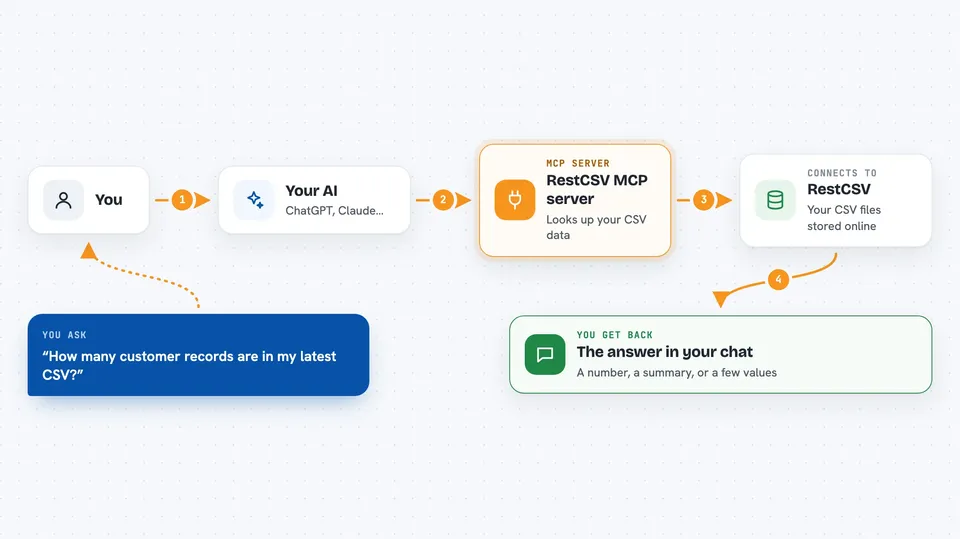
This connects your AI assistant to RestCSV, a web service where you keep CSV files such as spreadsheets exported from Excel or Google Sheets. Once it's set up, you can just ask questions about those files instead of downloading and scrolling through rows yourself. It's handy if you deal with lists of customers, products, sales figures or any tabular data kept online.
What is an MCP server? The 30-second version
On its own, your AI can only talk based on what it already knows. An MCP server is a little helper program that runs alongside your AI and hands it extra abilities. This particular helper links your AI to RestCSV, the place where your CSV files live. So when you ask something about your data, the AI goes out to RestCSV through this helper, gets what it needs, and brings the answer back to your chat window.
What this MCP server does
When you connect this server, your AI gains access to whatever CSV content sits behind your RestCSV account. You type a request in normal words, the AI sends it along to this helper, and the helper asks RestCSV for the matching file details. The result comes straight back into your conversation as readable information rather than raw code. In practice you stop switching tabs between chat and browser just to peek at a row count or column values.
 Click to zoom
What you can do with it
- Look up records inside your RestCSV-hosted CSV files
- Ask how many rows or columns a dataset has
- Pull specific fields from a table without leaving the chat
- Get quick facts about uploaded datasets while writing reports
- Check whether certain entries exist in your saved CSVs
Try asking your AI
- “How many customer records are in my latest RestCSV upload?”
- “Show me the product names listed in my inventory.csv on RestCSV.”
- “What columns appear in the orders sheet I put on RestCSV last week?”
- “Find the entry whose email ends in @example.org.”
What it gives back to you
Your AI replies right in the chat with plain-language answers built from your RestCSV data. Depending on the question, that might be a number, a short summary paragraph, a few field values pulled from a record, or confirmation that some item exists. There is usually no separate download involved because everything arrives as part of the reply itself.
Before you start
What you need
- A RestCSV account registered at restcsv.com
- That account's API key pasted wherever the setup instructions tell you
- Node.js installed on your computer if you plan to build the server locally
Install it with your AI
Add RestCSV MCP server to your AI, no technical skills needed
You don't install anything by hand. You copy one prompt, paste it into an AI that can work on your computer, and it checks, installs and connects the server for you, asking you when it needs something.
Sign in to get the install prompt
Members get a ready-made prompt that lets the Claude desktop app check RestCSV MCP server, install it and connect it for them, step by step. You don't need any technical skills: you copy, paste and answer a few questions. Your connected AI can also find and install any of the 4,609 MCP servers here for you.
Who it's for
Office staff, analysts and anyone else who keeps business data in CSV files and would rather query it in chat than scroll through long spreadsheets.