
MCP server · Social media
Nostr MCP server
by jorgenclaw
Lets your AI post notes, follow people, and send messages on Nostr for you.
This is a helper that connects your AI assistant to Nostr, a social network where posts are signed with a key instead of a username and password. It is handy if you already use Nostr and want your AI to write posts, reply, follow people, or send private messages without you clicking around. It runs in the cloud, so you do not install anything on your computer.
What is an MCP server? The 30-second version
On its own, your AI can only chat with you. An MCP server is a small helper program that gives your AI a new skill or a connection to an app or service. This one connects your AI to Nostr, so it can look things up and do things there when you ask. You stay in the chat, and the helper does the work behind the scenes.
What this MCP server does
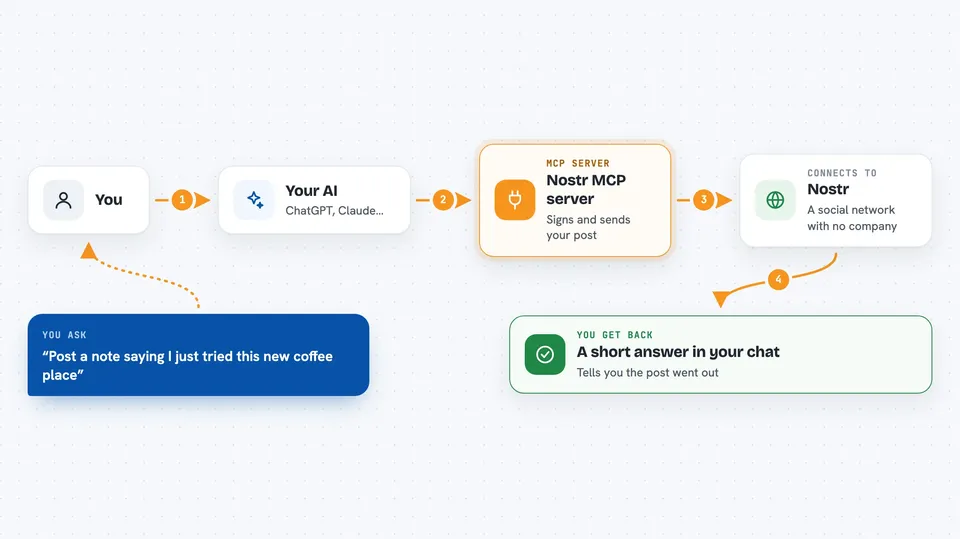
You ask your AI something like post this note to Nostr or follow that person. The AI passes your request to this helper. The helper talks to Nostr relays, which are the servers that hold and share Nostr posts. It signs the action with your key, sends it out, and reports back. You get a short answer in the chat telling you what happened.
 Click to zoom
What you can do with it
- Post a text note to Nostr
- Reply to someone's post with proper threading
- Follow or unfollow a person
- React to a post or repost it
- Send a private direct message
- Update your Nostr profile
- Look up a profile or fetch recent posts
Try asking your AI
- “Post a note saying I just tried this new coffee place”
- “Follow npub1... and reply to their last post with a short congrats”
- “Send a private message to npub1... asking if they are free tomorrow”
- “Show me the latest posts from npub1...”
What it gives back to you
You get short answers in the chat, like confirmation that a note was published, the text of a profile, or a list of recent posts. When you ask for a profile or events, it shows the details it found. When you post or react, it tells you the action went through. It does not dump raw technical data on you unless you ask for it.
Before you start
What you need
- A Nostr account with a public key (your npub)
- Either a NIP-46 signer app like Amber or nsecbunker, or your private key for direct signing
- An MCP-compatible AI app such as Claude Desktop or Cursor
Good to know
It can post, reply, follow, and send messages as you, and some actions like deleting or reposting are hard to undo, so check what your AI is about to do before you say yes.
Install it with your AI
Add Nostr MCP server to your AI, no technical skills needed
You don't install anything by hand. You copy one prompt, paste it into an AI that can work on your computer, and it checks, installs and connects the server for you, asking you when it needs something.
Sign in to get the install prompt
Members get a ready-made prompt that lets the Claude desktop app check Nostr MCP server, install it and connect it for them, step by step. You don't need any technical skills: you copy, paste and answer a few questions. Your connected AI can also find and install any of the 4,361 MCP servers here for you.
Who it's for
Nostr users who want their AI assistant to handle posting, replying, following, and messaging for them.





