
MCP server · Security
Kastell MCP server
by kastelldev
Let your AI check, harden, and keep an eye on your servers for you.
Kastell is a helper for looking after the security of your servers. It checks how safe a server is, applies safe fixes, and can lock things down to a stricter standard. It is handy if you run one or more servers and want an easier way to keep them in good shape.
What is an MCP server? The 30-second version
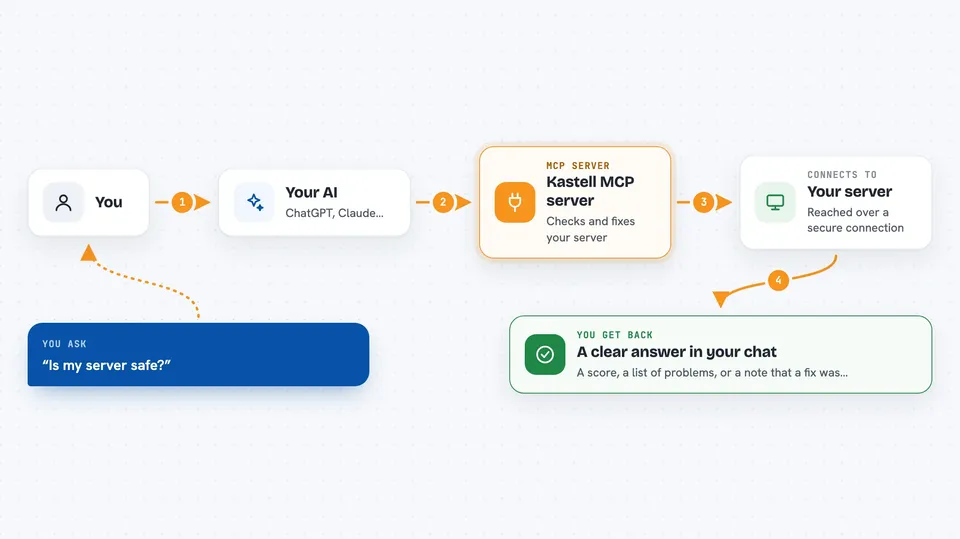
On its own, your AI can only chat with you. An MCP server is a small helper program that gives your AI a new skill or a connection to a service. This one connects your AI to Kastell, which talks to your servers. So when you ask your AI to check or harden a server, it can actually do it through Kastell instead of just talking about it.
What this MCP server does
You ask your AI something about a server, like whether it is safe or what needs fixing. Your AI passes that request to the Kastell helper. Kastell then connects to the server over SSH and runs its checks or actions. When it is done, it sends the results back, and your AI shows them to you in plain words. You can also ask it to apply safe fixes or run a full hardening pass.
 Click to zoom
What you can do with it
- Run a full security audit and get a score
- Apply safe fixes to problems it finds
- Harden SSH, the firewall, and other settings
- Check firewall status and set up UFW
- Look at CPU, memory, and disk usage
- List your servers and check their health
- Collect evidence for compliance reports
Try asking your AI
- “Run a security audit on my-server and tell me the score”
- “Show me what needs fixing on my-server and apply the safe fixes”
- “Harden my-server to production standards”
- “Check the firewall status on my-server”
What it gives back to you
You get back a summary of what Kastell found or did. That can be a score, a list of problems with short explanations, or a note that a fix was applied. For audits you can also get a fuller report, and for checks you get simple numbers like CPU, memory, and disk usage. Everything shows up in the chat as text you can read.
Before you start
What you need
- A server you can reach over SSH
- SSH access details for that server (like a key or password)
- Node.js installed if you run Kastell with npx
Good to know
It can change or delete things on your servers, so use the dry-run option first and be careful with destructive commands.
Install it with your AI
Add Kastell MCP server to your AI, no technical skills needed
You don't install anything by hand. You copy one prompt, paste it into an AI that can work on your computer, and it checks, installs and connects the server for you, asking you when it needs something.
Sign in to get the install prompt
Members get a ready-made prompt that lets the Claude desktop app check Kastell MCP server, install it and connect it for them, step by step. You don't need any technical skills: you copy, paste and answer a few questions. Your connected AI can also find and install any of the 4,609 MCP servers here for you.
Who it's for
People who look after one or more servers and want an easier, safer way to check and harden them without memorizing lots of commands.



