
MCP server · Security
shohei MCP server
by kent-tokyo
Lets your AI run website and network health checks like DNS, TLS certificates, and email security for you.
shohei is a helper program that gives your AI assistant a big toolbox for checking how healthy and safe a website or domain is. You ask a question in plain words, and it runs the technical checks behind the scenes. It is handy for anyone who looks after websites, email, or online services and wants quick answers without learning command-line tools.
What is an MCP server? The 30-second version
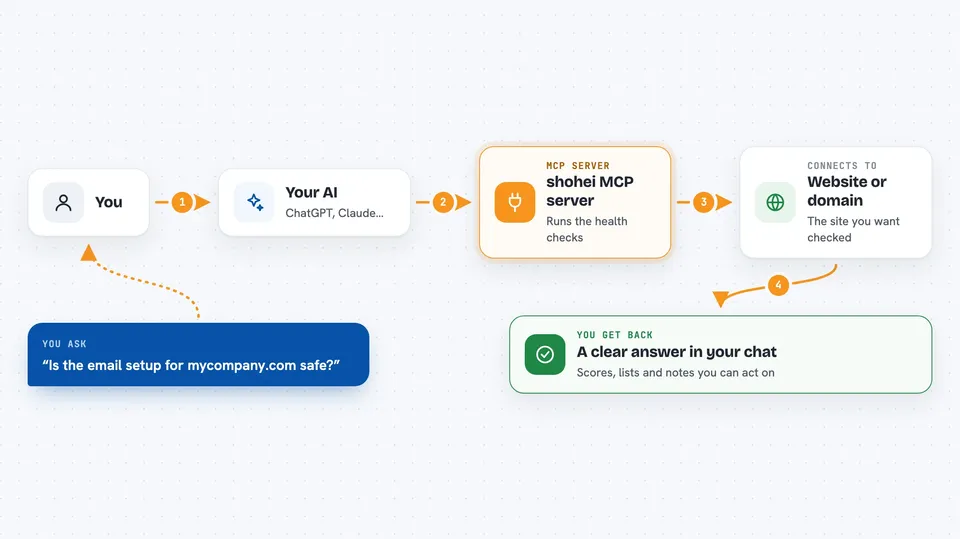
On its own, your AI can only chat with you using what it already knows. An MCP server is a small helper program that gives your AI a new skill or a connection to something outside the chat. This server connects your AI to a set of network and security checks, so it can actually look up live information about a domain or website. When you ask, the AI passes your request to shohei, shohei does the checking, and the AI explains the results back to you.
What this MCP server does
You type a question about a website or domain, like asking whether its email setup is safe. Your AI sends that request to the shohei helper. shohei then runs the right checks, such as looking up DNS records, inspecting a TLS certificate, or testing email security settings. It sends the findings back, and your AI turns them into a clear answer in the chat. You never have to run any commands yourself.
 Click to zoom
What you can do with it
- Check a website's TLS certificate and its chain of trust
- Score a domain's email security with SPF, DKIM, and DMARC checks
- See whether a domain's DNS records match across global resolvers
- Look up known vulnerabilities for the software a site runs
- Find lookalike domains that could be used for phishing
- Inspect security headers and spot missing protections
- Test whether common network ports are reachable
Try asking your AI
- “Check example.com's TLS certificate and tell me if anything looks wrong”
- “Is the email setup for mycompany.com safe? Give me a score”
- “Has my new domain finished spreading across the world's DNS servers?”
- “Find lookalike domains that could be used to trick my customers”
What it gives back to you
You get back plain answers in the chat, like a score for email security, a list of DNS records, or a note that a certificate is valid or expiring. It can also give you tables of findings, such as which security headers are missing or which lookalike domains are live. For deeper work, it can return structured data you can copy into a report. Everything shows up as readable text you can act on.
Before you start
What you need
- The Claude desktop app or another AI tool that supports MCP servers
- Rust and Cargo installed if you build it from source (a free programming toolkit from rust-lang.org)
- No API keys or paid accounts, since it uses free public services
Good to know
It can probe websites and networks on your behalf, so only point it at domains and systems you are allowed to test.
Install it with your AI
Add shohei MCP server to your AI, no technical skills needed
You don't install anything by hand. You copy one prompt, paste it into an AI that can work on your computer, and it checks, installs and connects the server for you, asking you when it needs something.
Sign in to get the install prompt
Members get a ready-made prompt that lets the Claude desktop app check shohei MCP server, install it and connect it for them, step by step. You don't need any technical skills: you copy, paste and answer a few questions. Your connected AI can also find and install any of the 4,609 MCP servers here for you.
Who it's for
This suits IT staff, website owners, and anyone who checks domains, email, or online services and wants quick answers without learning command-line tools.



