
MCP server · Text to speech
Telephony MCP server
by khan2a
Let your AI make phone calls, send texts, and read back call summaries using Vonage.
This is a small helper that connects your AI assistant to the phone network through Vonage. Once it is set up, you can ask your AI to place a call, send a text message, or check what was said on a call. It is handy for people who handle customer calls, reminders, or quick text updates and want their AI to do the dialing.
What is an MCP server? The 30-second version
On its own, your AI can only chat with you. An MCP server is a small helper program that gives your AI a new skill or a connection to an outside service. This one connects your AI to Vonage, a phone service, so it can actually make calls and send texts when you ask. Think of it as giving your assistant a phone and a texting app.
What this MCP server does
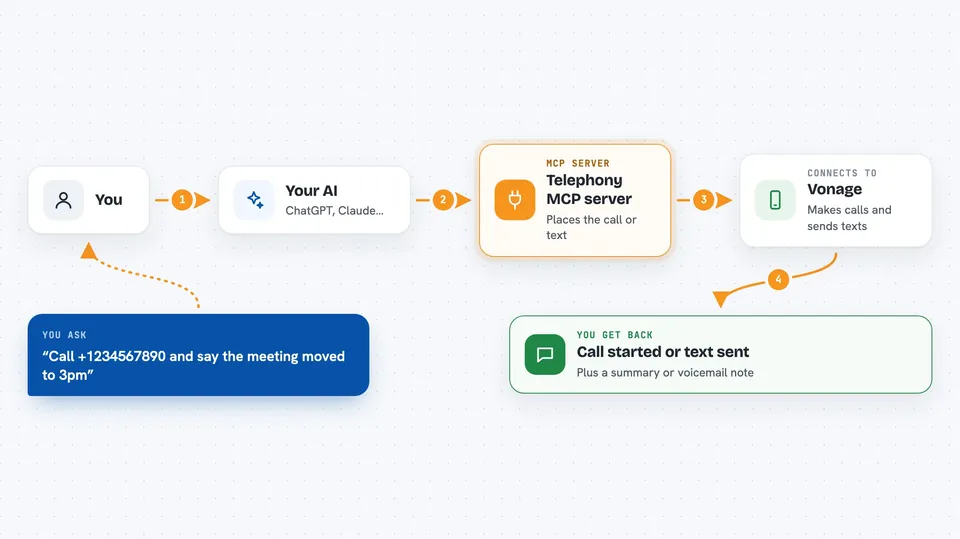
You type a request, like asking your AI to call a number and read a message out loud. Your AI passes that request to this helper, which talks to Vonage behind the scenes. Vonage places the call or sends the text, and any events like call finished or voicemail detected come back to a small callback server. Your AI then tells you what happened, for example that the call went through or that a summary of the speech is ready.
 Click to zoom
What you can do with it
- Place an automated voice call to a phone number and have it speak a message
- Send an SMS text message to a number
- Receive incoming SMS replies and read them in the chat
- Get a summary of what was said on a call using speech recognition
- Detect when a call goes to voicemail
- Choose a language or accent for the spoken message
- Check the status of a call, like completed or failed
Try asking your AI
- “Call +1234567890 and say the meeting is moved to 3pm”
- “Send a text to +1234567890 saying your package is on the way”
- “Call this number with a British accent and read today's top news”
- “Did my last call reach voicemail?”
What it gives back to you
You get plain answers in the chat, like Call started or Text sent. If a call finishes, you can see a summary of the speech or a note that voicemail was detected. You can also ask for a list of recent call events, and the AI will show them to you as a short list.
Before you start
What you need
- A Vonage account with API key, secret, application ID, and a private key file
- A Vonage virtual phone number (they call it an LVN)
- Python 3.13 or newer installed on your computer
- A public web address for callbacks if you want call events (services like ngrok can give you one)
Good to know
This server can place real phone calls and send real text messages, which may cost money on your Vonage account, so double-check numbers before you ask.
Install it with your AI
Add Telephony MCP server to your AI, no technical skills needed
You don't install anything by hand. You copy one prompt, paste it into an AI that can work on your computer, and it checks, installs and connects the server for you, asking you when it needs something.
Sign in to get the install prompt
Members get a ready-made prompt that lets the Claude desktop app check Telephony MCP server, install it and connect it for them, step by step. You don't need any technical skills: you copy, paste and answer a few questions. Your connected AI can also find and install any of the 4,361 MCP servers here for you.
Who it's for
Office workers who handle customer calls, appointment reminders, or quick text updates and want their AI to do the dialing and texting.





