MCP server · Coding
ArcGIS Pro MCP server
by Knight60
Lets your AI assistant work on the ArcGIS Pro project already open on your screen.
This is a small add-in for ArcGIS Pro that connects your AI assistant to the map project you already have open. You install it, click a button for the assistant you use, and then you can just describe what you want in plain words. It is handy for GIS analysts, planners, and anyone who spends a lot of time clicking through ArcGIS Pro menus.
What is an MCP server? The 30-second version
On its own, your AI can only chat. An MCP server is a small helper program that gives your AI a new skill or a connection to an app. This one connects your AI to ArcGIS Pro, so the assistant can look at your layers, run tools, and change things in the project that is open in front of you. You ask in a sentence, and the helper carries it out inside Pro.
What this MCP server does
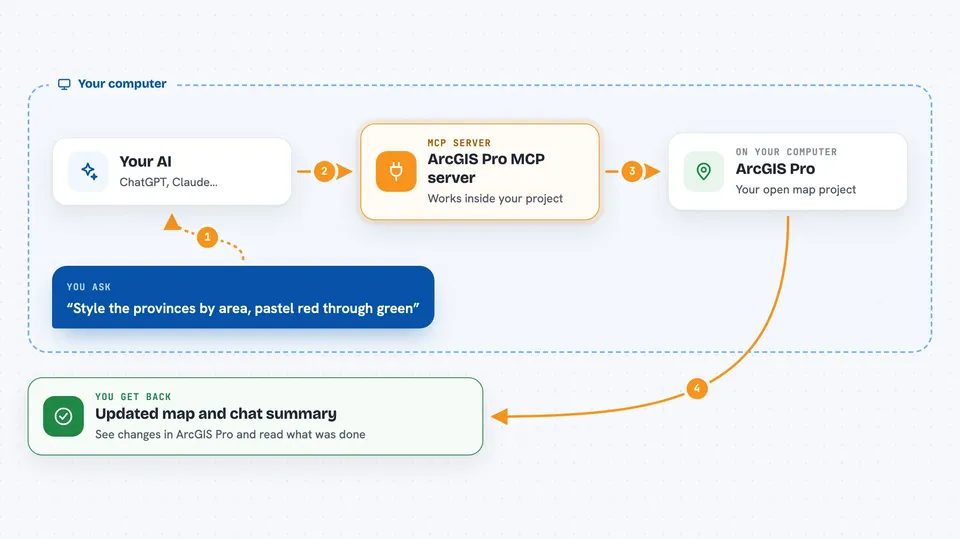
You type a request to your AI, like styling provinces by area or finding the province with the highest population. The AI sends that request to this add-in, which is running inside ArcGIS Pro. The add-in then uses ArcGIS Pro's own tools, or its built-in Python, to do the work on your open project. When it is done, the result comes back to you in the chat, and you can see the change in Pro. If a request needs a tool the add-in does not have, it can still run any of ArcGIS Pro's geoprocessing tools or Python code.
 Click to zoom
What you can do with it
- Style layers by a field, for example colour provinces by area
- Find the highest or lowest value in a layer and write it into a new field
- Select features by a condition or by location
- Add, remove, or reorder layers in your map
- Export the current map view as an image
- Run any of ArcGIS Pro's geoprocessing tools by name
- Read and update attribute tables
Try asking your AI
- “Style the provinces by area, pastel red through green”
- “Which province has the highest population? Put the answer in a new field”
- “Export the current map view as a PNG and show me”
- “Select all parcels larger than 500 square metres and zoom to them”
What it gives back to you
You get answers and summaries in the chat, like a list of layers, a count of features, or the name of the province with the highest population. It can also show you images, such as an exported map view. When it changes something in your project, like adding a field or styling a layer, you see that change in ArcGIS Pro itself. The chat tells you what was done and whether it worked.
Before you start
What you need
- ArcGIS Pro 3.7 or newer, installed and open
- The ArcGIS Pro MCP add-in file from the latest release
- An AI assistant that supports MCP, such as Claude, Codex, or Cursor
Good to know
Some tools can delete layers, fields, or rows, so check before you let it change or remove things in your project.
Install it with your AI
Add ArcGIS Pro MCP server to your AI, no technical skills needed
You don't install anything by hand. You copy one prompt, paste it into an AI that can work on your computer, and it checks, installs and connects the server for you, asking you when it needs something.
Sign in to get the install prompt
Members get a ready-made prompt that lets the Claude desktop app check ArcGIS Pro MCP server, install it and connect it for them, step by step. You don't need any technical skills: you copy, paste and answer a few questions. Your connected AI can also find and install any of the 4,361 MCP servers here for you.
Who it's for
GIS analysts, planners, and anyone who works with maps in ArcGIS Pro and wants to save time on repetitive tasks.