MCP server · Meetings
Meet Live Assist MCP server
by krystiangw
Get live advice during Google Meet or Zoom calls, based on the captions as they happen.
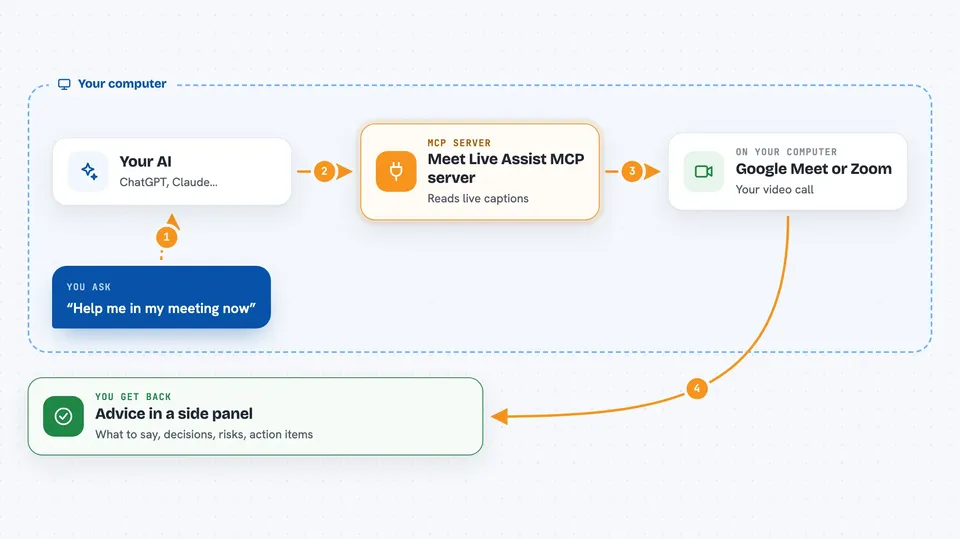
Meet Live Assist is a Chrome extension plus a small helper program that watches the captions in your Google Meet or Zoom call and shows advice in a side panel while the call is still going. It is handy if you often sit in meetings where you need to remember decisions, action items, or the next sentence to say. It is made for people who already use an AI coding agent like Claude Code on their own computer.
What is an MCP server? The 30-second version
On its own, your AI can only chat with you. An MCP server is a small helper program that gives your AI a new skill or a connection to something else. Here, the helper connects your AI to your live meeting, so it can read the captions and write advice back into the panel. You ask your AI to assist the meeting, and this helper makes that possible.
What this MCP server does
While your call runs, the extension captures the captions and sends them to a small server on your own computer. Your AI, through this MCP helper, reads those captions and thinks about what is happening. It then sends back short pieces of advice, like what to say next or what was decided. You see all of this in a side panel next to the call, and the transcript and notes are saved in a folder on your disk.
 Click to zoom
What you can do with it
- See a live transcript of the call in a side panel
- Get suggested sentences to say next, in the meeting's language
- Track decisions and action items as they come up
- Get warnings about risks you just agreed to
- Take screenshots during screen sharing
- Ask the assistant questions about the meeting in a chat
- Export a summary after the call ends
Try asking your AI
- “Assist my meeting now”
- “What was just decided?”
- “What should I say next?”
- “List the action items so far”
What it gives back to you
The panel shows short, colour-coded notes: things to say, information, summaries, explanations, risks, and action items. Each note can be copied with one click. You also get a running transcript and, after the call, a summary file saved on your computer. Some alerts, like a risk, also make a sound and show a notification.
Before you start
What you need
- Node.js 20 or newer
- Chrome 116 or newer
- Claude Code (or another AI agent that speaks MCP)
- The Meet Live Assist Chrome extension
Good to know
Your meeting is other people's conversation too, so check that everyone is okay with it being transcribed, and be careful because the assistant can create tickets or notes if you turn on autopilot.
Install it with your AI
Add Meet Live Assist MCP server to your AI, no technical skills needed
You don't install anything by hand. You copy one prompt, paste it into an AI that can work on your computer, and it checks, installs and connects the server for you, asking you when it needs something.
Sign in to get the install prompt
Members get a ready-made prompt that lets the Claude desktop app check Meet Live Assist MCP server, install it and connect it for them, step by step. You don't need any technical skills: you copy, paste and answer a few questions. Your connected AI can also find and install any of the 4,361 MCP servers here for you.
Who it's for
People who spend a lot of time in Google Meet or Zoom calls and want live help remembering decisions, action items, and what to say next.