MCP server · Translation
DialectOS Spanish Dialects MCP server
by KyaniteLabs
Translate and check your text in 25 regional Spanish variants, right from your AI chat.
DialectOS is a helper for Spanish translation that understands that Spanish is not one single language. It can turn your text into Mexican, Argentinian, Colombian, Puerto Rican Spanish and about twenty other regional versions, and it can check an existing translation for mistakes. It is handy if you write docs, app text, or support replies for Spanish-speaking customers in different countries.
What is an MCP server? The 30-second version
On its own, your AI can only chat with you. An MCP server is a small helper program that gives your AI a new skill or a connection to another service. This one connects your AI to DialectOS, a Spanish dialect translation and checking tool. Once it is connected, you can just ask your AI to translate or check something in a specific Spanish variant, and it will use DialectOS to do the work for you.
What this MCP server does
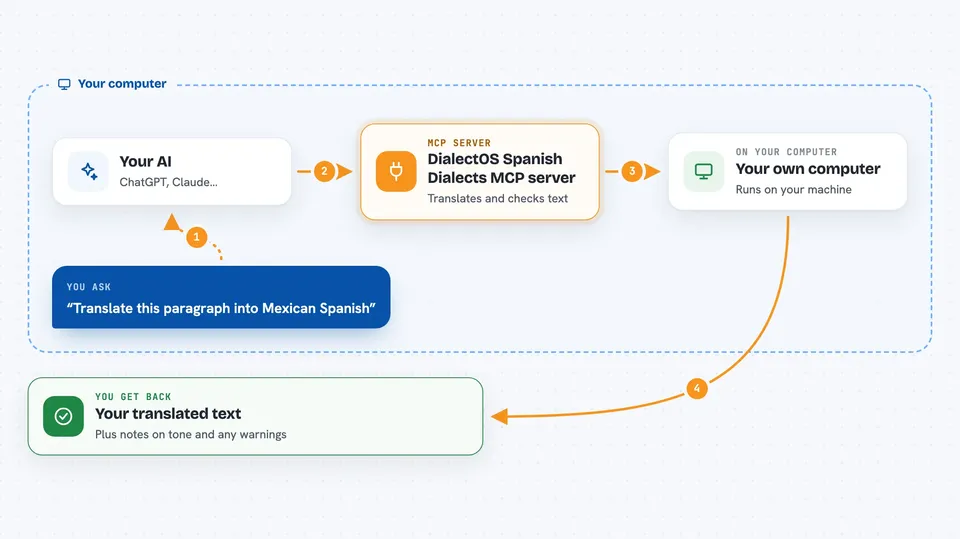
You ask your AI something like translate this paragraph into Mexican Spanish. Your AI passes that request to the DialectOS helper. The helper sends the text to a translation model you have set up, using DialectOS rules for the dialect you picked, and keeps your formatting like tables, links, and code blocks in place. Then it checks the result for problems like meaning that drifted or formality that does not match. You get the finished translation back in your chat, along with any warnings.
 Click to zoom
What you can do with it
- Translate text into one of 25 regional Spanish variants
- Translate a whole README or markdown file while keeping its structure
- Detect which Spanish dialect a piece of text is written in
- Check an existing translation for correctness and formality
- Find missing keys between two locale files
- Apply gender-neutral language like elles or latine
- Search a glossary of regional terms for the right word
Try asking your AI
- “Translate this paragraph into Mexican Spanish and keep the markdown table intact”
- “Check if this Spanish translation reads naturally for someone in Argentina”
- “Which Spanish dialect is this support message written in”
- “Translate these app strings into Colombian Spanish using a formal tone”
What it gives back to you
You get the translated text back in the chat, with your formatting preserved. For checks, you get a short report: what looks fine, what might be off, and which dialect it was checked against. For locale files, you get a list of missing or extra keys. Some answers also include a note about formality or a suggested glossary term.
Before you start
What you need
- Node.js and pnpm installed on your computer
- An AI model to do the translating, either a cloud one with an API key or a local one like LM Studio
- The DialectOS MCP server file from the GitHub release page
- A folder path if you want it to read or write locale files
Good to know
It sends your text to whichever AI model you have set up, so do not paste anything private or secret unless you trust that model and its provider.
Install it with your AI
Add DialectOS Spanish Dialects MCP server to your AI, no technical skills needed
You don't install anything by hand. You copy one prompt, paste it into an AI that can work on your computer, and it checks, installs and connects the server for you, asking you when it needs something.
Sign in to get the install prompt
Members get a ready-made prompt that lets the Claude desktop app check DialectOS Spanish Dialects MCP server, install it and connect it for them, step by step. You don't need any technical skills: you copy, paste and answer a few questions. Your connected AI can also find and install any of the 4,361 MCP servers here for you.
Who it's for
People who write docs, app text, or customer support content for Spanish-speaking audiences in different countries, and want a quick way to check their Spanish from inside their AI chat.