MCP server · Translation
xCOMET translation quality MCP server
by shuji-bonji
Lets your AI score how good a translation is and point out the mistakes in it.
This is a helper that lets your AI check the quality of a translation. You give it the original text and the translated text, and it tells you how good the translation is and where the problems are. It is handy for anyone who works with translated content and wants a second opinion before sending it out.
What is an MCP server? The 30-second version
On its own, your AI can only chat with you. An MCP server is a small helper program that gives your AI a new skill or a connection to another tool. This one connects your AI to xCOMET, a translation quality checker made by a research group called Unbabel. Once it is set up, your AI can hand a translation to xCOMET and bring the results back to you in the chat.
What this MCP server does
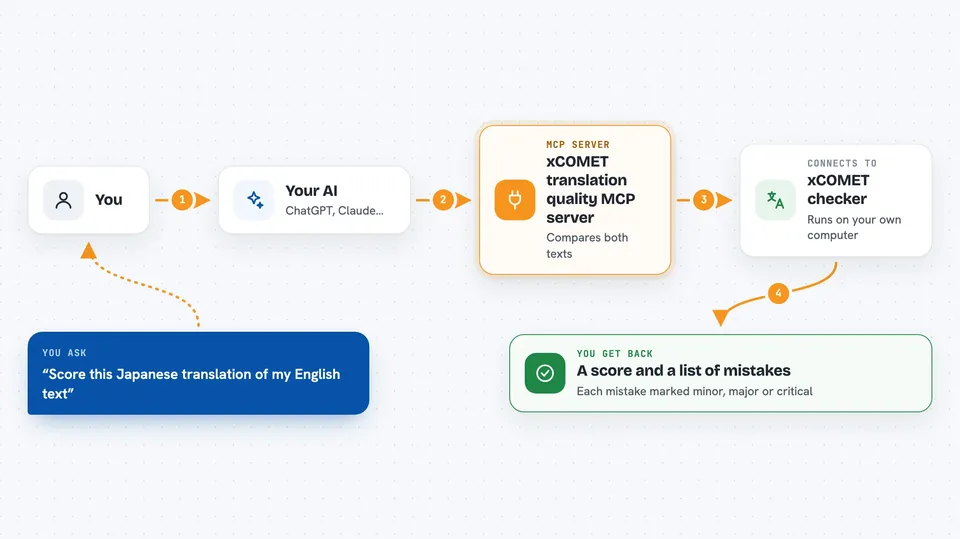
You paste in the original text and its translation, and ask your AI to check it. Your AI passes both to this helper, which runs them through the xCOMET model. The model compares them and works out a quality score between 0 and 1, where higher is better. It also spots the specific spots where the translation went wrong and labels each one as minor, major, or critical. Then your AI shows you the score and the list of problems right in the chat.
 Click to zoom
What you can do with it
- Score a single translation from 0 to 1
- Point out the exact spots where a translation went wrong
- Rank each mistake as minor, major, or critical
- Check many translation pairs in one go, up to 500 at a time
- Filter the error list so you only see the serious ones
- Use a reference translation if you have one, or skip it
- Get the results as plain text or as a tidy table
Try asking your AI
- “Score this Japanese translation of my English text and tell me if it is good enough to publish”
- “Find the errors in this French translation and show me only the major and critical ones”
- “Check these 20 product descriptions in German and give me a score for each”
- “Compare my translation to this reference version and tell me where they differ”
What it gives back to you
You get back a quality score between 0 and 1, plus a short summary line like good quality with 0 errors detected. If there are problems, you get a list of the error spots, each with a severity label. For a batch, you get one score and error list per pair, so you can scan them all at once. Everything shows up as text or a table in your chat, nothing to download.
Before you start
What you need
- Python version 3.9 to 3.12 installed on your computer
- The unbabel-comet package installed in a Python environment
- A free HuggingFace account with access requested for the XCOMET model, plus a login or an access token
- Node.js version 22 or newer
Good to know
The model file is very large (about 14GB for the recommended one, up to 42GB for the biggest), so make sure you have space and a decent internet connection before starting.
Install it with your AI
Add xCOMET translation quality MCP server to your AI, no technical skills needed
You don't install anything by hand. You copy one prompt, paste it into an AI that can work on your computer, and it checks, installs and connects the server for you, asking you when it needs something.
Sign in to get the install prompt
Members get a ready-made prompt that lets the Claude desktop app check xCOMET translation quality MCP server, install it and connect it for them, step by step. You don't need any technical skills: you copy, paste and answer a few questions. Your connected AI can also find and install any of the 4,361 MCP servers here for you.
Who it's for
Translators, localization reviewers, and anyone who publishes translated content and wants a quick quality check before it goes out.