MCP server · Translation
Live Translate MCP server
by waxberry-dev
Let your AI turn English or Mandarin audio files into translated speech, right on your computer.
This is a small helper that lets Claude listen to an audio file, translate it between English and Mandarin, and speak the translation back. It is handy if you deal with voice notes, meetings, or interviews in either language and want a quick translation without uploading your audio anywhere. The listening and the speaking happen on your own machine; only the text of the translation goes to Claude.
What is an MCP server? The 30-second version
On its own, your AI can only chat with you in text. An MCP server is a small helper program that gives your AI a new skill or a connection to another tool. This one gives your AI the skill of translating speech, so it can take an audio file, understand what was said, translate it, and produce a spoken version. You just ask in plain words, and the AI uses this helper behind the scenes.
What this MCP server does
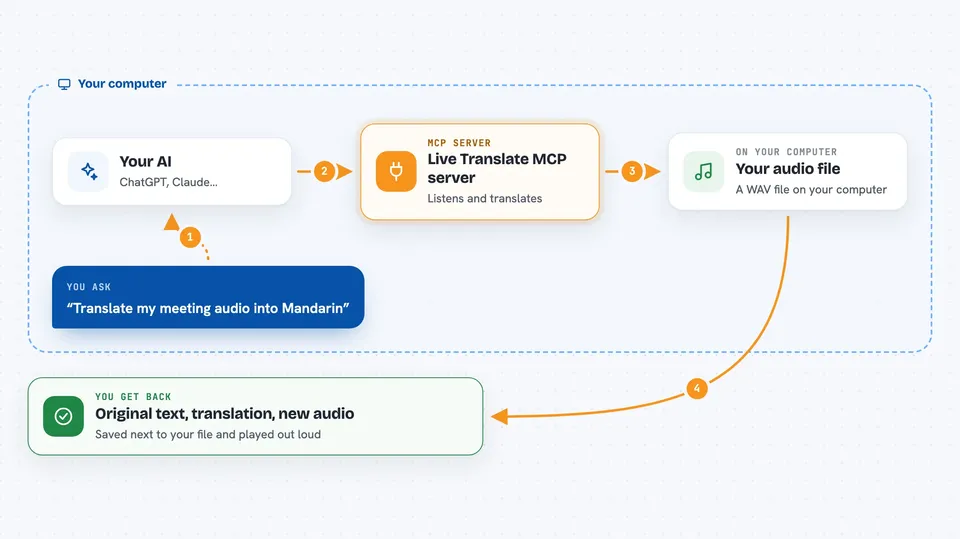
You give your AI the location of a WAV audio file, or ask it to check that everything is ready. The AI passes that request to this helper. The helper listens to the audio on your computer, turns the speech into text, sends only that text to Claude for translation, then creates a spoken version of the translation on your computer and plays it. You get the original words, the translation, and a new audio file saved next to the original.
 Click to zoom
What you can do with it
- Translate a WAV audio file from English to Mandarin
- Translate a WAV audio file from Mandarin to English
- Save the translated speech as a new audio file
- Play the translated audio out loud for you
- Check that the translation helper is set up and ready
- Detect the language automatically from the audio
Try asking your AI
- “Translate this audio file for me: /Users/alice/meeting_clip.wav”
- “Use translate_file on /tmp/interview.wav”
- “Check if live-translate is ready”
- “Turn this recording into Mandarin speech: /Users/alice/notes.wav”
What it gives back to you
You get back the original text, the translated text, and the location of the new audio file that was saved next to your original. The helper also plays the translated audio for you. In the chat, this shows up as a short answer with the two texts and the file path.
Before you start
What you need
- The Claude desktop app or Claude Code
- An Anthropic API key (a kind of password for apps; you get one from Anthropic)
- Node.js 18 or newer installed on your computer
- espeak-ng installed (a small free tool used for speech sounds)
Good to know
The translated text is sent to the Claude API, so do not use it for audio you are not allowed to share with that service, and remember it needs an API key which can cost money to use.
Install it with your AI
Add Live Translate MCP server to your AI, no technical skills needed
You don't install anything by hand. You copy one prompt, paste it into an AI that can work on your computer, and it checks, installs and connects the server for you, asking you when it needs something.
Sign in to get the install prompt
Members get a ready-made prompt that lets the Claude desktop app check Live Translate MCP server, install it and connect it for them, step by step. You don't need any technical skills: you copy, paste and answer a few questions. Your connected AI can also find and install any of the 4,361 MCP servers here for you.
Who it's for
Anyone who works with English or Mandarin voice recordings, like assistants, translators, researchers, or people handling meetings and interviews in both languages.