
MCP server · Research
Fiverr MCP server
by KyuRish
Lets your AI search Fiverr gigs, compare prices, and read seller reviews for you.
This is a small helper that connects your AI assistant to Fiverr, the site where freelancers sell their services. Once it is set up, you can ask your AI to look up gigs, compare packages, and check seller profiles without opening a browser yourself. It is handy if you hire freelancers often or just want to compare options quickly.
What is an MCP server? The 30-second version
On its own, your AI can only chat with you using what it already knows. An MCP server is a small helper program that gives your AI a new skill or a connection to another service. This one connects your AI to Fiverr, so when you ask about a gig or a seller, the AI can actually go look it up and bring the answer back to your chat.
What this MCP server does
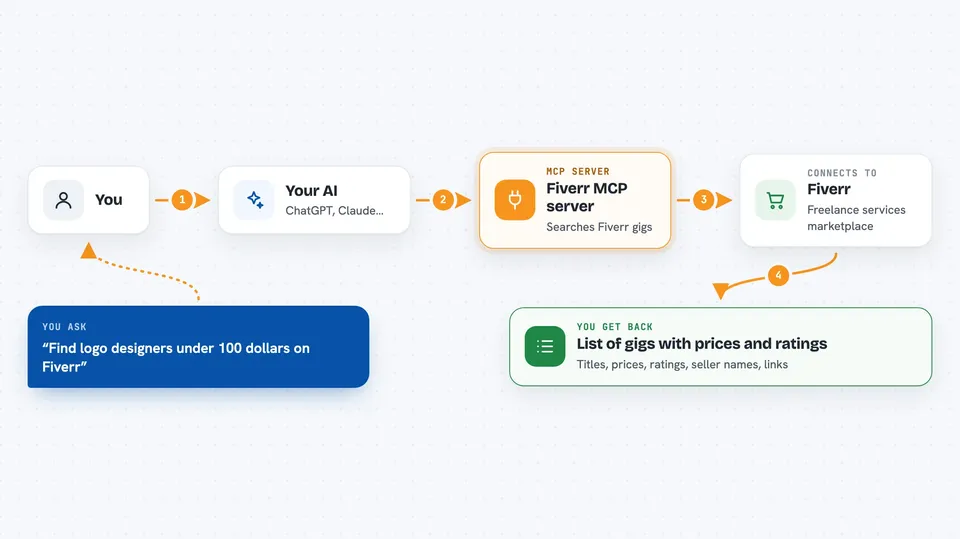
You ask your AI something like find logo designers under 100 dollars on Fiverr. The AI passes your request to this helper, which quietly reads the public Fiverr pages for you. The helper sends back a clean list of gigs with prices, ratings, and seller names. Your AI then shows you that list in the chat and can dig deeper into any gig or seller you pick.
 Click to zoom
What you can do with it
- Search Fiverr gigs by keyword, price range, seller level, or category
- Compare the Basic, Standard, and Premium packages of a gig
- Look up a seller's profile, languages, certifications, and hourly rate
- Read the first page of reviews for any gig
- List Fiverr categories so you can search within the right one
- Sort results by relevance, best selling, newest, or price
Try asking your AI
- “Find top rated logo designers on Fiverr under 150 dollars”
- “Show me the packages and prices for this gig: paste the Fiverr link”
- “What do buyers say about this seller? Read the reviews for their gig”
- “List Fiverr categories so I can pick the right one for video editing”
What it gives back to you
You get back plain lists and summaries in the chat. For a search, that means gig titles, prices in US dollars, ratings, review counts, seller names, and links. For a gig, you get its packages, description, and tags. For a seller, you get their bio, location, languages, and hourly rate.
Before you start
What you need
- The Claude desktop app or another AI app that supports MCP servers
- uv (a small tool that runs Python programs; the README shows the one-line setup)
Good to know
It only reads public Fiverr pages, but scraping may go against Fiverr's terms, so keep it for personal use and leave the default rate limit in place.
Install it with your AI
Add Fiverr MCP server to your AI, no technical skills needed
You don't install anything by hand. You copy one prompt, paste it into an AI that can work on your computer, and it checks, installs and connects the server for you, asking you when it needs something.
Sign in to get the install prompt
Members get a ready-made prompt that lets the Claude desktop app check Fiverr MCP server, install it and connect it for them, step by step. You don't need any technical skills: you copy, paste and answer a few questions. Your connected AI can also find and install any of the 4,361 MCP servers here for you.
Who it's for
Anyone who hires freelancers on Fiverr and wants to compare gigs and sellers without clicking through pages by hand.


