MCP server · Security
SysKnife MCP server
by lacs-project
Lets your AI plan Linux admin tasks as safe typed steps you approve, with a signed audit log.
SysKnife is a helper for people who look after Linux machines. It lets your AI assistant suggest system tasks in plain language, but nothing runs until you approve it in your own terminal. It is handy if you want AI help with server chores without handing over the keys.
What is an MCP server? The 30-second version
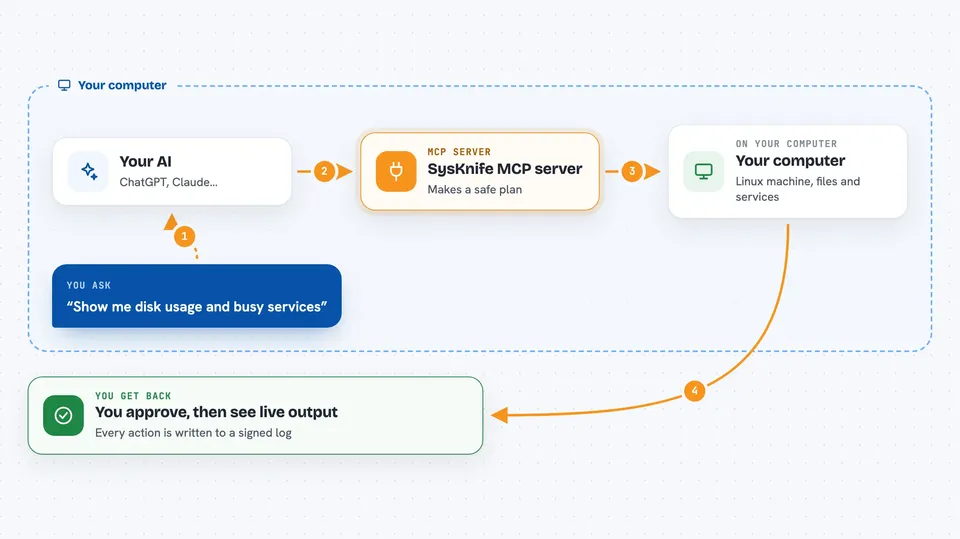
On its own, your AI can only chat. An MCP server is a small helper program that gives your AI a new skill or a connection to something real. This one connects your AI to a Linux machine through a careful middleman, so it can plan tasks like checking disk space or restarting a service. The AI never types raw commands itself; it only picks from a fixed list of typed actions.
What this MCP server does
You describe what you want in plain words, like checking disk usage or listing busy services. Your AI turns that into a plan made of typed steps, each with a risk level and a preview. You review the plan and approve each step with a one-time code in your terminal. Then a background helper runs only what you approved, shows the output live, and writes every action into a signed log. If something fails on certain systems, it can roll the change back.
 Click to zoom
What you can do with it
- Plan Linux tasks from a plain-language request
- See each step with its risk level and preview before anything runs
- Approve steps one at a time with a one-time receipt
- Check disk usage and other read-only facts about the machine
- Read back past runs from the signed audit log
- Verify that the audit log has not been tampered with
- Check the health of the helper and its audit chain
Try asking your AI
- “Show me disk usage and list services that ate CPU in the last hour”
- “Plan a safe way to free up space in /var/log”
- “What did I run yesterday, and did any of it fail?”
- “Check whether the audit log is intact”
What it gives back to you
You get a plan as a list of steps, each with a risk level, a preview of what would run, and a transaction ID. After you approve, you see the live output of each step in the chat. You can also ask for past runs, disk numbers, or a yes/no answer on whether the audit log is intact.
Before you start
What you need
- A Linux machine you can install software on
- Node.js 22 or newer (the installer tells you if yours is too old)
- An account and key from an AI provider such as OpenAI, Anthropic, Gemini, Groq, DeepSeek, Mistral or xAI (Ollama needs no key)
- A terminal where you can type the approval command
Good to know
It can change your system, so only approve steps you understand, and remember the AI cannot approve anything by itself.
Install it with your AI
Add SysKnife MCP server to your AI, no technical skills needed
You don't install anything by hand. You copy one prompt, paste it into an AI that can work on your computer, and it checks, installs and connects the server for you, asking you when it needs something.
Sign in to get the install prompt
Members get a ready-made prompt that lets the Claude desktop app check SysKnife MCP server, install it and connect it for them, step by step. You don't need any technical skills: you copy, paste and answer a few questions. Your connected AI can also find and install any of the 4,609 MCP servers here for you.
Who it's for
System administrators, developers and IT staff who look after Linux servers and want AI help without giving it direct control.