
MCP server · Research
Bing Search MCP server
by leehanchung
Lets your AI search the web, news, and images through Microsoft Bing while you chat.
This is a small helper that connects your AI assistant to Microsoft's Bing search service. Once it is set up, you can ask your AI to look things up online, find recent news, or pull up images, and it will bring the results back into the chat. It is handy for anyone who wants their AI to answer with fresh information from the web instead of just what it already knows.
What is an MCP server? The 30-second version
On its own, your AI can only chat with you using what it already learned. An MCP server is a small helper program that gives your AI a new skill or a connection to an outside service. This one connects your AI to Microsoft Bing, so when you ask a question that needs current information, the AI can actually search the web for you. You do not need to understand how it works inside; you just ask, and the AI uses this helper behind the scenes.
What this MCP server does
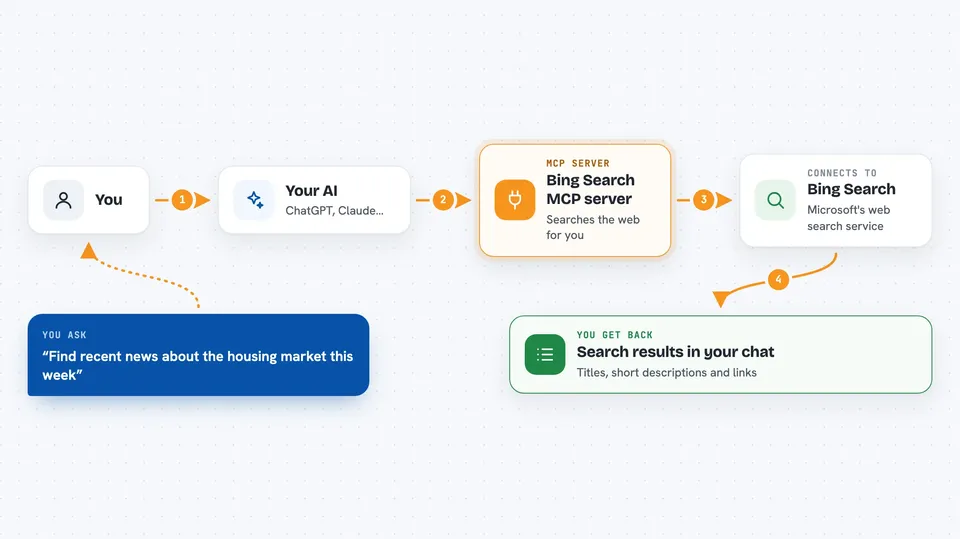
You ask your AI something that needs a web search, like a fact you want checked or a topic you want the latest news on. The AI sends your request to this helper program, which talks to Microsoft's Bing search service. Bing sends back matching web pages, news articles, or images. The helper passes those results to your AI, and your AI shows them to you in the chat, often with short summaries and links.
 Click to zoom
What you can do with it
- Search the web for general information and websites
- Find recent news articles and current events
- Look up images on a topic
- Limit how many results come back
- Choose a language or region for results
- Filter news by how fresh it is, like today or this week
Try asking your AI
- “Search the web for the latest information on electric car battery recycling”
- “Find recent news about the housing market this week”
- “Show me some images of modern office desk setups”
- “Look up what the weather forecast says for Tokyo this weekend”
What it gives back to you
You get back a list of search results in the chat. Each result usually has a title, a short description, and a link you can click. For news, you also get the source and date. For images, you get image links and descriptions. Your AI can then summarize or pick out the parts you care about.
Before you start
What you need
- A Microsoft Bing Search API key from the Azure portal (a kind of password for apps; Microsoft gives you one when you create a Bing Search resource)
- Python 3.10 or higher on your computer
- An MCP-compatible app like Claude Desktop or Cursor
Good to know
Bing searches may count against your Microsoft Azure account's usage limits, which can cost money if you go over the free tier.
Install it with your AI
Add Bing Search MCP server to your AI, no technical skills needed
You don't install anything by hand. You copy one prompt, paste it into an AI that can work on your computer, and it checks, installs and connects the server for you, asking you when it needs something.
Sign in to get the install prompt
Members get a ready-made prompt that lets the Claude desktop app check Bing Search MCP server, install it and connect it for them, step by step. You don't need any technical skills: you copy, paste and answer a few questions. Your connected AI can also find and install any of the 4,609 MCP servers here for you.
Who it's for
Anyone who wants their AI to answer with fresh web, news, or image results, especially office workers doing research, writing, or fact-checking.


