MCP server · Social media
NetworkLytics MCP server
by Leekangbum
Lets your AI pull up YouTube comment network analysis: top influencers, communities, and sentiment.
NetworkLytics is a service that studies YouTube comments and figures out who the big voices are, how commenters group together, and whether the mood is positive or negative. This MCP server connects that service to your AI assistant, so you can just ask for the results in plain words. It is handy if you work with creators, marketing, or community research and do not want to click around a dashboard.
What is an MCP server? The 30-second version
On its own, your AI can only chat with you. An MCP server is a small helper program that gives your AI one extra skill. This helper connects your AI to NetworkLytics, so when you ask about a YouTube comment analysis, the AI can go fetch the real numbers from NetworkLytics and explain them to you. You do not have to copy and paste anything from a website.
What this MCP server does
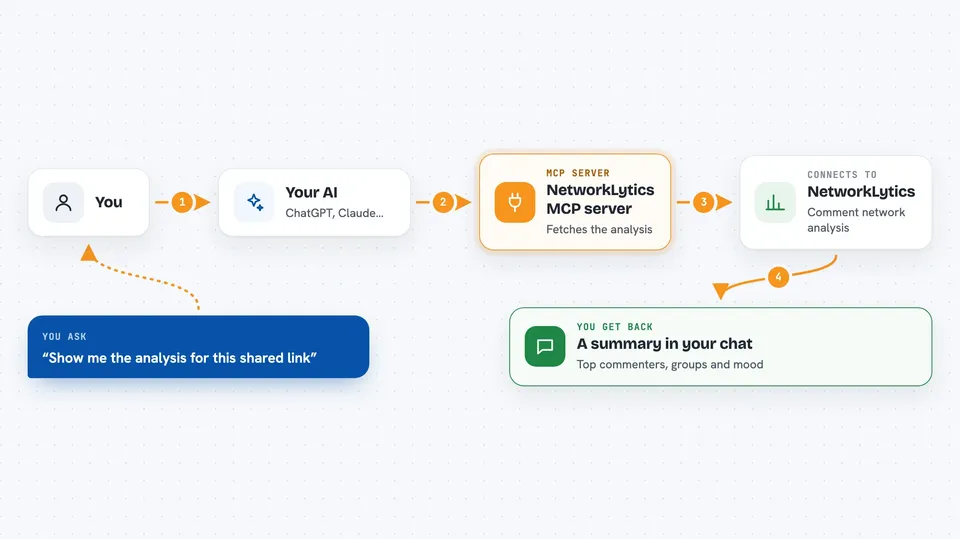
You ask your AI something like show me the analysis for this shared link. The AI passes your request to this helper program. The helper talks to NetworkLytics over the internet and asks for that analysis. NetworkLytics sends back the numbers, the top commenters, the community groups, and the sentiment. Your AI then reads all of that and gives you a clear answer in the chat.
 Click to zoom
What you can do with it
- Look up a NetworkLytics analysis from a shared link
- Find the top influencers in a YouTube comment network
- See how many communities the commenters split into
- Check the overall sentiment of a comment section
- Get the main topic keywords people are talking about
- Fetch an analysis by its ID if you have an API key
- Ask what the NetworkLytics API offers
Try asking your AI
- “Show me the analysis for this shared link: https://networklytics.net/shared/abc-123”
- “Who are the top 3 influencers in this analysis?”
- “What is the sentiment trend in this YouTube channel's comment community?”
- “How many communities did the commenters form, and what are the main keywords?”
What it gives back to you
You get back a summary in the chat: the video title and channel, how many commenters and connections were found, how many communities formed, and the overall mood with positive and negative ratios. It also lists the top influencers with their comment counts and the main topic keywords. If you ask for a specific thing, like just the influencers, the AI will pull out that part for you.
Before you start
What you need
- Python installed on your computer (the install command uses pip)
- A NetworkLytics account and an API key from its settings page (a kind of password for apps)
- The Claude desktop app or another AI tool that supports MCP servers
Good to know
The README says the NetworkLytics service is currently paused, so this may not work until it is back or you run your own local server.
Install it with your AI
Add NetworkLytics MCP server to your AI, no technical skills needed
You don't install anything by hand. You copy one prompt, paste it into an AI that can work on your computer, and it checks, installs and connects the server for you, asking you when it needs something.
Sign in to get the install prompt
Members get a ready-made prompt that lets the Claude desktop app check NetworkLytics MCP server, install it and connect it for them, step by step. You don't need any technical skills: you copy, paste and answer a few questions. Your connected AI can also find and install any of the 4,609 MCP servers here for you.
Who it's for
People who study YouTube communities, like social media analysts, marketing teams, and creators who want to understand their comment sections.