
MCP server · Notes
OWL MCP server
by liftkkkk
Let your AI read, search, edit and check your OWL, TTL or RDF knowledge files for you.
This is a small helper program that connects your AI assistant to your OWL, TTL or RDF files. These are files that describe knowledge in a structured way, like a map of classes and things and how they relate. It is handy if you work with knowledge graphs and would rather ask questions in plain words than write tricky query code yourself.
What is an MCP server? The 30-second version
On its own, your AI can only chat. An MCP server is a small helper program that gives your AI a new skill or a connection to something else. This one connects your AI to your OWL, TTL and RDF ontology files, so it can look inside them, answer questions about them and even make changes when you ask. You just talk normally, and the helper does the technical work behind the scenes.
What this MCP server does
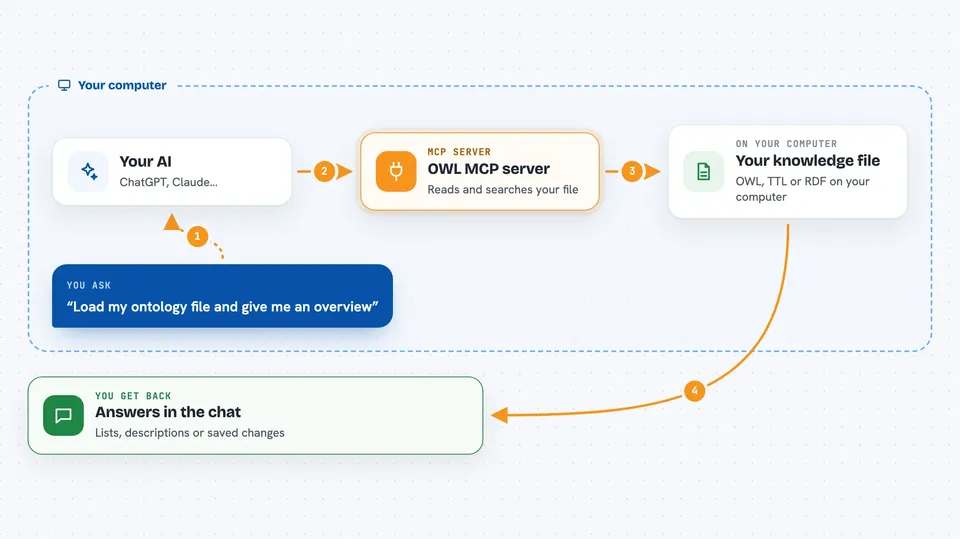
You ask your AI something about your knowledge file, like what classes it has or which items match a rule. The AI passes your request to this helper program. The helper opens your file, reads or searches it, and sometimes runs a reasoning tool to find facts that are not written down directly. Then it sends the answer back, and your AI shows it to you in the chat. If you ask it to add something, it updates the file in memory, and you can save it when you are ready.
 Click to zoom
What you can do with it
- Load an OWL, TTL or RDF file from your computer or from a web address
- List the classes, individuals and properties in your file
- Describe one class or one individual in detail
- Search for a class, individual or property by keyword
- Run a SPARQL query to pull out exactly what you need
- Add new classes, individuals or property links
- Run a reasoner to check your file for logical problems and find hidden facts
- Save your changes back to a file
Try asking your AI
- “Load my ontology file at C:/work/example.ttl and give me an overview”
- “List all classes that start with bank”
- “Describe the BankStatement class and its properties”
- “Add a new class called AA with parent BB and label CC, then save it as turtle”
- “Run the HermiT reasoner and tell me if my ontology is consistent”
What it gives back to you
You get back plain answers in the chat: lists of classes or individuals, short descriptions of a class or item, or the rows from a SPARQL query. When you run the reasoner, it tells you whether your file is consistent and what new facts it found. When you add something, it confirms what was added, and after saving it tells you where the file was written.
Before you start
What you need
- Python with the mcp, owlready2 and rdflib packages installed
- Java (JDK 8 or newer) if you want to use the reasoning tools
- An MCP client like Claude Desktop, Cursor or WorkBuddy, with the server added to its config file
Good to know
Changes you make with the add tools are not saved until you ask it to save, so remember to save if you want to keep them, and be careful because saving overwrites the file you loaded.
Install it with your AI
Add OWL MCP server to your AI, no technical skills needed
You don't install anything by hand. You copy one prompt, paste it into an AI that can work on your computer, and it checks, installs and connects the server for you, asking you when it needs something.
Sign in to get the install prompt
Members get a ready-made prompt that lets the Claude desktop app check OWL MCP server, install it and connect it for them, step by step. You don't need any technical skills: you copy, paste and answer a few questions. Your connected AI can also find and install any of the 4,609 MCP servers here for you.
Who it's for
People who work with knowledge graphs, ontologies or structured data, such as researchers, data modelers and analysts in finance, health or engineering.





