MCP server · Design tools
localfig MCP server
by LucasGorgal
Lets your AI read and change the Figma file you have open, right from your desktop app.
localfig connects your AI assistant to the Figma desktop app so it can work on the design file you have open. It is handy if you spend time in Figma and want help reading tokens, checking what changed, or making edits without clicking through everything yourself. Everything stays on your own computer.
What is an MCP server? The 30-second version
On its own, your AI can only chat with you. An MCP server is a small helper program that gives your AI a new skill or a connection to an app. localfig is that helper for Figma: once it is running, your AI can look at your open file and make changes there when you ask. It talks to Figma through a small plugin, not through Figma's online service.
What this MCP server does
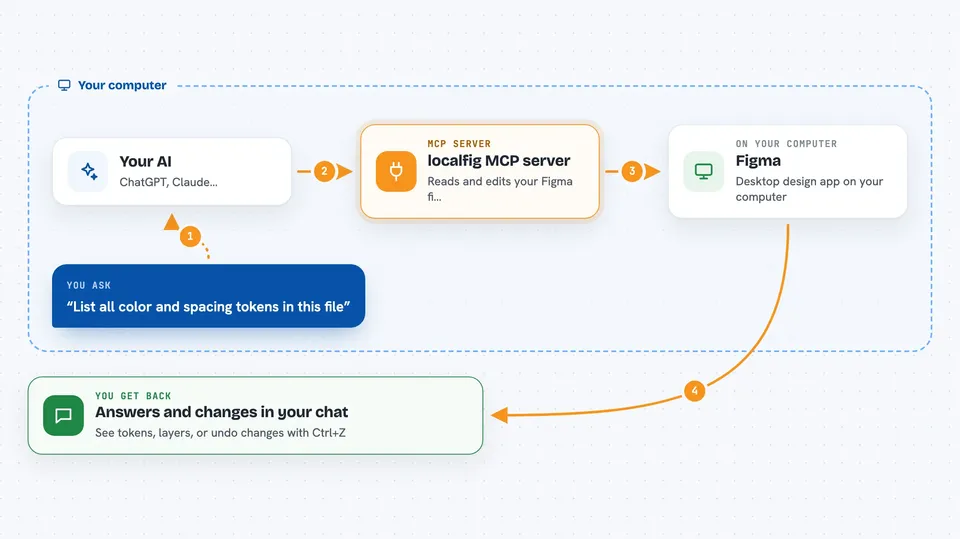
You ask your AI to do something in Figma, like list your color tokens or add a text layer. The AI sends that request to localfig, which passes it to a small plugin running inside your open Figma file. The plugin uses Figma's own plugin tools to read or change the design, then sends the answer back. You see the result in your chat, and any change it made shows up in Figma as one undo step you can reverse.
 Click to zoom
What you can do with it
- Read every color, spacing and text token in your file, with light and dark values
- Look up what changed in the file since the last time your AI checked
- Find layers by name, type or text across the page or the whole file
- Create or edit frames, text and auto-layout, and bind properties to tokens
- Export a frame as a PNG, JPG, SVG, PDF or JSON file
- Place a local image into a shape's fill
- Save a named version before risky edits, or undo the last AI change
Try asking your AI
- “List all the color and spacing tokens in this file with their light and dark values”
- “What did I change in this file since your last check?”
- “Find every text layer on this page that mentions 'Sign up' and show me their font sizes”
- “Export the frame named Hero as a PNG and show me what it looks like”
- “Create a new text layer under the header that says 'Welcome back' in our body text style”
What it gives back to you
You get answers in your chat: lists of tokens, layer names, sizes and colors, or a short summary of what changed. Exports come back as files saved on your computer, and PNG or JPG previews appear right in the conversation so you can see the render. When your AI makes a change, it tells you what it did, and you can undo it in Figma with one Ctrl+Z.
Before you start
What you need
- Node.js 18 or newer
- The Figma desktop app (the browser version cannot load this plugin)
- An MCP client such as Claude Desktop, Claude Code, Cursor, Windsurf or Cline
- About five minutes to run the setup and import the plugin once
Good to know
This can change your Figma file, so save a named version or check the undo history before letting it make big edits.
Install it with your AI
Add localfig MCP server to your AI, no technical skills needed
You don't install anything by hand. You copy one prompt, paste it into an AI that can work on your computer, and it checks, installs and connects the server for you, asking you when it needs something.
Sign in to get the install prompt
Members get a ready-made prompt that lets the Claude desktop app check localfig MCP server, install it and connect it for them, step by step. You don't need any technical skills: you copy, paste and answer a few questions. Your connected AI can also find and install any of the 4,361 MCP servers here for you.
Who it's for
Designers, design-system maintainers and anyone who works in Figma and wants an AI helper that can actually read and edit the open file.