
MCP server · Security · official
PerspectiveGraph MCP server
by luiacuaniello · official
Lets your AI list and explain attack paths from the internet to sensitive assets, and test fixes.
PerspectiveGraph is a tool that looks at your cloud and Kubernetes setup and works out how an attacker could get from the internet to something valuable. It joins up the reports from your existing scanners into one picture. This MCP server lets your AI assistant ask that tool questions and explain the answers back to you.
What is an MCP server? The 30-second version
On its own, your AI can only chat. It cannot see your cloud account or work out routes through it. An MCP server is a small helper program that gives your AI a new skill, here a connection to a running PerspectiveGraph engine, so the AI can ask it about attack paths and read the answers. You ask in plain words, the AI passes the question to PerspectiveGraph, and you get a real answer instead of a guess.
What this MCP server does
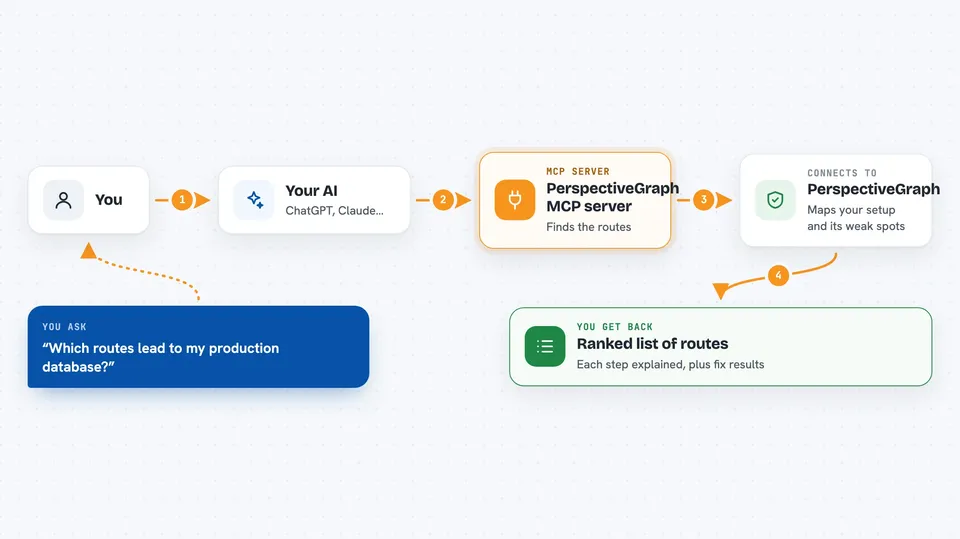
You ask your AI something like which routes lead to your production database. The AI sends that question to the PerspectiveGraph engine through this MCP server. The engine looks at the graph of your environment and finds the routes that match. It sends back the list, with each step explained. Your AI then talks you through it in the chat.
 Click to zoom
What you can do with it
- List the attack paths from internet exposure to sensitive assets
- Explain each hop in a route and what it lets an attacker do
- Find the choke points where cutting one link removes the most risk
- Simulate a fix and see what actually changes
- Check whether the engine's own scores can be trusted yet
- Point it at the public demo or your own running engine
Try asking your AI
- “What are the top attack paths in my account right now?”
- “Explain the hops on the highest priority route”
- “If I cut this one permission, how many routes disappear?”
- “Which single change removes the most risk?”
What it gives back to you
You get back a ranked list of routes, each with its steps and a short explanation of what each step allows. You also get the result of any fix you asked it to simulate, showing which routes changed. The answers come back as text your AI can read out and discuss with you. Nothing is changed in your environment.
Before you start
What you need
- A running PerspectiveGraph engine, or the public demo address
- The PerspectiveGraph command line tool installed
- Access to your AWS account if you want it to read your own estate (read-only)
Good to know
The scores are not yet calibrated against real-world data, so treat them as the engine's best guess rather than a measured risk, and do not put the percentages in front of a board.
Install it with your AI
Add PerspectiveGraph MCP server to your AI, no technical skills needed
You don't install anything by hand. You copy one prompt, paste it into an AI that can work on your computer, and it checks, installs and connects the server for you, asking you when it needs something.
Sign in to get the install prompt
Members get a ready-made prompt that lets the Claude desktop app check PerspectiveGraph MCP server, install it and connect it for them, step by step. You don't need any technical skills: you copy, paste and answer a few questions. Your connected AI can also find and install any of the 4,609 MCP servers here for you.
Who it's for
Security engineers, cloud and platform teams, and developers who want to understand how an attacker could reach their sensitive systems.



