
MCP server · Notes
knowledge-rag MCP server
by lyonzin
Lets your AI search your own local documents and files, all on your own computer.
knowledge-rag is a small helper program that gives your AI assistant the ability to search through your own files. You put your documents, notes, or code in a folder, and your AI can then look things up in them when you ask. It is handy for anyone who has a pile of documents and wants their AI to answer questions using those instead of guessing.
What is an MCP server? The 30-second version
On its own, your AI can only chat with you using what it already learned. An MCP server is a small helper program that gives your AI a new skill or a connection to something else. This one connects your AI to a folder of your own documents on your computer, so the AI can search them and pull out the parts that matter. Everything stays on your machine, so your files are not sent anywhere.
What this MCP server does
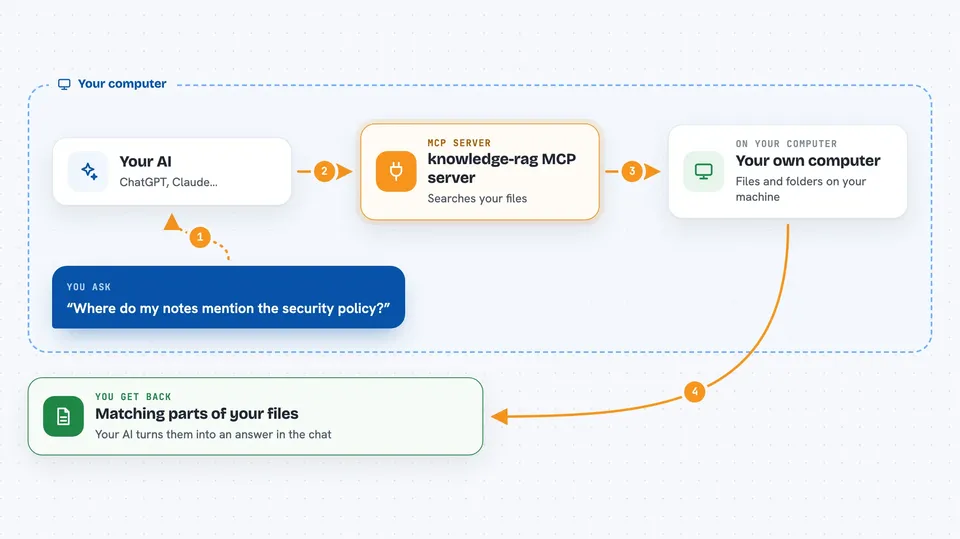
You ask your AI a question, like where something is written in your notes. The AI uses this helper to search the folder you set up. The helper looks through your files using two search methods at once, one based on exact words and one based on meaning, then picks the best matches. It hands those matches back to your AI, and your AI uses them to answer you. You can also add, update, or remove documents through the AI if you want.
 Click to zoom
What you can do with it
- Search your own documents by meaning, not just exact words
- Get the full text of a specific document when you need it
- Find documents similar to one you already have
- Add a new document to the searchable collection
- Update or remove a document when it changes
- Add a web page by its link so it can be searched too
- See a list of everything that is indexed
Try asking your AI
- “Search my documents for anything about onboarding new employees”
- “What does my notes folder say about the security policy?”
- “Find documents similar to the report I just added”
- “Add this file to my knowledge base and tell me when it is ready”
What it gives back to you
You get back a list of matching passages from your own files, usually with the file name and the part of the text that matched. Your AI then turns that into a normal answer in the chat, often quoting the file it came from. If you ask it to add or remove a document, it tells you whether that worked.
Before you start
What you need
- Python installed on your computer (the free programming language it runs on)
- A folder with the documents you want to search
- The Claude Code or Cursor app, or another AI tool that supports MCP servers
Good to know
It can add, change, and remove documents in the folder you point it at, so keep a backup of anything important.
Install it with your AI
Add knowledge-rag MCP server to your AI, no technical skills needed
You don't install anything by hand. You copy one prompt, paste it into an AI that can work on your computer, and it checks, installs and connects the server for you, asking you when it needs something.
Sign in to get the install prompt
Members get a ready-made prompt that lets the Claude desktop app check knowledge-rag MCP server, install it and connect it for them, step by step. You don't need any technical skills: you copy, paste and answer a few questions. Your connected AI can also find and install any of the 4,609 MCP servers here for you.
Who it's for
Anyone who has a lot of their own documents, notes, or code and wants their AI to answer questions using those files instead of guessing.





