MCP server · Research
Lyrenth MCP server
by lyrenth
Lets your AI read any web page as clean, easy-to-read text instead of messy HTML.
This is a small helper that lets your AI assistant read web pages for you. Instead of getting a jumble of website code, your AI gets a tidy version of the page with the title, description, and main content. It is handy for anyone who asks their AI to look things up online, summarize articles, or compare a few pages at once.
What is an MCP server? The 30-second version
On its own, your AI can only chat with you using what it already knows. An MCP server is a small helper program that gives your AI a new skill or a connection to an app or service. This one connects your AI to Lyrenth, a service that reads web pages and turns them into clean text. So when you ask your AI to read a link, it quietly uses this helper to fetch the page for you.
What this MCP server does
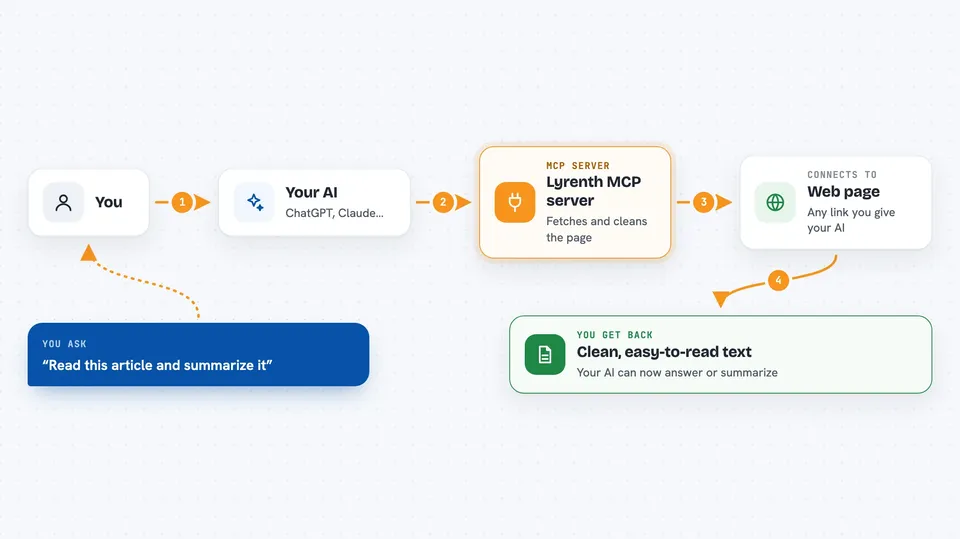
You ask your AI to read a web page, and the AI passes that link to this helper. The helper talks to Lyrenth, which fetches the page and strips out the menus, ads, and clutter. What comes back is a clean version of the page in plain text, plus a short note about how much smaller it is than the original. Your AI then reads that clean version and answers your question, summarizes the page, or compares it with others. You can also ask it to read up to 20 links in one go, and check how many reads you have left on your plan.
 Click to zoom
What you can do with it
- Read a single web page and summarize it
- Read up to 20 pages at once and compare them
- Get a clean, low-clutter version of an article
- Force a fresh copy of a page instead of the cached one
- Limit how long the returned text is, to save space
- Check your plan tier and how many reads you have left
Try asking your AI
- “Read https://example.com/article and summarize it”
- “Read these three pages and tell me which one covers the topic best”
- “Read this blog post and pull out the main points”
- “How many reads do I have left this month?”
What it gives back to you
You get back a clean version of the page as Markdown text, with the title, description, and main content. There is a small header at the top showing how many tokens it used and how much smaller it is than the raw page. If you asked for several pages, you get each one separately, and any that failed are noted without stopping the rest. For usage checks, you get your plan tier, reads used, reads left, and the reset date.
Before you start
What you need
- A free Lyrenth API key from https://lyrenth.com/signup (2,000 reads a month, no card needed)
- An MCP client like Claude Desktop, Claude Code, or Cursor
Good to know
Each successful read uses one credit from your monthly Lyrenth limit, so keep an eye on your usage if you read a lot of pages.
Install it with your AI
Add Lyrenth MCP server to your AI, no technical skills needed
You don't install anything by hand. You copy one prompt, paste it into an AI that can work on your computer, and it checks, installs and connects the server for you, asking you when it needs something.
Sign in to get the install prompt
Members get a ready-made prompt that lets the Claude desktop app check Lyrenth MCP server, install it and connect it for them, step by step. You don't need any technical skills: you copy, paste and answer a few questions. Your connected AI can also find and install any of the 4,361 MCP servers here for you.
Who it's for
Anyone who asks their AI to read, summarize, or compare web pages, especially writers, researchers, and office workers who want cleaner answers.