
MCP server · Notes
remem MCP server
by majiayu000
Your AI remembers past coding sessions, decisions and bug fixes, and recalls them in new chats.
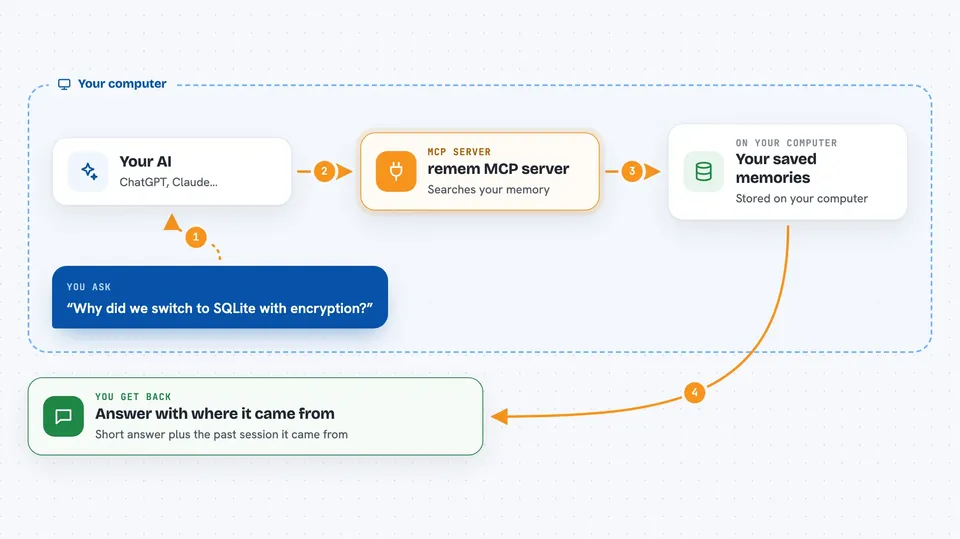
remem is a memory helper for people who use Claude Code or Codex CLI. It quietly saves what happened in your coding sessions and lets your AI look those notes up again later. It is handy if you are tired of explaining the same project over and over in every new chat.
What is an MCP server? The 30-second version
On its own, your AI can only chat with what is in front of it right now. An MCP server is a small helper program that gives your AI a new skill or a connection to something outside the chat. This one connects your AI to remem, a memory store that lives on your own computer. When you ask about an earlier decision or bug fix, your AI can look it up in remem and answer with the details instead of guessing.
What this MCP server does
You ask your AI something about your project, like why a certain fix was made. The AI uses this helper to search your saved memory. The helper reads from a local database on your machine that was filled in automatically from your past Claude Code or Codex sessions. You get back short answers with notes about where each fact came from. You can also ask it to save a new decision right away so it is not forgotten.
 Click to zoom
What you can do with it
- Recall earlier decisions, bug fixes and project patterns from past sessions
- Search your saved memory by keyword, branch or project
- Look up the full details behind a single memory entry
- Save a new decision or note right away when you want it kept
- Review and approve memory candidates before they become permanent
- Suppress memories that are no longer relevant
- Check why a memory was included in your session context
Try asking your AI
- “What did we decide about database encryption last week?”
- “Search my memory for the deployment decision on main branch”
- “Show me the details of that FTS5 tokenizer fix”
- “Save this as a memory: we switched to SQLite with encryption for fresh installs”
What it gives back to you
You get short, readable answers in the chat, usually with a note about which past session or memory the fact came from. Searches return a list of matching memories with titles and short details. If you ask for one memory, you get its full text and where it came from. Saving a memory gives you a confirmation that it was stored.
Before you start
What you need
- A computer running macOS, Linux or Windows
- Claude Code or OpenAI Codex CLI installed
- The remem program installed on your machine (Homebrew, npm, Cargo or the installer script)
Good to know
It reads your past coding sessions and stores them in a local database, so be careful if those sessions contain secrets or private code, and remember that governance actions can change or hide stored memories.
Install it with your AI
Add remem MCP server to your AI, no technical skills needed
You don't install anything by hand. You copy one prompt, paste it into an AI that can work on your computer, and it checks, installs and connects the server for you, asking you when it needs something.
Sign in to get the install prompt
Members get a ready-made prompt that lets the Claude desktop app check remem MCP server, install it and connect it for them, step by step. You don't need any technical skills: you copy, paste and answer a few questions. Your connected AI can also find and install any of the 4,609 MCP servers here for you.
Who it's for
Developers and technical teams who use Claude Code or Codex CLI daily and want their AI to remember past project work.





