
MCP server · Notes
fish_bridge MCP server
by MakeaMouse
Turns long AI chats into a short knowledge graph your AI reads back automatically.
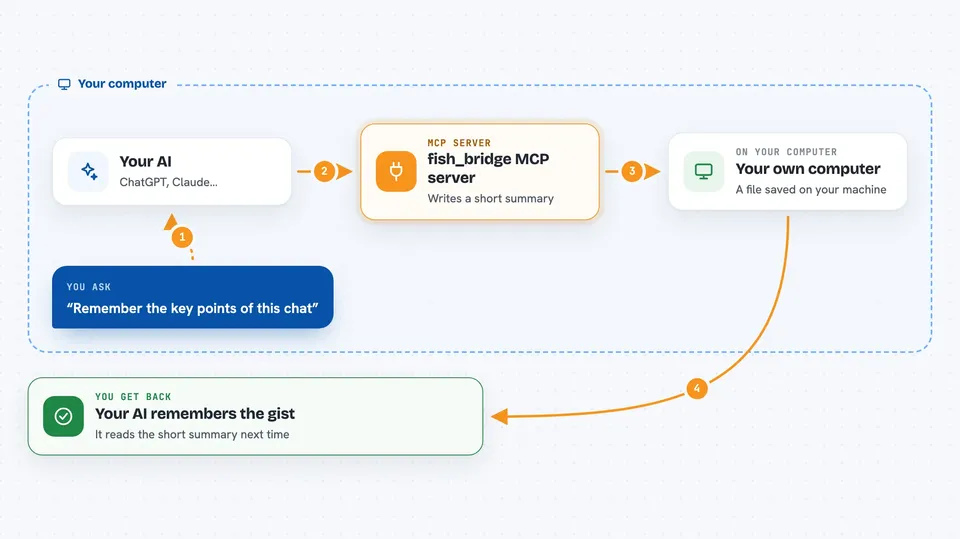
fish_bridge is a small helper that takes a long AI chat session and shrinks it into a short, tidy summary. That summary is written into a file your AI tool reads on every turn. It is handy if you work in long chats and keep running out of room or losing track of what was decided.
What is an MCP server? The 30-second version
On its own, your AI can only chat with you. An MCP server is a small helper program that gives your AI a new skill or a connection to something else. This one connects your AI to fish_bridge, a tool that stores a compact map of your session. With it, your AI can record each turn as it happens and pull the short summary back when it needs context.
What this MCP server does
You chat with your AI as usual. As you go, this helper records each turn and pulls out the important bits: questions, decisions, errors, tasks, files. It merges duplicates and flags when something changed its mind, then compresses everything into a short block of text. That block is saved into a file your AI reads on the next turn, so it remembers the gist without carrying the whole chat.
 Click to zoom
What you can do with it
- Record each chat turn into a compact session graph
- Pull back the current short summary of your session
- Ask for context focused on one topic, like a caching plan
- Mark a topic as resolved when it is done
- Add a new note or decision to the graph by hand
- Export the session to a file you can share or reload later
- List items you deferred for later
Try asking your AI
- “Record this turn in fish_bridge”
- “What is the current context for this session?”
- “Show me the focus on the Redis caching decision”
- “Mark the caching strategy as resolved”
What it gives back to you
You get short, structured answers in the chat: a list of active topics, a focused summary on one subject, or a confirmation that something was recorded or marked done. When you export, you get a file you can save or reload later. The main output is a small text block that your AI reads back on the next turn.
Before you start
What you need
- Python and the uv tool installed on your computer
- A backend choice: local Ollama (free, offline) or a cloud key like Gemini, OpenAI, or Claude
- If using a cloud backend, an API key from that provider (a kind of password for apps; the site gives you one)
Good to know
If you use a cloud backend, each turn sends a small amount of text to that provider and costs a tiny amount of money; the local Ollama option is free and stays on your computer.
Install it with your AI
Add fish_bridge MCP server to your AI, no technical skills needed
You don't install anything by hand. You copy one prompt, paste it into an AI that can work on your computer, and it checks, installs and connects the server for you, asking you when it needs something.
Sign in to get the install prompt
Members get a ready-made prompt that lets the Claude desktop app check fish_bridge MCP server, install it and connect it for them, step by step. You don't need any technical skills: you copy, paste and answer a few questions. Your connected AI can also find and install any of the 4,609 MCP servers here for you.
Who it's for
People who work in long AI chat sessions and want their assistant to remember the important parts without dragging the whole history along.





