
MCP server · Analytics
SqlAugur MCP server
by mbentham
Lets your AI safely read your SQL Server databases and explain their structure.
SqlAugur is a small helper program that connects your AI assistant to a SQL Server database in a safe, read-only way. It is handy if you work with databases and want to ask questions in plain English instead of writing SQL yourself. Your AI can look at tables, run read-only queries, and even draw simple diagrams of how the data fits together.
What is an MCP server? The 30-second version
On its own, your AI can only chat with you. An MCP server is a small program that gives your AI a new skill, in this case the ability to talk to a SQL Server database. Once SqlAugur is connected, your AI can look things up in your database and bring the answers back to your chat. You stay in control because it only ever reads, never changes anything.
What this MCP server does
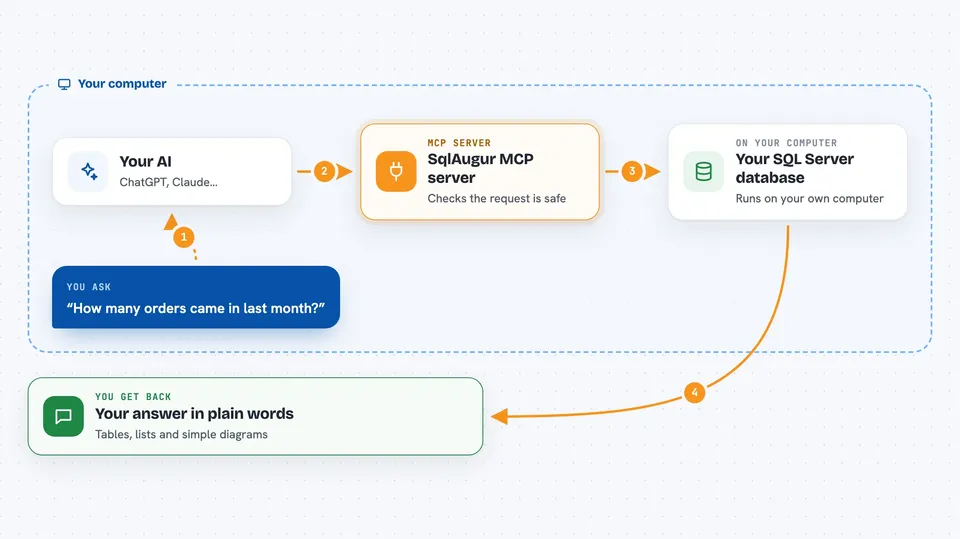
You ask your AI a question about your database, like which tables exist or how many orders came in last month. Your AI sends that request to SqlAugur, which checks it is a safe read-only query and then runs it against your SQL Server. SqlAugur sends the results back, and your AI explains them to you in the chat. It can also describe tables, list stored procedures, and generate simple diagrams of your database structure. Everything is limited to reading, so your data stays untouched.
 Click to zoom
What you can do with it
- List the SQL Server instances you have set up
- List all databases on a server
- Run a read-only SELECT query and see the rows
- Describe a table's columns, keys, and indexes
- Get a quick overview of a database schema
- List views, stored procedures, and functions
- Generate a PlantUML or Mermaid diagram of your tables
Try asking your AI
- “List the servers I have configured”
- “Show me all databases on the production server”
- “Describe the Customers table in the Sales database”
- “Give me a schema overview of the Orders database”
- “Run a query to count how many orders were placed last month”
What it gives back to you
You get answers in your chat: lists of servers or databases, tables of query results, and Markdown descriptions of tables and schemas. Diagrams are saved as files you can open in other tools. Everything is presented in a readable way, not as raw code.
Before you start
What you need
- A SQL Server database you can connect to
- .NET 10.0 runtime (or Docker, if you prefer that route)
- A connection string for your database (a line of text that says where the database is and how to log in)
- An MCP client like Claude Desktop or another AI assistant that supports MCP
Good to know
SqlAugur is read-only by design, so it cannot change or delete your data. Still, be careful about which databases you connect it to, because your AI can see the data it reads.
Install it with your AI
Add SqlAugur MCP server to your AI, no technical skills needed
You don't install anything by hand. You copy one prompt, paste it into an AI that can work on your computer, and it checks, installs and connects the server for you, asking you when it needs something.
Sign in to get the install prompt
Members get a ready-made prompt that lets the Claude desktop app check SqlAugur MCP server, install it and connect it for them, step by step. You don't need any technical skills: you copy, paste and answer a few questions. Your connected AI can also find and install any of the 4,361 MCP servers here for you.
Who it's for
This is most useful for people who work with SQL Server databases, like analysts, developers, or database administrators who want to explore data without writing SQL by hand.


