
MCP server · Research
Grok MCP server
by merterbak
Lets your AI use xAI's Grok to search the web and X, look at images, and make pictures or videos.
This is a small helper that connects your AI assistant to Grok, the AI made by xAI. Once it is set up, you can ask your usual assistant to do things like search the web, look at an image you have, or create a new picture. It is handy for people who already use an AI chat tool and want a second brain to handle searching, images, and files.
What is an MCP server? The 30-second version
On its own, your AI can only chat with you using what it already knows. An MCP server is a small helper program that gives your AI a new skill or a connection to another service. This one connects your AI to Grok, xAI's AI service, so it can look things up, read images, or make pictures when you ask. You do not need to understand how it works inside. You just talk to your assistant like normal, and it quietly uses this helper behind the scenes.
What this MCP server does
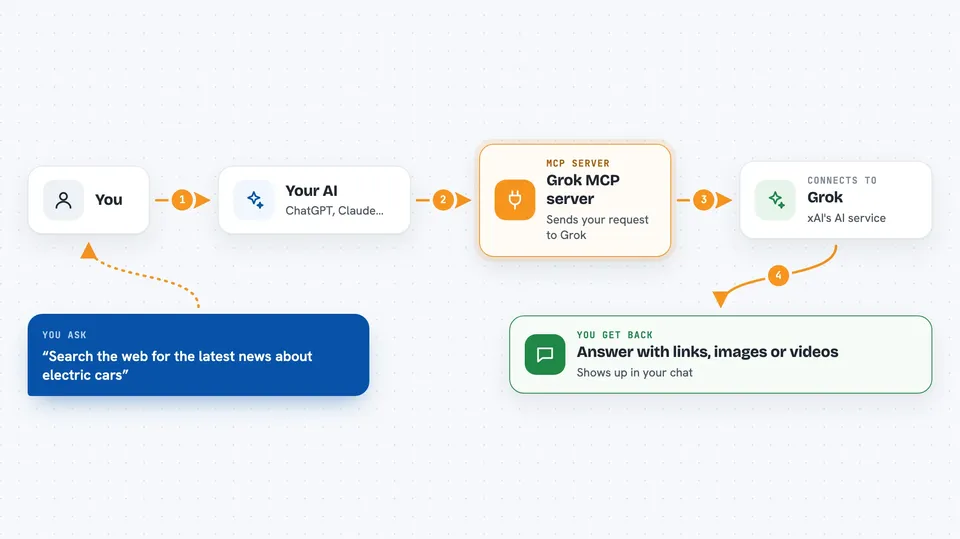
You type a request in your normal AI chat, like asking it to search the web or make a picture. Your assistant passes that request to this helper program. The helper then talks to Grok, xAI's service, over the internet using your xAI account key. Grok does the work, such as searching, reading an image, or generating a picture, and sends the result back. Your assistant shows you the answer, the image, or the summary right in the chat.
 Click to zoom
What you can do with it
- Search the web and get answers with links to sources
- Search X (Twitter) posts by keyword, handle, or date
- Look at an image on your computer and describe or answer questions about it
- Create new images or edit existing ones from a text description
- Make short videos from text or from an image
- Upload documents and chat with them
- Run small Python code snippets to solve a task
Try asking your AI
- “Search the web for the latest news about electric cars and summarize it”
- “What are people saying on X about the new iPhone this week”
- “Look at the image at /Users/me/Desktop/receipt.png and tell me the total”
- “Make a picture of a cat wearing a tiny astronaut helmet”
- “Upload this PDF and answer questions about it”
What it gives back to you
You get answers in plain text, often with links to the pages Grok used. For images and videos, you get a link or a saved file in the images folder. For files you uploaded, you get summaries or answers based on their content. Everything shows up in your normal chat window, like any other reply from your assistant.
Before you start
What you need
- Python 3.11 or newer installed on your computer
- The Astral UV tool installed (a small program that runs Python projects)
- An xAI API key from console.x.ai (a kind of password for apps; the site gives you one)
- The Claude desktop app or Claude Code, or another AI tool that supports MCP servers
Good to know
This helper can create images and videos and use your xAI account, which may cost money depending on your plan, and it can read files you point it to, so only share folders you are comfortable with.
Install it with your AI
Add Grok MCP server to your AI, no technical skills needed
You don't install anything by hand. You copy one prompt, paste it into an AI that can work on your computer, and it checks, installs and connects the server for you, asking you when it needs something.
Sign in to get the install prompt
Members get a ready-made prompt that lets the Claude desktop app check Grok MCP server, install it and connect it for them, step by step. You don't need any technical skills: you copy, paste and answer a few questions. Your connected AI can also find and install any of the 4,609 MCP servers here for you.
Who it's for
People who already use an AI chat assistant and want it to search the web, look at images, or create pictures and videos without switching apps.


