
MCP server · Developer tools
Token Savior MCP server
by Mibayy
Lets your AI find and edit code by name, remember past decisions, and tidy up messy command output.
Token Savior is a helper that plugs into your AI coding assistant and gives it a map of your code. Instead of reading whole files to answer a small question, your AI can jump straight to the function or class you mean. It is handy if you work in a code project with your AI and want it to stop guessing and stop forgetting.
What is an MCP server? The 30-second version
On its own, your AI can only chat with you. An MCP server is a small helper program that gives your AI a new skill or a connection to something else. This one connects your AI to your code project, so it can look up functions, classes and how they call each other. When you ask a question, your AI asks this helper, and the helper goes and finds the answer in your files.
What this MCP server does
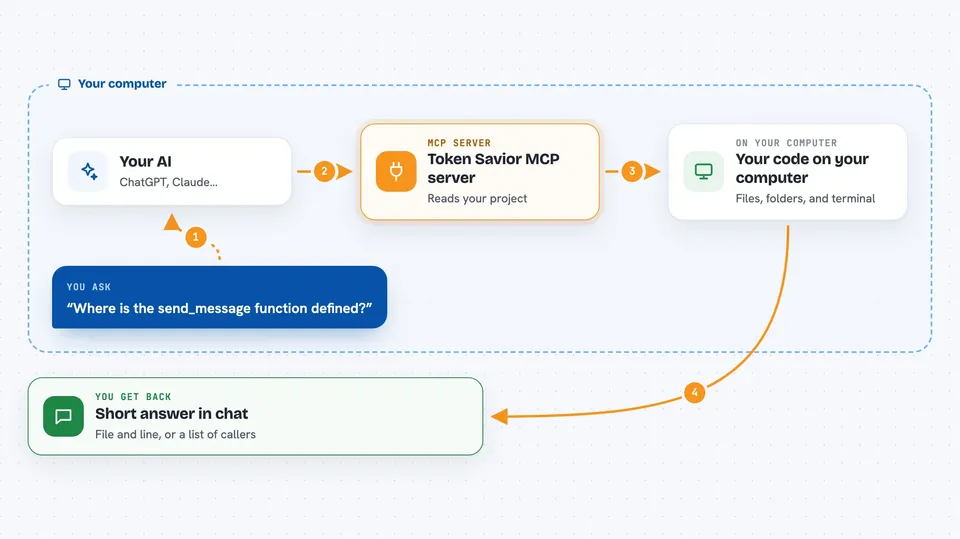
You ask your AI something about your code, like where a function is defined or what would break if you changed it. Your AI passes that request to Token Savior. Token Savior has already read through your project and built an index of every function, class and import, so it can answer by pointer instead of by reading whole files. It can also remember decisions and fixes from earlier sessions and bring them back at the start of a new one. Along the way it can rewrite some of your terminal commands so their output is shorter and easier to read.
 Click to zoom
What you can do with it
- Find where a function or class is defined without reading the whole file
- See what other code depends on a piece you want to change
- Trace the chain of calls that leads to a function
- Spot code that is never used anywhere
- Get a summary of what a change would affect before you make it
- Keep notes from past sessions so your AI remembers your project rules
- Shorten the output of common commands like git status or pytest
Try asking your AI
- “Where is the send_message function defined and who calls it?”
- “If I change the LLMClient class, what else in the project would break?”
- “Is there any dead code in this folder that nothing uses?”
- “Show me the source of the compile function without reading the whole file”
What it gives back to you
You get back short, focused answers in the chat: the file and line where something lives, a list of the places that use it, or a small summary of what a change would touch. It can also show you a compact version of a command's output, like a trimmed git status. Nothing is written into your chat as a giant wall of code unless you ask for the source of one specific thing.
Before you start
What you need
- Python installed on your computer
- The token-savior-recall package installed with pip
- The folder path of the project you want it to read
- Your AI assistant's MCP settings file, so you can add the server
Good to know
It reads the project folders you point it at and can change files when your AI edits code, so point it only at folders you are happy for it to read and write, and keep backups of your work.
Install it with your AI
Add Token Savior MCP server to your AI, no technical skills needed
You don't install anything by hand. You copy one prompt, paste it into an AI that can work on your computer, and it checks, installs and connects the server for you, asking you when it needs something.
Sign in to get the install prompt
Members get a ready-made prompt that lets the Claude desktop app check Token Savior MCP server, install it and connect it for them, step by step. You don't need any technical skills: you copy, paste and answer a few questions. Your connected AI can also find and install any of the 4,609 MCP servers here for you.
Who it's for
Developers and anyone who works on a code project with an AI assistant and wants faster, more accurate answers.




