
MCP server · Notes
Linksee Memory MCP server
Give your AI a memory that survives new chats, so it remembers past decisions and warns you before repeating old mistakes.
Linksee Memory is a memory helper for your AI coding assistant. It saves the decisions and lessons from one session and brings them back in the next one, so you do not have to explain everything again. It is handy if you work with Claude Code, Cursor, Codex, Windsurf or Gemini CLI and keep losing context between sessions.
What is an MCP server? The 30-second version
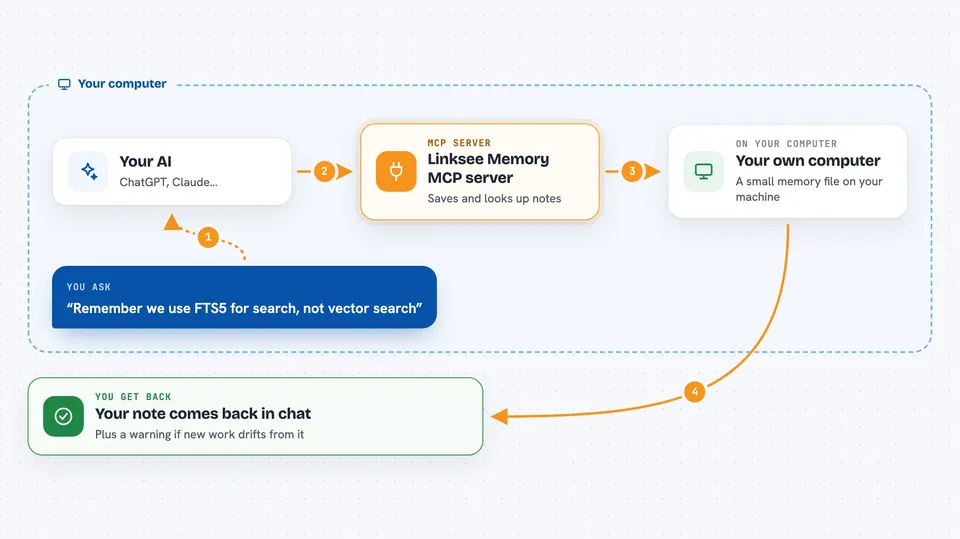
On its own, your AI can only chat with what is in front of it. An MCP server is a small helper program that gives your AI a new skill or a connection to something else. This one connects your AI to a memory file on your own computer, so the AI can save notes and look them up when you ask. Nothing leaves your machine.
What this MCP server does
You tell your AI to remember something, like a decision you made or a mistake you want to avoid. The AI passes that to Linksee Memory, which writes it into a small local file on your computer. Later, in a new chat or a different tool, when you ask about that topic, the AI asks Linksee Memory to look it up and gets your note back. It can also check whether your current code still matches the decisions you saved, and warn you if something drifted away from what you agreed.
 Click to zoom
What you can do with it
- Save a decision or lesson so your AI remembers it in future sessions
- Recall past decisions and caveats at the start of a new chat
- See which of your projects have drifted away from their original goals
- Get a warning before an edit that contradicts a decision you locked
- Share one memory between Claude Code, Cursor, Codex, Windsurf and Gemini CLI
- Look up where a file fits in your product map and what else it touches
- Mark a decision as changed so the old one stops nagging you
Try asking your AI
- “Remember that we use FTS5 for search, not vector search”
- “What did we decide about the login flow last week?”
- “What's drifting right now across my projects?”
- “Before I edit this file, is there anything I should know?”
What it gives back to you
You get short written answers in your chat. Sometimes it is a list of saved decisions with dates and importance, sometimes a status like aligned or drifting with the reason. When it finds a problem, it shows the file and line as evidence. When it saves something, it just confirms it is stored.
Before you start
What you need
- Node.js installed on your computer (the setup command uses npx)
- A coding assistant that supports MCP, such as Claude Code, Cursor, Codex, Windsurf or Gemini CLI
- No account and no API key needed
Good to know
It saves notes about your work in a local file, so treat that file as private and be careful if you share your computer or project folder.
Install it with your AI
Add Linksee Memory MCP server to your AI, no technical skills needed
You don't install anything by hand. You copy one prompt, paste it into an AI that can work on your computer, and it checks, installs and connects the server for you, asking you when it needs something.
Sign in to get the install prompt
Members get a ready-made prompt that lets the Claude desktop app check Linksee Memory MCP server, install it and connect it for them, step by step. You don't need any technical skills: you copy, paste and answer a few questions. Your connected AI can also find and install any of the 4,609 MCP servers here for you.
Who it's for
Developers and technical teams who use AI coding assistants across several projects and want their decisions to stick.





