
MCP server · Developer tools
Claude Prompts MCP server
by minipuft
Save your best prompts once and reuse them, with checks and step-by-step chains your AI follows.
Claude Prompts is a helper that keeps your favourite prompts in one place and lets your AI run them again and again. Instead of retyping the same instructions, you type a short code and the AI fills in the details. It is handy if you keep asking your AI to do the same kind of task, like reviewing code or writing a summary.
What is an MCP server? The 30-second version
On its own, your AI can only chat with you. An MCP server is a small helper program that gives your AI a new skill or a connection to something useful. This one connects your AI to a library of saved prompt templates, so it can pull up the right instructions, follow them step by step, and check its own work. You do not need to understand how it works under the hood. You just ask, and the helper does the rest.
What this MCP server does
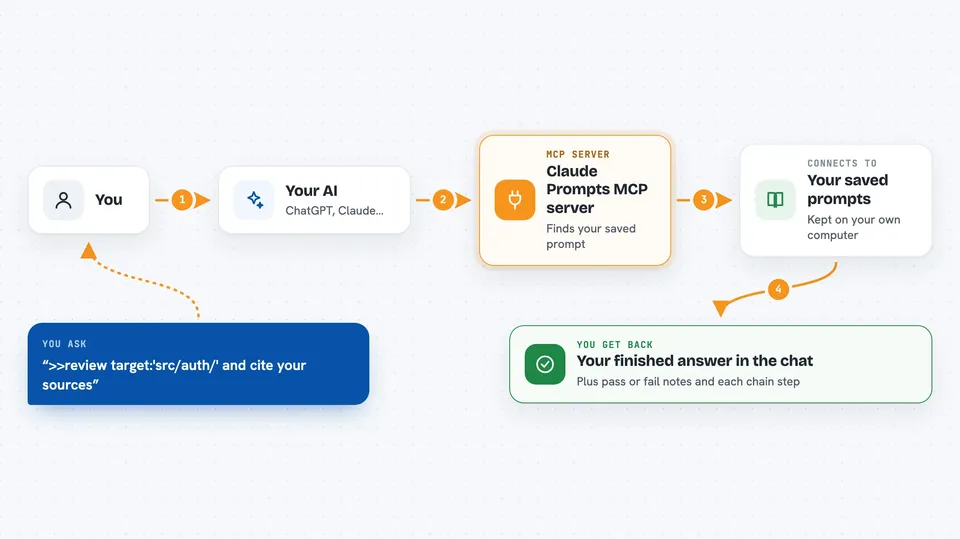
You type a short request using a special marker, like >>review, and your AI sends it to this helper. The helper looks up the saved prompt template you named, fills in the details you gave, and hands the instructions back to your AI. Your AI then works through the steps, and if a check fails, it tries again or asks you what to do. When it is done, you get the finished result right in your chat. You can also chain several prompts together so one step feeds into the next.
 Click to zoom
What you can do with it
- Reuse your best prompts without retyping them
- Chain several prompts so each step builds on the last
- Add checks that make your AI verify its own output
- Export your prompts as skills your coding tool can use directly
- Let your AI write and save new prompts as you work
- Switch between different reasoning styles for different tasks
- Ask the helper to pick the right prompt for a job
Try asking your AI
- “>>review target:'src/auth/' and cite your sources”
- “>>tech_evaluation_chain library:'zod' context:'API validation'”
- “>>research_chain topic:'remote team policies'”
- “%judge Help me refactor this authentication module”
What it gives back to you
You get the finished answer in your chat, just like a normal reply from your AI, but shaped by the saved prompt. If you used checks, you also see whether they passed or failed. If you ran a chain, you get the result of each step in order. Sometimes the helper also tells you which prompt it used and whether it had to retry.
Before you start
What you need
- A supported AI client, such as Claude Code, Claude Desktop, Cursor, or Codex
- Node.js installed if you use the npx setup (the README gives a drag-and-drop option for Claude Desktop that skips this)
Good to know
The helper can run shell commands as part of its checks, so only use prompts and checks you trust.
Install it with your AI
Add Claude Prompts MCP server to your AI, no technical skills needed
You don't install anything by hand. You copy one prompt, paste it into an AI that can work on your computer, and it checks, installs and connects the server for you, asking you when it needs something.
Sign in to get the install prompt
Members get a ready-made prompt that lets the Claude desktop app check Claude Prompts MCP server, install it and connect it for them, step by step. You don't need any technical skills: you copy, paste and answer a few questions. Your connected AI can also find and install any of the 4,361 MCP servers here for you.
Who it's for
People who write the same prompts over and over, or who want to share a set of prompts with their team, especially developers using coding assistants.



