
MCP server · Social media
Clipwise MCP server
Lets your AI look up Clipwise info, creator use cases, and trending TikTok videos by country.
This is a small add-on that connects your AI assistant to Clipwise, a platform made for people who create short videos for TikTok, Instagram Reels, YouTube Shorts, and Facebook Reels. Once it is set up, you can ask your AI about Clipwise, ask for advice on common creator problems, and search for trending TikTok videos in different countries. It is handy if you make short videos or run social media for clients.
What is an MCP server? The 30-second version
On its own, your AI can only chat with you using what it already knows. An MCP server is a small helper program that gives your AI a new skill or a connection to an outside service. This one connects your AI to Clipwise, so when you ask a question about short-form video or trends, the AI can go and fetch real answers from Clipwise instead of guessing. You do not need to understand how it works under the hood. You just install it once and then talk to your AI like normal.
What this MCP server does
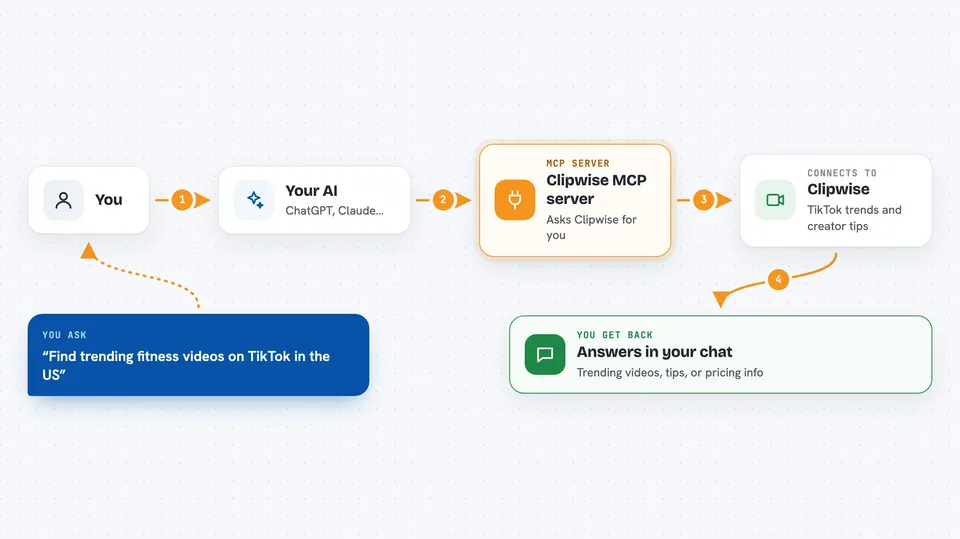
You ask your AI a question, like what Clipwise is or how to fix low views on TikTok. The AI passes that request to this helper program. The helper then talks to Clipwise over the internet and brings back the answer. For trend searches, it asks Clipwise for viral TikTok videos matching your keyword and country, and hands the results back to your AI. Your AI then shows you a clear answer in the chat, as if it knew it all along.
 Click to zoom
What you can do with it
- Ask what Clipwise is and what it offers
- Get concrete use cases for problems like low views or competitor research
- Search trending TikTok videos by keyword in a chosen country
- Look up which platforms and features Clipwise supports
- Check pricing and plan details without leaving the chat
- Get ideas for content strategy based on Clipwise playbooks
Try asking your AI
- “What is Clipwise and what can it do for me?”
- “My TikTok videos get low views, what can I do?”
- “Find trending fitness videos on TikTok in the US”
- “What tools exist for analyzing Instagram Reels?”
What it gives back to you
You get plain answers in the chat, written in normal sentences. For trend searches, you get a list of viral TikTok videos with details like titles or descriptions and country info. For use cases, you get problem-to-solution suggestions. For general questions, you get an overview of Clipwise features, platforms, and pricing.
Before you start
What you need
- The Claude desktop app, Cursor, Windsurf, or another AI assistant that supports MCP
- Node.js installed on your computer (the setup uses npx)
- A free Clipwise API key from tryclipwise.com if you want to search trends (the site gives you one)
Good to know
Trend search needs your Clipwise API key, and heavy use may count against your Clipwise plan limits.
Install it with your AI
Add Clipwise MCP server to your AI, no technical skills needed
You don't install anything by hand. You copy one prompt, paste it into an AI that can work on your computer, and it checks, installs and connects the server for you, asking you when it needs something.
Sign in to get the install prompt
Members get a ready-made prompt that lets the Claude desktop app check Clipwise MCP server, install it and connect it for them, step by step. You don't need any technical skills: you copy, paste and answer a few questions. Your connected AI can also find and install any of the 4,361 MCP servers here for you.
Who it's for
Short-form video creators, social media managers, and small agencies who want quick answers and trend ideas without leaving their AI chat.





