
MCP server · Analytics
kd-scout MCP server
by moiosintel
Lets your AI score keyword difficulty, rank opportunities, and draft content briefs for you.
kd-scout is a small helper that does keyword research math for you. You give it a list of keywords, and it works out how hard each one looks, how good the opportunity is, and what a content brief for a topic could look like. It is handy if you write content, run a blog, or plan marketing and want quick numbers without opening a spreadsheet.
What is an MCP server? The 30-second version
On its own, your AI can only chat with you. An MCP server is a small helper program that gives your AI a new skill or a connection to something useful. This one gives your AI the ability to run keyword research calculations, so when you ask about difficulty or a content plan, it can actually work out the numbers instead of guessing. You do not need to understand how it works inside; you just connect it once and ask your questions in normal words.
What this MCP server does
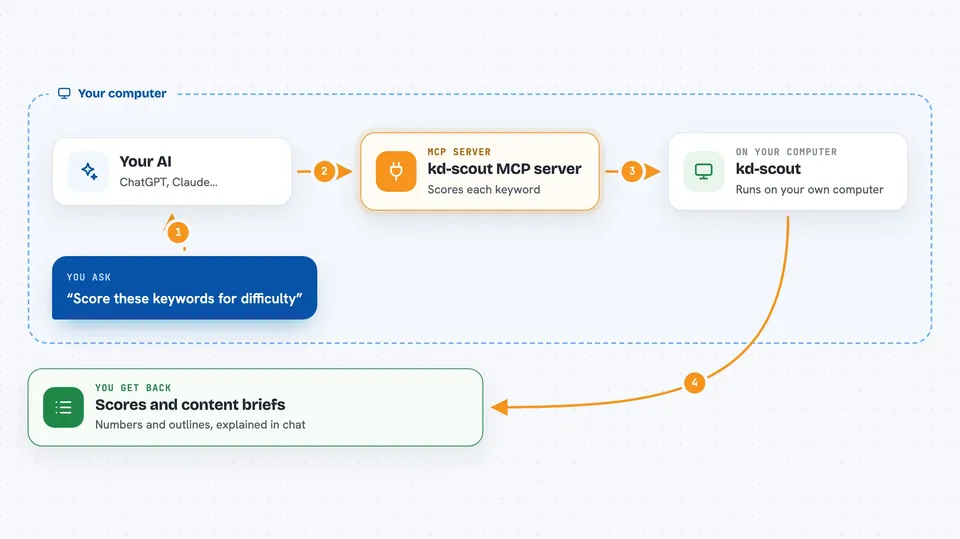
You ask your AI something like how hard a set of keywords looks. Your AI passes that list to kd-scout. kd-scout runs its scoring math and sends back a number from 0 to 100 for each keyword. If you also give it a monthly search volume, it blends that with difficulty into an opportunity score. And if you ask for a content brief on a topic, it returns an outline with headings, a word-count target, FAQs, and a suggested schema type.
 Click to zoom
What you can do with it
- Score a list of keywords for difficulty from 0 to 100
- Blend difficulty and monthly search volume into an opportunity score
- Get a structured content brief for a topic, including an H2 outline
- See a suggested word-count target for a piece of content
- Get FAQ ideas and a suggested schema type for a page
- Compare several keywords side by side in one request
Try asking your AI
- “Score these keywords for difficulty: best budget laptop, cheap running shoes, beginner yoga mat”
- “What is the opportunity score for difficulty 42 and monthly volume 3000”
- “Write me a content brief for a topic about home coffee grinders”
- “Compare difficulty for these five keywords and tell me which looks easiest”
What it gives back to you
You get numbers and text back in the chat. For difficulty you get a score from 0 to 100 for each keyword you sent. For opportunity you get a single blended score from 0 to 100. For a content brief you get an outline with H2 headings, a word-count target, FAQ questions, and a schema type. Your AI can then explain or rearrange any of that for you.
Before you start
What you need
- Python 3.10 or newer on your computer
- The kd-scout package installed (pip install kd-scout)
- An MCP client, such as the Claude desktop app, that can run local MCP servers
Good to know
The scores come from a fixed scoring model, so treat them as rough guidance rather than exact truth, and check anything important yourself.
Install it with your AI
Add kd-scout MCP server to your AI, no technical skills needed
You don't install anything by hand. You copy one prompt, paste it into an AI that can work on your computer, and it checks, installs and connects the server for you, asking you when it needs something.
Sign in to get the install prompt
Members get a ready-made prompt that lets the Claude desktop app check kd-scout MCP server, install it and connect it for them, step by step. You don't need any technical skills: you copy, paste and answer a few questions. Your connected AI can also find and install any of the 4,361 MCP servers here for you.
Who it's for
Content writers, bloggers, SEO beginners, and small marketing teams who want quick keyword numbers and content outlines without a paid tool.





