
MCP server · Analytics
Zabbix MCP server
by mpeirone
Ask your AI about your Zabbix monitoring: hosts, problems, items, triggers and more.
This is a small helper that connects your AI assistant to Zabbix, the tool many IT teams use to watch their servers and network. Once it is set up, you can just ask questions in plain words instead of clicking around the Zabbix web pages. It is handy for anyone who keeps an eye on systems and wants quick answers.
What is an MCP server? The 30-second version
On its own, your AI can only chat with you. An MCP server is a little helper program that gives your AI a new skill or a connection to another app. This one connects your AI to your Zabbix monitoring server, so the AI can look things up or make changes there for you. You ask in normal words, and the helper does the actual talking to Zabbix.
What this MCP server does
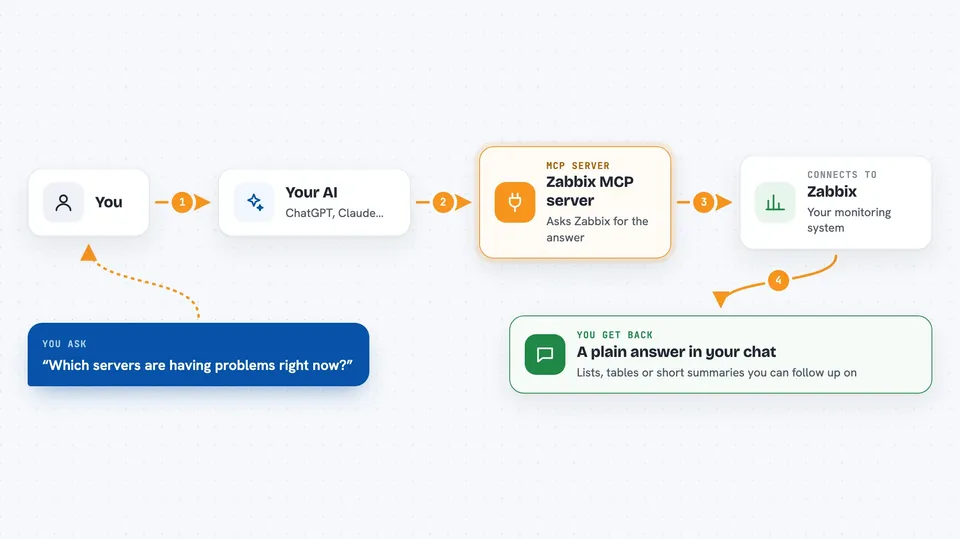
You ask your AI something like which servers are having problems right now. The AI sends that request to this helper, and the helper asks your Zabbix server for the answer. Zabbix replies with the data, and the helper hands it back to the AI. The AI then explains it to you in the chat, in plain words. It works with Zabbix 6.0 and newer.
 Click to zoom
What you can do with it
- List your monitored hosts and their names
- Show current problems and recent alerts
- Look up items, triggers and templates
- Get details about a specific host or group
- Create or update hosts and other objects, if you allow it
- Ask for the documentation of any Zabbix action
- Discover which Zabbix actions are available
Try asking your AI
- “Which hosts are currently in a problem state?”
- “Show me the recent problems on our web servers”
- “List all hosts in the group Production”
- “What does the host.create action need as input?”
What it gives back to you
You get answers in the chat, usually as lists or short summaries. For example, a list of host names, a table of current problems, or the details of one host. If you ask it to create or change something, it tells you what it did. Everything stays in the conversation, so you can ask follow-up questions.
Before you start
What you need
- A Zabbix server (version 6.0 or newer) that you can reach
- An API token from Zabbix, or a username and password
- The URL of your Zabbix server, like https://zabbix.example.com
- Python with uv installed, or Docker, depending on how you run it
Good to know
This helper can also change or delete things in Zabbix if you do not turn on read-only mode, so be careful when asking it to make changes.
Install it with your AI
Add Zabbix MCP server to your AI, no technical skills needed
You don't install anything by hand. You copy one prompt, paste it into an AI that can work on your computer, and it checks, installs and connects the server for you, asking you when it needs something.
Sign in to get the install prompt
Members get a ready-made prompt that lets the Claude desktop app check Zabbix MCP server, install it and connect it for them, step by step. You don't need any technical skills: you copy, paste and answer a few questions. Your connected AI can also find and install any of the 4,609 MCP servers here for you.
Who it's for
IT admins, system engineers and support teams who already use Zabbix and want faster answers without clicking through the web interface.



