
MCP server · API
OpenAPI MCP Gateway
by mroops0111
Connect your AI to many web APIs at once through one helper, so it can look things up and make changes for you.
This is a helper program that lets your AI talk to web services that have a public instruction manual (called an OpenAPI or Swagger spec). You point it at one or more of those manuals, and your AI gains the ability to use those services. It is handy if you want your AI to work with tools like GitHub, Asana, or your company's own internal system without building a custom connector for each one.
What is an MCP server? The 30-second version
On its own, your AI can only chat. It cannot reach out to GitHub or your company's internal system unless something gives it that ability. An MCP server is a small helper program that gives your AI a new skill or a connection to an app or service. This particular helper connects your AI to any service that publishes an OpenAPI spec, so when you ask your AI to do something there, it can actually do it.
What this MCP server does
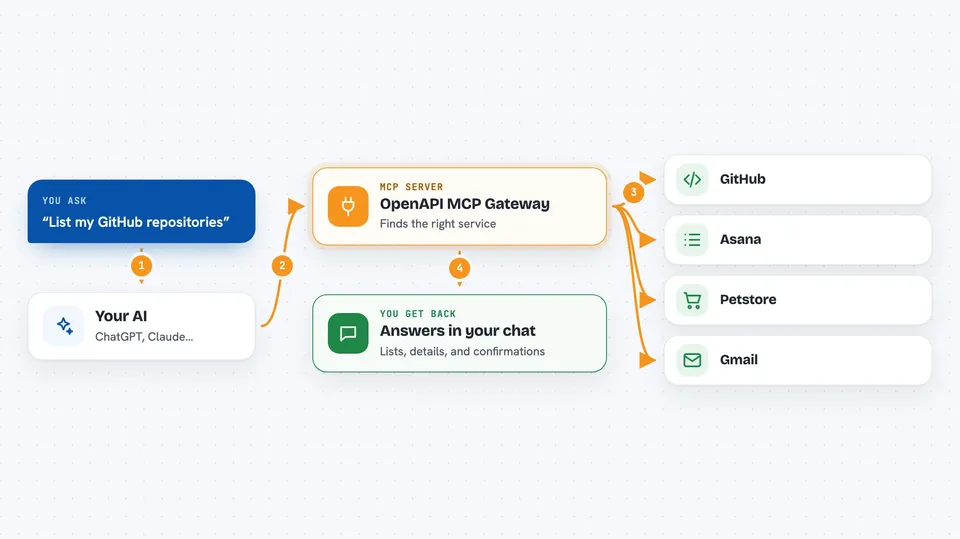
You ask your AI to do something, like list your GitHub repositories or check a customer record. Your AI sends that request to this helper program. The helper looks up the right instructions in the service's manual (the OpenAPI spec), adds the right password or token, and talks to the actual service on your behalf. The service sends back the answer, and the helper passes it to your AI, which shows it to you in the chat. You can connect several services at once, each with its own password, all running in one helper.
 Click to zoom
What you can do with it
- Connect your AI to a public API that needs no login, like the Petstore demo
- Connect to APIs that use a fixed token or API key, like GitHub
- Connect to services that use OAuth2 login, like Asana, so each person gets their own access
- Run several APIs side by side in one helper, each at its own web address
- Turn large APIs into a few simple actions so your AI does not get overwhelmed
- Expose read-only parts of an API as resources your AI can browse
- Add this helper to a desktop app like Claude Desktop using a simple config
Try asking your AI
- “List my GitHub repositories”
- “Show me the details of order 123 in the Petstore”
- “What workspaces do I have in Asana?”
- “Find the open issues in the project my-org/my-repo”
What it gives back to you
You get back answers, lists, and details in your chat. For example, if you ask for your GitHub repositories, you see a list of repository names and descriptions. If you ask for a specific record, you see its fields and values. If you ask it to make a change, it tells you whether the change worked.
Before you start
What you need
- Python 3.11 or newer
- The uv tool (a way to run Python programs; the README shows how to install it)
- For services that need login: a token or API key from that service (a kind of password for apps)
- For OAuth2 services: a client ID and client secret from that service
Good to know
This helper can make changes to the services you connect, like creating or deleting items, so be careful when you ask your AI to do something that modifies data.
Install it with your AI
Add OpenAPI MCP Gateway to your AI, no technical skills needed
You don't install anything by hand. You copy one prompt, paste it into an AI that can work on your computer, and it checks, installs and connects the server for you, asking you when it needs something.
Sign in to get the install prompt
Members get a ready-made prompt that lets the Claude desktop app check OpenAPI MCP Gateway, install it and connect it for them, step by step. You don't need any technical skills: you copy, paste and answer a few questions. Your connected AI can also find and install any of the 4,609 MCP servers here for you.
Who it's for
This is most useful for people who want their AI to work with several web services at once, like developers, IT staff, or anyone who manages multiple online tools and wants to avoid building separate connections for each one.


