MCP server · Coding
jobd MCP server
by musharna
Let your AI send long or GPU-heavy jobs to your own machines and check on them later.
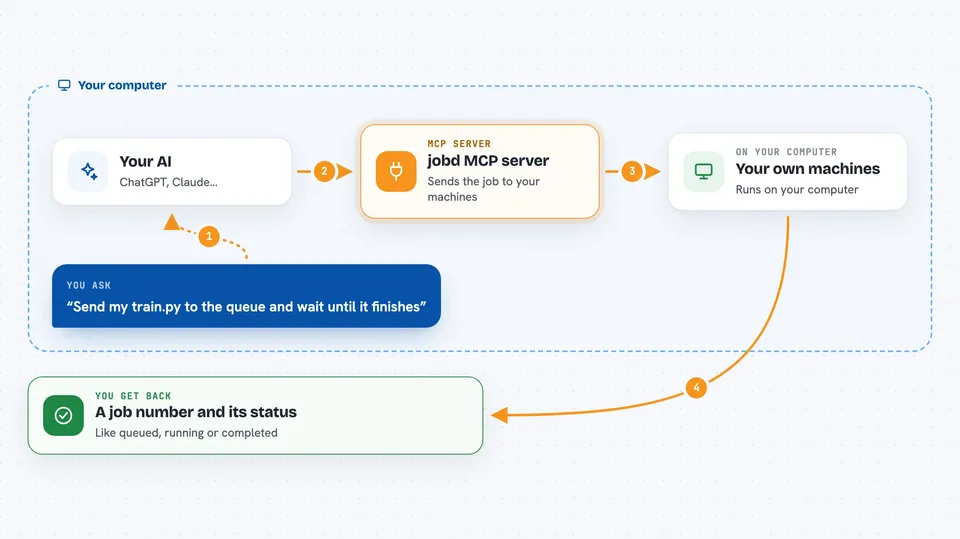
jobd is a small helper you run on your own computers to line up long-running jobs, like training runs or big data tasks, and send each one to whichever machine has room. It comes with an MCP server, so your AI assistant can add jobs, watch them, and stop them for you. It is handy if you have a couple of machines with graphics cards and no big cloud setup.
What is an MCP server? The 30-second version
On its own, your AI can only chat. An MCP server is a small helper program that gives your AI a new skill or a connection to an app or service. This one connects your AI to jobd, your own job queue across your machines, so the AI can send work there and check on it when you ask. You still run jobd yourself on hardware you own.
What this MCP server does
You tell your AI what you want to run, for example a training script that needs 16 GB of graphics memory. The AI uses this helper to hand that request to the jobd broker, the part that keeps the queue. The broker looks at which of your machines has enough free memory right now and sends the job there. The job keeps running even if you close your laptop, and the AI can later ask for its status or its output. When you ask, the AI can also stop a job or move a more important one ahead.
 Click to zoom
What you can do with it
- Send a long job to your own machines and let it pick the one with enough free GPU memory
- Check the status of a job or a whole batch of jobs
- Read the output a job has produced so far
- Stop a job or let a higher-priority job take its place
- See which of your machines are online and how much room they have
- Run the same job many times with different settings in one go
Try asking your AI
- “Send my train.py script to the queue and wait until it finishes”
- “Which machines are free right now and how much GPU memory do they have?”
- “Show me the last part of the output from job 42”
- “Cancel the job I started an hour ago”
What it gives back to you
You get answers in the chat: a job number when something is sent, a short status line like queued, running, completed or preempted, and the text your job printed. For a batch, you get a small tally of how each member ended. If you ask about your machines, you get a list with their free memory and whether they are healthy.
Before you start
What you need
- Python 3.11 or newer on the machine that runs jobd
- The jobd package installed, with the MCP part added
- A jobd broker running and at least one worker machine connected to it
- For GPU routing, machines with NVIDIA cards and the nvidia-ml-py helper installed
Good to know
This helper can start, stop and take over jobs on your own machines, so only connect it to a broker you control and be careful with jobs that write or delete files.
Install it with your AI
Add jobd MCP server to your AI, no technical skills needed
You don't install anything by hand. You copy one prompt, paste it into an AI that can work on your computer, and it checks, installs and connects the server for you, asking you when it needs something.
Sign in to get the install prompt
Members get a ready-made prompt that lets the Claude desktop app check jobd MCP server, install it and connect it for them, step by step. You don't need any technical skills: you copy, paste and answer a few questions. Your connected AI can also find and install any of the 4,609 MCP servers here for you.
Who it's for
People with a small home or office setup of two to five machines with GPUs who run long jobs and want their AI assistant to manage the queue.