
MCP server · Developer tools
Octocode MCP server
by Muvon
Lets your AI search and understand your codebase by meaning, not just keywords.
Octocode is a small helper that gives your AI assistant a map of your code. Instead of guessing, your AI can look through your project files, see how they connect, and answer questions about your code in plain language. It is handy if you work with code and want your AI to actually understand your project.
What is an MCP server? The 30-second version
On its own, your AI can only chat with you. It cannot see your files or your project. An MCP server is a small helper program that gives your AI a new skill or a connection to something, here to your codebase. Once Octocode is connected, your AI can search your code, follow how files depend on each other, and answer questions about your project when you ask.
What this MCP server does
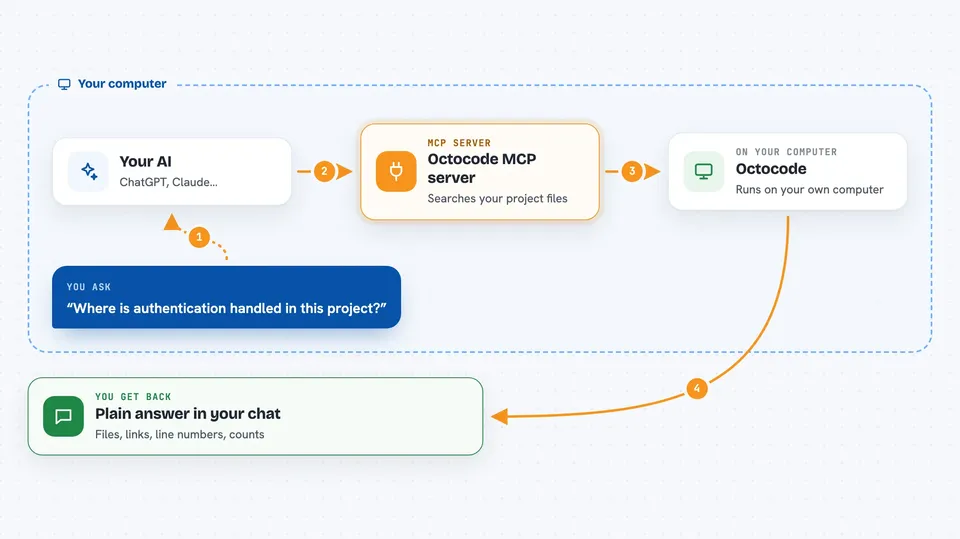
You ask your AI a question about your code, like where something is handled. The AI sends that question to Octocode, which looks through your project files. Octocode finds the right files and figures out how they connect, like which file imports which. Then it sends the answer back, and your AI explains it to you in the chat.
 Click to zoom
What you can do with it
- Search your code by meaning, not exact words
- See how files import and call each other
- View a file's structure without reading the whole thing
- Find all places a function is used
- Jump to where something is defined
- Find patterns like every unwrap or new call
- Search your commit history for changes
Try asking your AI
- “Where is authentication handled in this project?”
- “What files depend on the payment module?”
- “Show me all error handling in the API layer”
- “Find every call site of this function”
What it gives back to you
You get answers in plain language in your chat. The AI might list files, show how they connect, or point to specific lines. Sometimes it shows a short summary of a file's structure, like its functions and imports. It can also tell you numbers, like how many places something is used.
Before you start
What you need
- The Octocode program installed on your computer
- Your project folder on the same computer
- An MCP-compatible AI app like Claude Desktop, Cursor, or Windsurf
Good to know
It reads your project files, so make sure you are okay with your AI seeing that code.
Install it with your AI
Add Octocode MCP server to your AI, no technical skills needed
You don't install anything by hand. You copy one prompt, paste it into an AI that can work on your computer, and it checks, installs and connects the server for you, asking you when it needs something.
Sign in to get the install prompt
Members get a ready-made prompt that lets the Claude desktop app check Octocode MCP server, install it and connect it for them, step by step. You don't need any technical skills: you copy, paste and answer a few questions. Your connected AI can also find and install any of the 4,609 MCP servers here for you.
Who it's for
Developers and anyone who works with code and wants their AI assistant to understand their project.




