
MCP server · Developer tools
RulesetMCP server
by n8daniels
Lets your AI read your project's own rule files so it follows your standards every time.
RulesetMCP is a small helper that keeps your AI grounded in your project's rules. Instead of repeating things like "use UPPER-CASE for SQL keywords" in every new chat, you write those rules down once in files, and the AI looks them up when it needs them. It is handy for anyone who keeps correcting the AI about the same conventions over and over.
What is an MCP server? The 30-second version
On its own, your AI can only chat with you. An MCP server is a small helper program that gives your AI a new skill or a connection to something else. This one connects your AI to your own rule files, so when you ask it to write or check something, it can look up your rules first and follow them.
What this MCP server does
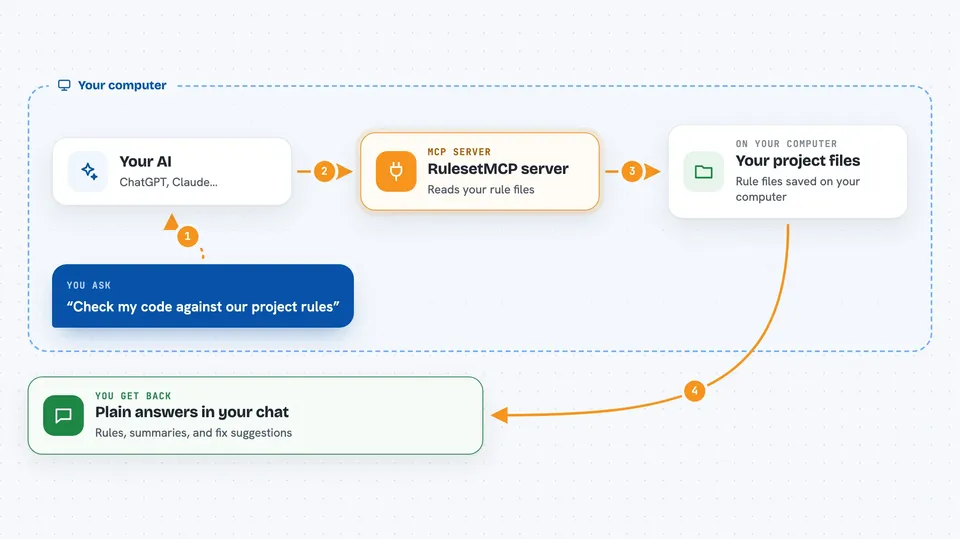
You write your standards in plain files inside your project, things like naming rules, SQL formatting, or security habits. RulesetMCP reads those files and hands them to your AI when asked. When you give the AI a task, it can pull the rules that match that area, summarize them for the job, or check a piece of code against them. You get answers and suggestions that already match how your team works, instead of generic advice.
 Click to zoom
What you can do with it
- List the projects and rule sets you have set up
- Look up rules by area, tag, or how strict they are
- Get a short summary of the rules that matter for a specific task
- Check a piece of code, SQL, or config against your rules and get fix suggestions
- Reload your rules after you edit the files, without restarting anything
Try asking your AI
- “Refactor this SQL stored procedure to pull more data from the users table”
- “Check this function against our project rules and tell me what to fix”
- “What are the rules I should keep in mind before I add a new API endpoint”
- “Summarize the security rules for this project before I write the login code”
What it gives back to you
You get answers in the chat, written in plain words. It can return a list of rules, a short summary of the ones that fit your task, or a check result that points out what does not match and how to fix it. It does not change your files by itself; it just tells you and your AI what the rules say.
Before you start
What you need
- Node.js installed on your computer (the free program that runs this kind of tool)
- A config file that points to your project folders and where your rule files live
- Rule files written in Markdown or YAML inside your project
- An MCP-compatible AI app, such as Claude Desktop or Claude Code
Good to know
It only reads your rule files, so it will not change or delete anything, but the rules it hands to your AI are only as good as the files you write.
Install it with your AI
Add RulesetMCP server to your AI, no technical skills needed
You don't install anything by hand. You copy one prompt, paste it into an AI that can work on your computer, and it checks, installs and connects the server for you, asking you when it needs something.
Sign in to get the install prompt
Members get a ready-made prompt that lets the Claude desktop app check RulesetMCP server, install it and connect it for them, step by step. You don't need any technical skills: you copy, paste and answer a few questions. Your connected AI can also find and install any of the 4,361 MCP servers here for you.
Who it's for
Developers and teams who keep repeating the same coding standards to their AI and want those standards written down once and followed automatically.





