
MCP server · Notes
MemHeaven MCP server
by nazar256
Give your AI a searchable long-term memory you host yourself, so it remembers context across chats.
MemHeaven is a memory server you set up in your own Cloudflare account. It lets cloud AI tools like ChatGPT remember things across separate chats, and lets you look at, search, and delete what is stored. It is handy for people who want their AI to keep project context and preferences without relying only on the memory built into the AI app.
What is an MCP server? The 30-second version
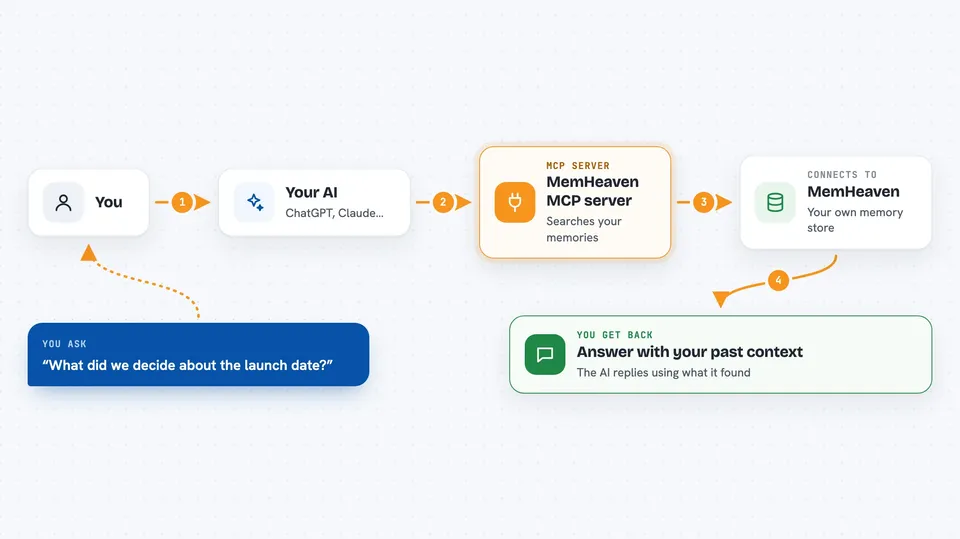
On its own, your AI can only chat with what is in front of it. An MCP server is a small helper program that gives your AI a new skill or a connection to something outside the chat. Here, that helper is MemHeaven, a memory service running on your own Cloudflare account. When you ask your AI about earlier context, it calls this helper, which looks up what you saved before and brings it back into the conversation.
What this MCP server does
You ask your AI something that needs earlier context, like a project decision or a preference. The AI calls MemHeaven through its MCP connection. MemHeaven searches the memory records stored in your Cloudflare account and finds the relevant pieces. It sends those pieces back to the AI, which then answers you using that context. When you want to save something, the AI writes it into MemHeaven so it is there next time.
 Click to zoom
What you can do with it
- Save durable facts, decisions, and preferences as plain text notes
- Search your saved memory by meaning, not just exact words
- Start a chat with a short summary of relevant past context
- Check for duplicates before saving a new memory
- Read and update notes you saved earlier
- Delete memory records you no longer want
- Track facts over time in a simple knowledge graph
What it gives back to you
You get answers in the chat that include the relevant memory the AI found. When you save something, the AI usually confirms it was stored. When you search, you may see a short list of matching notes with brief details. You can also ask for status or counts, and the AI will show those numbers.
Before you start
What you need
- A Cloudflare account (the free plan is enough for personal use)
- Node.js and npm installed on your computer
- A hosted AI client that supports remote MCP, such as ChatGPT
Good to know
This server can store, change, and delete your memory records, so be careful about what you ask it to save and check before deleting anything.
Install it with your AI
Add MemHeaven MCP server to your AI, no technical skills needed
You don't install anything by hand. You copy one prompt, paste it into an AI that can work on your computer, and it checks, installs and connects the server for you, asking you when it needs something.
Sign in to get the install prompt
Members get a ready-made prompt that lets the Claude desktop app check MemHeaven MCP server, install it and connect it for them, step by step. You don't need any technical skills: you copy, paste and answer a few questions. Your connected AI can also find and install any of the 4,066 MCP servers here for you.
Who it's for
People who use cloud AI tools daily and want their AI to remember project context across chats without giving up control of that memory.




