
MCP server · Developer tools
Woodpecker CI MCP server
by ni-c
Lets your AI check failing Woodpecker pipelines, read the broken step's log, and restart or cancel them for you.
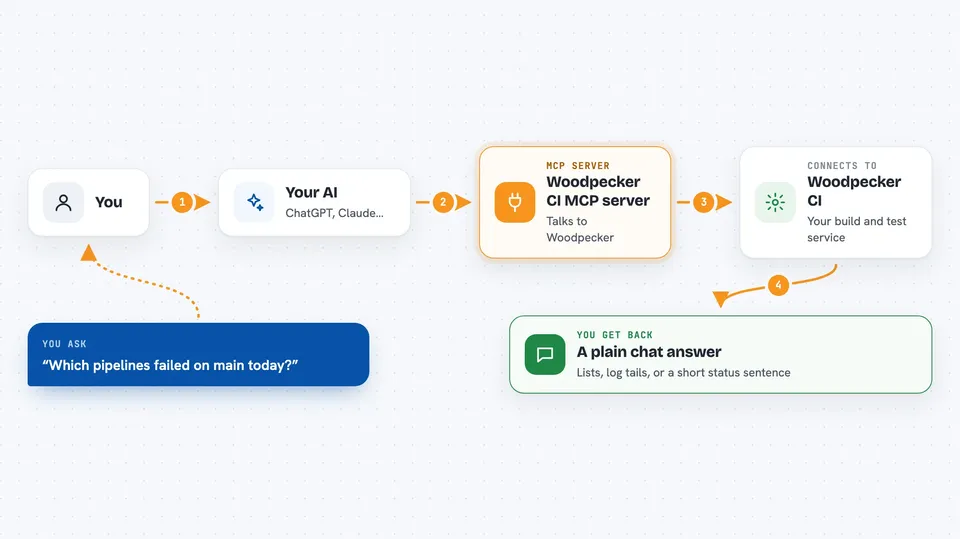
This is a helper that connects your AI assistant to Woodpecker CI, the tool that runs your build and test pipelines. Once it is set up, you can ask your AI in plain words what failed and it will go look. It is handy for anyone who watches a Woodpecker setup and is tired of clicking through the web page.
What is an MCP server? The 30-second version
On its own, your AI can only chat with you. An MCP server is a small helper program that gives your AI a new skill or a connection to an app. This one connects your AI to your Woodpecker CI server, so it can look things up there and do things for you when you ask. You install it once, and after that your AI can talk to Woodpecker on your behalf.
What this MCP server does
You ask your AI something like which pipelines failed today. Your AI uses this helper, and the helper talks to your Woodpecker server using your account. Woodpecker sends back the list, and your AI reads it and tells you in the chat. If you then ask it to read the log of the step that broke, the helper fetches that log, tidies it up, and shows the end of it where the error usually is. You can also ask it to restart, cancel or approve a pipeline, and the helper carries that out.
 Click to zoom
What you can do with it
- List your repositories and see which ones are active in Woodpecker
- Show recent pipelines with their branch, event and status
- Read the log of a step that failed, with its exit code
- Restart a pipeline at the same commit
- Cancel a pipeline that is running or waiting
- Approve a pipeline that is blocked waiting for a person
- List and manage secrets, registries and scheduled crons
Try asking your AI
- “Which pipelines failed on the main branch today?”
- “Show me the log of the step that broke in pipeline 42”
- “Restart the last pipeline on the release branch”
- “Cancel the pipeline that has been running for an hour”
- “What is waiting in the queue right now?”
What it gives back to you
You get answers in plain chat text: lists of repositories or pipelines, the tail of a build log with the exit code, or a short sentence like Pipeline 12 was cancelled. Alongside the text, the helper also sends the same facts as structured fields, so your AI can use them without guessing. For logs, you see the end of the output first, because that is where a failing step usually explains itself.
Before you start
What you need
- Node.js version 22 or newer
- A Woodpecker personal access token from your user settings, under CLI and API
- The root address of your Woodpecker server, for example https://woodpecker.example.com
- An MCP client like Claude Code, Claude Desktop or Codex
Good to know
It can change and delete things in your CI, including pipelines, secrets and repositories, and your token carries the full authority of your account, so consider setting WOODPECKER_READ_ONLY=true or narrowing the tools if you only want it to look.
Install it with your AI
Add Woodpecker CI MCP server to your AI, no technical skills needed
You don't install anything by hand. You copy one prompt, paste it into an AI that can work on your computer, and it checks, installs and connects the server for you, asking you when it needs something.
Sign in to get the install prompt
Members get a ready-made prompt that lets the Claude desktop app check Woodpecker CI MCP server, install it and connect it for them, step by step. You don't need any technical skills: you copy, paste and answer a few questions. Your connected AI can also find and install any of the 4,609 MCP servers here for you.
Who it's for
Developers, release engineers and anyone who keeps a self-hosted Woodpecker CI running and wants to check or fix pipelines without leaving their AI chat.



