
MCP server · Research · official
Octagon Deep Research MCP server
by OctagonAI · official
Lets your AI run deep research on any topic and hand you back a full written report.
This is a helper that plugs into your AI chat and gives it a research assistant. You type a question, and instead of a quick answer, it digs through many sources and writes up a proper report. It is handy for anyone who has to look into a topic and write something about it.
What is an MCP server? The 30-second version
On its own, your AI can only chat with you using what it already knows. An MCP server is a small helper program that gives your AI a new skill or a connection to another service. This one connects your AI to Octagon's deep research service. So when you ask a research question, your AI can send it off, wait for the findings, and bring the answer back into your chat.
What this MCP server does
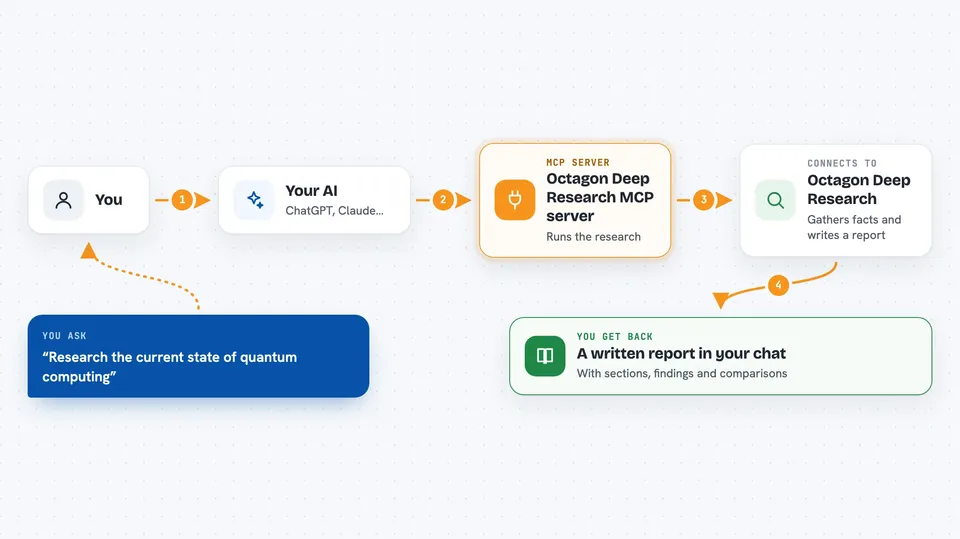
You ask your AI a research question in plain words. Your AI passes that question to this helper, which sends it to Octagon's deep research service. Octagon gathers information from many sources, checks the facts against each other, and puts together a written report. Your AI then shows you that report right in the chat. You can ask follow-up questions and run as many research tasks as you like.
 Click to zoom
What you can do with it
- Research any topic and get a written report back
- Compare companies or technologies side by side
- Look into recent developments in a field
- Check facts across several sources
- Explore policy or regulatory changes
- Get a summary of a market or industry
- Run many research tasks without hitting a limit
Try asking your AI
- “Research the current state of quantum computing and where it is being used commercially”
- “Compare the main large language models and how they differ”
- “Look into recent breakthroughs in Alzheimer's treatment over the last three years”
- “Analyze how different countries are regulating AI right now”
What it gives back to you
You get a written research report in your chat, usually with sections and findings. It pulls together information from several sources and cross-checks the numbers. The report can cover trends, comparisons, and background. You can then ask your AI to shorten it, expand a part, or turn it into a summary for your team.
Before you start
What you need
- An Octagon account (free to sign up)
- An Octagon API key from your account page (a kind of password for apps)
- Node.js installed on your computer, which includes npx
Good to know
Each research request uses your Octagon account, so check whether your plan charges per query before running a lot of them.
Install it with your AI
Add Octagon Deep Research MCP server to your AI, no technical skills needed
You don't install anything by hand. You copy one prompt, paste it into an AI that can work on your computer, and it checks, installs and connects the server for you, asking you when it needs something.
Sign in to get the install prompt
Members get a ready-made prompt that lets the Claude desktop app check Octagon Deep Research MCP server, install it and connect it for them, step by step. You don't need any technical skills: you copy, paste and answer a few questions. Your connected AI can also find and install any of the 4,361 MCP servers here for you.
Who it's for
Anyone who has to research a topic and write it up, like analysts, students, writers, consultants, and product or marketing teams.


