MCP server · Developer tools
Rhizome MCP server
by Odrin
Lets your AI keep a shared, crash-safe to-do list for a coding project, so work survives when a session dies.
Rhizome MCP is a helper that gives your AI a proper task list for a coding project, stored in a small local database on your own machine. It is handy when you have several AI coding sessions working on the same project over time, or when a session gets cut off halfway through a job. Instead of losing track of what was being done, the next session can pick up where the last one stopped.
What is an MCP server? The 30-second version
On its own, your AI can only chat with you. It cannot remember a project's to-do list between sessions, and it cannot safely share one with another AI session. An MCP server is a small helper program that gives your AI a new skill or a connection to something. Rhizome MCP is that helper here: it runs quietly on your computer and gives your AI a shared task list for your project, so it can look up, claim, and update work for you when you ask.
What this MCP server does
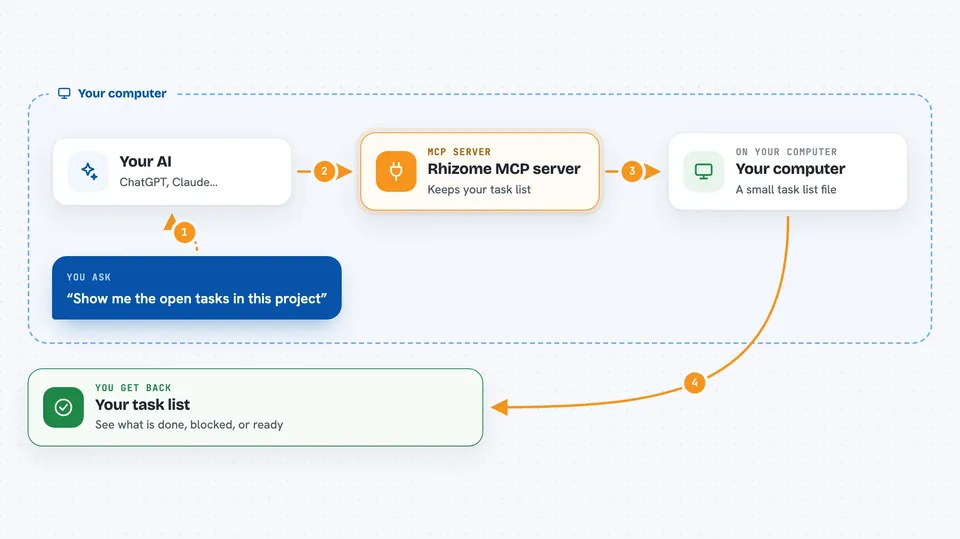
You ask your AI to work on your project. The AI talks to this helper, which keeps a task list in a small database file on your machine. The helper lets the AI claim a task, and that claim comes with an expiry time, so if the AI stops or crashes, the task frees itself and another session can take it. The AI can also save a short note about where it got to, record decisions, and mark tasks as done. When you ask, the AI can show you what is claimed, what is blocked, and what is waiting for review.
 Click to zoom
What you can do with it
- Create and track tasks for a coding project
- Claim a task so two AI sessions do not grab the same one
- Save a checkpoint note so another session can resume the work
- Record decisions and search past notes
- See which tasks are blocked and by what
- Request a review of a finished task
- Print a status board of the whole project
Try asking your AI
- “Show me the open tasks in this project and which ones are ready to start”
- “Claim the next ready task and tell me what it involves”
- “Save a checkpoint on this task with what is done and what is next”
- “List the tasks that are blocked and explain why”
What it gives back to you
You get back plain answers in the chat: lists of tasks, their status, who or what has claimed them, and any blockers. It can also give you short summaries, saved notes, and search results from earlier work. If you ask for a board, it can print a table or write a self-contained HTML page you can open in a browser.
Before you start
What you need
- A coding project folder on your computer
- An MCP-compatible AI client, such as Claude Code, Codex, GitHub Copilot, or VS Code
- Node.js if you want to try it with npx without installing anything else
Good to know
It keeps its own task database on your machine and can change or close tasks, so it is worth checking what it did before trusting the list.
Install it with your AI
Add Rhizome MCP server to your AI, no technical skills needed
You don't install anything by hand. You copy one prompt, paste it into an AI that can work on your computer, and it checks, installs and connects the server for you, asking you when it needs something.
Sign in to get the install prompt
Members get a ready-made prompt that lets the Claude desktop app check Rhizome MCP server, install it and connect it for them, step by step. You don't need any technical skills: you copy, paste and answer a few questions. Your connected AI can also find and install any of the 4,361 MCP servers here for you.
Who it's for
Developers and anyone who runs AI coding sessions on a project and wants the work to survive crashes, handoffs, and context limits.