MCP server · Productivity
Taskmaster MCP server
by eyaltoledano
Turn a project description into a clear task list your AI can plan, expand and track for you.

Taskmaster is a helper that keeps a to-do list for your project and lets your AI assistant work with it. You describe what you want to build, and it turns that into numbered tasks you can plan, expand and tick off. It is handy for anyone juggling a project with many steps, even if you are not a programmer.
What is an MCP server? The 30-second version
On its own, your AI can only chat. It cannot remember a task list or keep track of what is done. An MCP server is a small helper program that gives your AI a new skill. This one connects your AI to Taskmaster, a task manager that lives in your project folder, so the AI can add, read and update tasks for you when you ask.
What this MCP server does
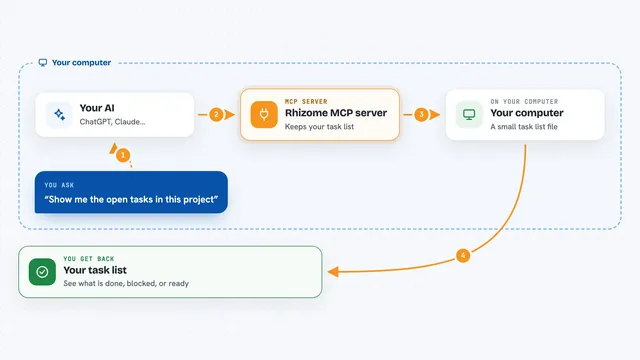
You tell your AI what you want to build, or you point it at a written project description. The AI passes that to Taskmaster through this helper. Taskmaster breaks the description into numbered tasks and saves them in your project. Later you can ask your AI what to do next, and it reads the list back and tells you. When you finish something, you ask the AI to mark it done, and Taskmaster updates the list.
 Click to zoom
What you can do with it
- Turn a written project description into a numbered task list
- Ask what the next task is and get a clear answer
- Expand a vague task into smaller, clearer steps
- Mark tasks as done, in progress or blocked
- Show one task or several tasks at once
- Add your own task in plain words
- Look up fresh information for a task using research
Try asking your AI
- “Initialize taskmaster-ai in my project”
- “Can you parse my PRD at scripts/prd.txt?”
- “What's the next task I should work on?”
- “Can you help me expand task 4?”
What it gives back to you
You get back a clear list of tasks with numbers, titles and short descriptions. When you ask for the next task, you get one task with its details. When you mark something done, you get a short confirmation that the list was updated. Some answers also include a small summary of how many tasks are left.
Before you start
What you need
- Node.js installed on your computer
- At least one API key from an AI provider, or the Claude Code CLI
- The MCP config file for your editor (Cursor, Windsurf, VS Code or Q CLI)
Good to know
It can add, change and delete tasks in your project, so check the list before letting it remove things.
Install it with your AI
Add Taskmaster MCP server to your AI, no technical skills needed
You don't install anything by hand. You copy one prompt, paste it into an AI that can work on your computer, and it checks, installs and connects the server for you, asking you when it needs something.
Sign in to get the install prompt
Members get a ready-made prompt that lets the Claude desktop app check Taskmaster MCP server, install it and connect it for them, step by step. You don't need any technical skills: you copy, paste and answer a few questions. Your connected AI can also find and install any of the 4,361 MCP servers here for you.
Who it's for
People running a project with many steps, like product managers, founders and developers who want their AI to keep the plan straight.