MCP server · Research
Web Scraper MCP server
by ofershap
Let your AI read any web page and hand you back clean text, links, and page details.
This is a small helper that lets your AI assistant read web pages for you. You give it a link, and it pulls out the actual article or documentation text instead of the menus and ads. It is handy for anyone who keeps copying and pasting pages into their chat.
What is an MCP server? The 30-second version
On its own, your AI can only chat with what it already knows or what you paste in. An MCP server is a little helper program that gives your AI a new skill, and this one gives it the skill of reading web pages. Once it is connected, you can just say "read this page and summarize it" and the AI will go fetch it for you. No accounts, no passwords, no setup beyond adding it once.
What this MCP server does
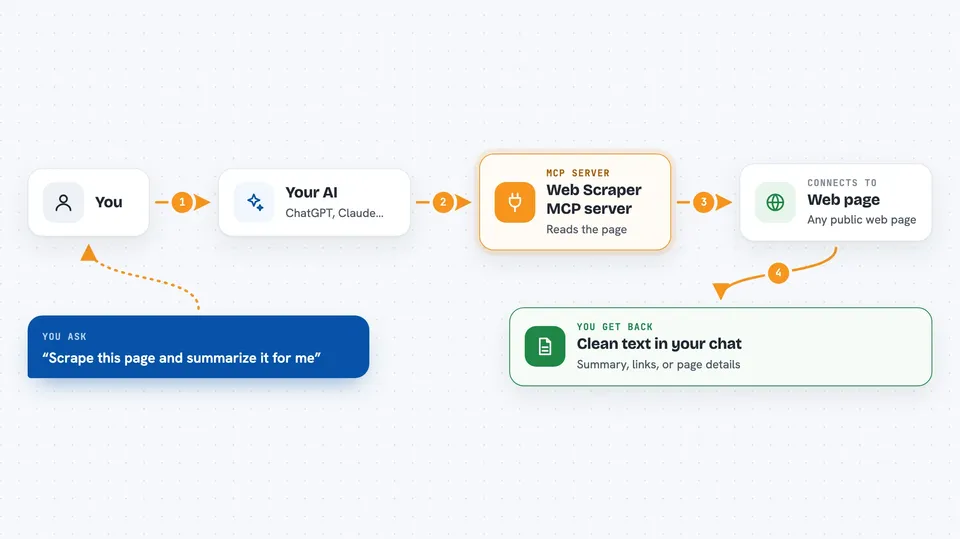
You ask your AI something like "scrape this docs page and summarize it." The AI passes the link to this helper. The helper downloads the page, strips out the clutter, and keeps the main readable content. It hands that back to your AI, which then answers you in the chat. You can also ask it for just the links, just the page details, or a batch of several pages at once.
 Click to zoom
What you can do with it
- Read a web page and turn it into clean, readable text
- Summarize a documentation page or blog post for you
- List every link on a page with its link text
- Show a page's title, description, and preview image
- Search inside a page for a word or phrase
- Scrape several URLs at once and give you a short summary of each
Try asking your AI
- “Scrape the API docs from https://docs.example.com and summarize them”
- “Extract all links from this page”
- “What's the preview image and description for this URL?”
- “Search this page for mentions of authentication”
- “Scrape these 5 URLs and give me a summary of each”
What it gives back to you
You get the page content back as clean text, right in the chat. Depending on what you asked, it might be a summary, a list of links, a set of page details like title and description, or matching lines from a search. For batches, you get a short title and excerpt for each URL. It only reads pages, it does not change anything on them.
Before you start
What you need
- Node.js installed on your computer (the free program that runs npx)
- An MCP client like Claude Desktop, Cursor, or VS Code Copilot
Good to know
It only reads public pages and cannot handle sites that load their content with JavaScript, so some modern web apps will come back empty.
Install it with your AI
Add Web Scraper MCP server to your AI, no technical skills needed
You don't install anything by hand. You copy one prompt, paste it into an AI that can work on your computer, and it checks, installs and connects the server for you, asking you when it needs something.
Sign in to get the install prompt
Members get a ready-made prompt that lets the Claude desktop app check Web Scraper MCP server, install it and connect it for them, step by step. You don't need any technical skills: you copy, paste and answer a few questions. Your connected AI can also find and install any of the 4,609 MCP servers here for you.
Who it's for
Anyone who reads a lot of docs, blogs, or articles and wants their AI to do the reading and summarizing.