
MCP server · Productivity
ProductPlan MCP server
by olgasafonova
Ask your AI about your ProductPlan roadmaps, OKRs, ideas and launches, and make changes by chatting.
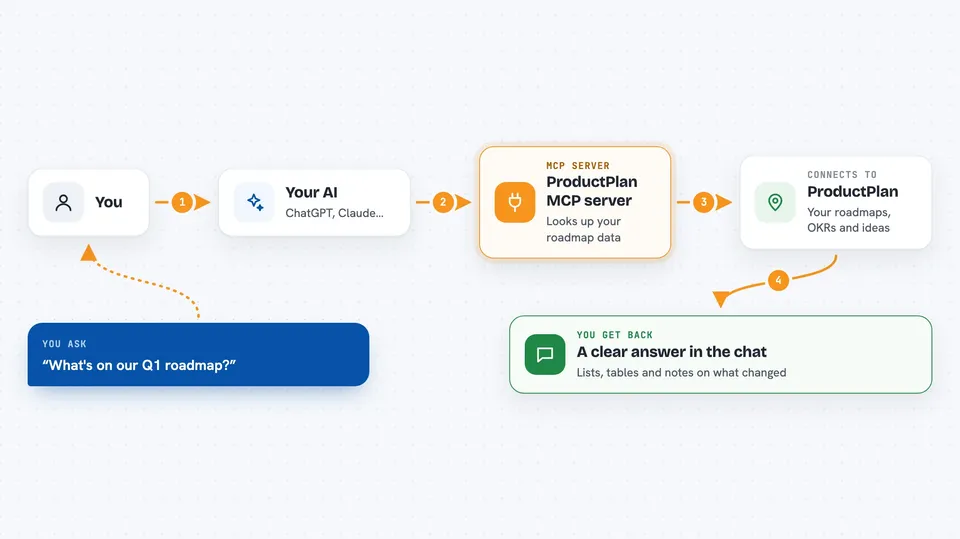
This is a small helper program that connects your AI assistant to ProductPlan. Once it is set up, you can ask questions about your roadmaps, OKRs, ideas and launches in plain language instead of clicking around. It is handy for product managers, team leads, and anyone who lives in ProductPlan all day.
What is an MCP server? The 30-second version
On its own, your AI can only chat with you. An MCP server is a small helper program that gives your AI a new skill or a connection to an app, and here that app is ProductPlan. You install the helper on your own computer, give it your ProductPlan token, and from then on your AI can look things up in ProductPlan or make changes there when you ask. Your token stays on your machine, it is not sent to any third party.
What this MCP server does
You ask your AI a question in normal words, like what is on your Q1 roadmap. Your AI passes that request to this helper program running quietly on your computer. The helper talks to ProductPlan using your API token and fetches the real data. It sends the results back to your AI, which turns them into a readable answer in the chat. If you ask for a change, like moving bars or creating an idea, the helper makes that change in ProductPlan for you.
 Click to zoom
What you can do with it
- List your roadmaps and the bars on each one
- Check OKR progress and see which objectives are behind
- Create and update ideas in Discovery, with tags and priorities
- Look up launches and see which tasks are still open
- Edit many bars at once, up to 100 in a single call
- Assign legend colors to bars by name
- Filter bars by name, dates, lane, legend or tag
Try asking your AI
- “What's on our Q1 roadmap?”
- “Show me all objectives that are behind schedule”
- “Create a new idea for mobile app improvements”
- “What launches are coming up this month?”
- “List all ideas tagged customer-request”
What it gives back to you
You get answers in the chat, in normal sentences and tables, not raw data. For example, a list of bars with their dates, a summary of OKR progress, or a note that an idea was created. When you make changes, the helper tells you what it changed. You can also ask for a dry run first, so you see what would happen before anything is written.
Before you start
What you need
- A ProductPlan account with access to the roadmaps you want to see
- Your ProductPlan API token, from Settings then API in ProductPlan
- An AI assistant that supports MCP, like Claude Desktop, Claude Code, Cursor, or VS Code with Cline or Continue
- The ProductPlan MCP helper file downloaded from the Releases page for your computer
Good to know
It can create, edit and delete things in ProductPlan, including bulk changes to up to 100 bars at once, so ask for a dry run first when you are not sure.
Install it with your AI
Add ProductPlan MCP server to your AI, no technical skills needed
You don't install anything by hand. You copy one prompt, paste it into an AI that can work on your computer, and it checks, installs and connects the server for you, asking you when it needs something.
Sign in to get the install prompt
Members get a ready-made prompt that lets the Claude desktop app check ProductPlan MCP server, install it and connect it for them, step by step. You don't need any technical skills: you copy, paste and answer a few questions. Your connected AI can also find and install any of the 4,609 MCP servers here for you.
Who it's for
Product managers, team leads, and anyone who uses ProductPlan and wants quick answers without clicking through the interface.





