
MCP server · Developer tools
Token Optimizer MCP server
by ooples
Helps your AI use fewer tokens by caching, compressing, and remembering what it already worked out.
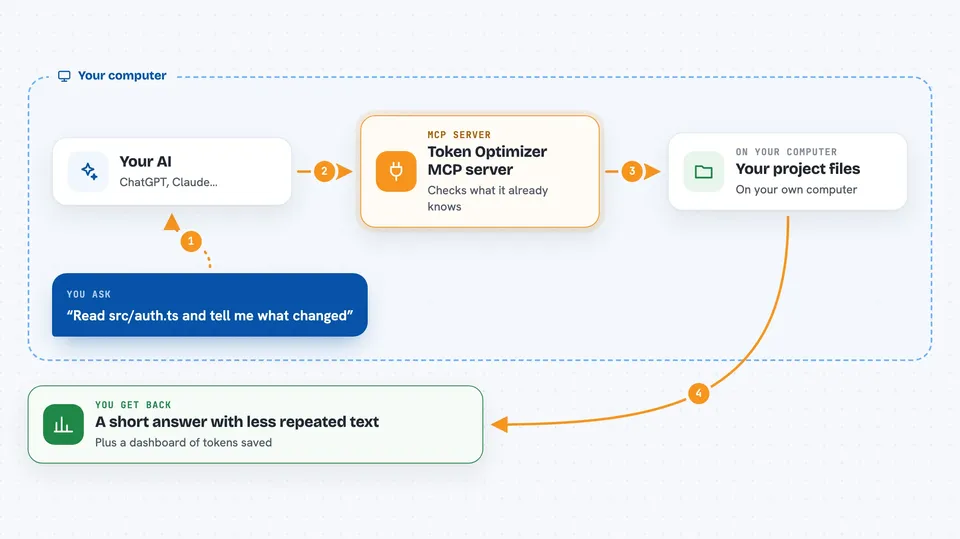
Token Optimizer is a helper that sits between your AI assistant and the work it does, so it stops paying again and again for things it already read or figured out. It is handy for anyone who runs long coding or research sessions and watches the cost or the context window fill up. You install it once and it quietly does its job in the background.
What is an MCP server? The 30-second version
On its own, your AI can only chat with what you paste in or what it can see in the current conversation. An MCP server is a small helper program that gives your AI a new skill or a connection to something outside the chat. This one connects your AI to a local token-saving layer that watches what it reads and remembers what it learned. So when you ask your AI to look at a file or search your project, the helper steps in and hands back a smaller, smarter answer.
What this MCP server does
When you ask your AI to read a file, search your project, or edit code, the request goes through this helper instead of straight to the file. The helper keeps a local record of what has already been read and what conclusions were reached, so it can send back only the part that changed or the answer itself. It also compresses large chunks of text before they reach the model, aiming to lower your bill rather than just shrink the byte count. Over a session, it builds a small map of your project's files, symbols, and findings, and reuses that map the next time your AI touches the same area. You see the results in your chat as usual, just with less repeated material and often fewer back-and-forth steps.
 Click to zoom
What you can do with it
- Read a file and get back only the part that changed since last time
- Search your project without dumping entire files into the chat
- Remember findings and decisions from earlier sessions so your AI does not re-derive them
- Compress large text before it reaches the model to lower token cost
- Show a dashboard of how many tokens were avoided and by which client
- Run a token audit that ranks what is costing you the most per session
- Attribute usage separately for different AI clients like Claude Code, Codex, or Gemini
Try asking your AI
- “Read src/auth.ts and tell me what changed since we last looked at it”
- “Search the project for where the retry logic lives, but keep the output small”
- “Run a token audit and show me the top things costing me tokens this week”
- “What did we decide last session about the token expiry fix?”
What it gives back to you
You get back the same kind of answers you would normally get from your AI, but with less repeated text and often fewer steps. File reads come back as diffs or short summaries, searches come back as focused results instead of whole files, and past findings show up as short notes. If you open the dashboard, you also see numbers: tokens avoided, tokens still used, and which client spent them.
Before you start
What you need
- Node.js installed on your computer
- Claude Code or another supported AI client
- The plugin installed (not just the bare server) if you want the enforcement to actually happen
Good to know
It can block or change how your AI reads, searches, and edits files, so if something looks missing or refused, that is the optimizer stepping in rather than a bug.
Install it with your AI
Add Token Optimizer MCP server to your AI, no technical skills needed
You don't install anything by hand. You copy one prompt, paste it into an AI that can work on your computer, and it checks, installs and connects the server for you, asking you when it needs something.
Sign in to get the install prompt
Members get a ready-made prompt that lets the Claude desktop app check Token Optimizer MCP server, install it and connect it for them, step by step. You don't need any technical skills: you copy, paste and answer a few questions. Your connected AI can also find and install any of the 4,609 MCP servers here for you.
Who it's for
Developers, technical writers, and anyone who runs long AI coding or research sessions and cares about token cost or context limits.



