
MCP server · Research
Zotero MCP server (zotio)
by OrgMentem
Lets your AI read and safely update your Zotero library, check for retracted papers, and keep notes in sync.
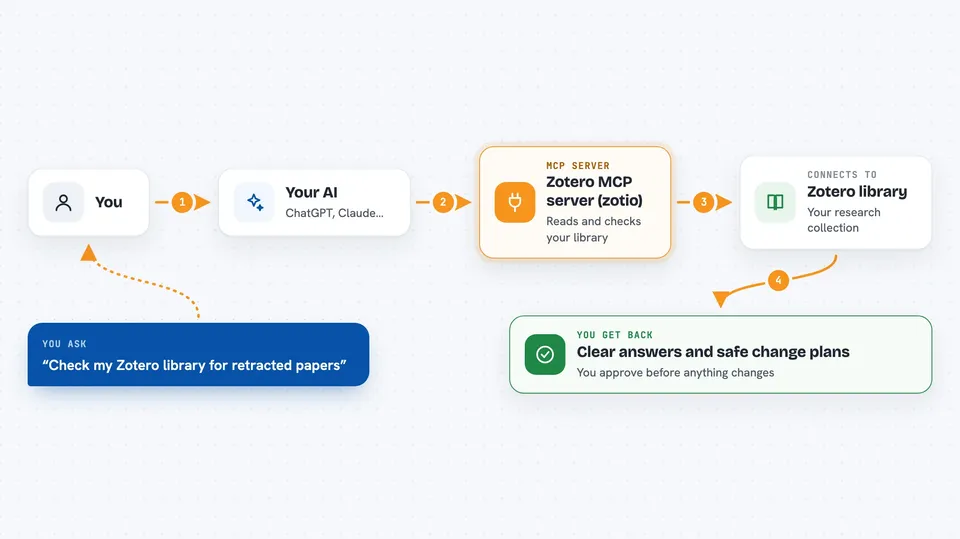
zotio is a helper that connects your AI assistant to your Zotero reference library. It reads your library from your own computer, and when it changes something it shows you a plan first. It is handy if you collect papers, write with citations, or keep research notes in Obsidian or Logseq.
What is an MCP server? The 30-second version
On its own, your AI can only chat with you. An MCP server is a small helper program that gives your AI a new skill or a connection to an app, and here that app is Zotero. Once this helper is connected, your AI can look things up in your Zotero library and make careful changes for you when you ask. You stay in charge: the helper shows a preview before anything is changed.
What this MCP server does
You ask your AI something about your Zotero library, like whether a paper is retracted or which items are missing PDFs. The AI passes your request to this helper. The helper reads your library from your own computer, or talks to Zotero's online service when a change is needed. It sends back a clear answer or a plan of changes for you to approve. Nothing is changed until you say yes.
 Click to zoom
What you can do with it
- Check whether papers in your library have been retracted or corrected
- Find duplicate items and missing details like titles or abstracts
- Preview and apply safe edits, tag changes, or moves in your library
- Import a folder of PDFs after you review a list first
- Keep an Obsidian or Logseq vault in sync with Zotero notes
- Run a health check on your library before you submit a paper
Try asking your AI
- “Check my Zotero library for retracted papers”
- “Are there duplicate items in my library? Show me a plan to fix them”
- “Which items are missing a PDF or a proper title?”
- “Sync my Obsidian vault with my Zotero library and tell me about any conflicts”
What it gives back to you
You get back clear answers in the chat: lists of items, short summaries, health reports, and plans of changes. When a change is applied, you see what was changed and can undo reversible ones. It also tells you where the information came from and how fresh it is.
Before you start
What you need
- The Zotero desktop app running on your computer (for reading your library)
- A Zotero Web API key if you want the AI to make changes (Zotero gives you one for free in your account settings)
- The zotio program installed (you can install it with Homebrew or download a ready-to-run file)
Good to know
It can change or delete items in your Zotero library, but it always shows a preview first and needs your explicit approval before applying changes.
Install it with your AI
Add Zotero MCP server (zotio) to your AI, no technical skills needed
You don't install anything by hand. You copy one prompt, paste it into an AI that can work on your computer, and it checks, installs and connects the server for you, asking you when it needs something.
Sign in to get the install prompt
Members get a ready-made prompt that lets the Claude desktop app check Zotero MCP server (zotio), install it and connect it for them, step by step. You don't need any technical skills: you copy, paste and answer a few questions. Your connected AI can also find and install any of the 4,361 MCP servers here for you.
Who it's for
Researchers, students, writers, and anyone who keeps a Zotero library and wants an AI to help check, clean, and update it safely.





