
MCP server · Developer tools
HookSense MCP server
by ozers
Lets your AI create a callback web address and wait for a result to arrive there instead of checking over and over.
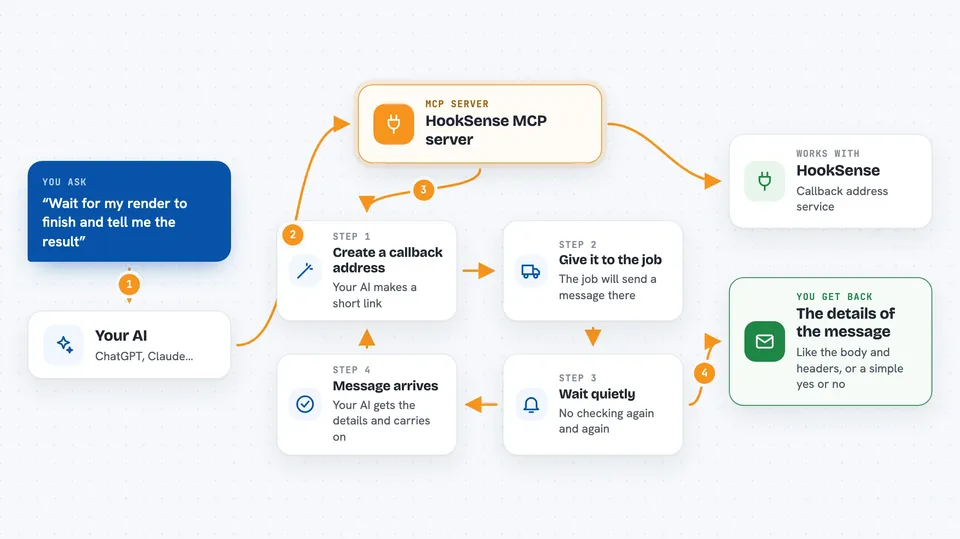
HookSense is a helper that gives your AI a way to wait for results from other jobs. Instead of asking "is it done yet?" again and again, your AI sets up a callback address, hands it to the job, and gets woken up the moment the result arrives. It is handy if you run things that finish later, like a render, a deploy, or an approval from a person.
What is an MCP server? The 30-second version
On its own, your AI can only chat with you. An MCP server is a small helper program that gives your AI a new skill or a connection to another service. This one connects your AI to HookSense, a webhook and callback service. Once connected, your AI can create callback addresses, wait for messages to land there, and check that those messages are genuine.
What this MCP server does
You ask your AI to set up a callback address, and it uses this helper to create one on HookSense. You then give that address to whatever job you are running, like a render or an approval step. When the job finishes, it sends a message to that address. Your AI is waiting on it, so the moment the message lands, your AI gets the details and can carry on with your request.
 Click to zoom
What you can do with it
- Create a callback address your AI can hand to another job
- Wait quietly until a callback arrives instead of checking again and again
- List the callbacks that have come in to one of your addresses
- Fetch the full details of a single callback, including its body and headers
- Check that a callback really came from the right sender using a secret
- Send a received callback on to another address
- Look up your callback addresses and their settings
Try asking your AI
- “Create a callback endpoint, use it as the webhook for my image render, and wait for the result, then summarize the output.”
- “Open a callback URL, give it to the approval step, and wait until a human approves before continuing.”
- “Wait for the next callback on payments-prod, verify its signature, and tell me the amount.”
- “List the callbacks that came in today and show me the ones that failed.”
What it gives back to you
You get the callback address as a short link, and later the details of the message that arrived there, like the body and headers. If you ask for a list, you get a short summary of each callback. If you ask to verify a signature, you get a simple yes or no about whether it is genuine.
Before you start
What you need
- A HookSense account and an API token from hooksense.com/account/tokens
- An MCP client like Claude Desktop, Claude Code, Cursor, or Continue
- Node.js installed on your computer so the npx command can run
Good to know
This helper can create callback addresses and send callbacks on to other addresses, so check the target before you ask it to replay anything.
Install it with your AI
Add HookSense MCP server to your AI, no technical skills needed
You don't install anything by hand. You copy one prompt, paste it into an AI that can work on your computer, and it checks, installs and connects the server for you, asking you when it needs something.
Sign in to get the install prompt
Members get a ready-made prompt that lets the Claude desktop app check HookSense MCP server, install it and connect it for them, step by step. You don't need any technical skills: you copy, paste and answer a few questions. Your connected AI can also find and install any of the 4,609 MCP servers here for you.
Who it's for
People who run jobs that finish later, like developers, ops folks, and anyone setting up approvals or long tasks that need a result back.



