
MCP server · Notes
mcp-me personal profile server
by paladini
Your AI learns who you are from a local profile, so it can answer and write with your real background.
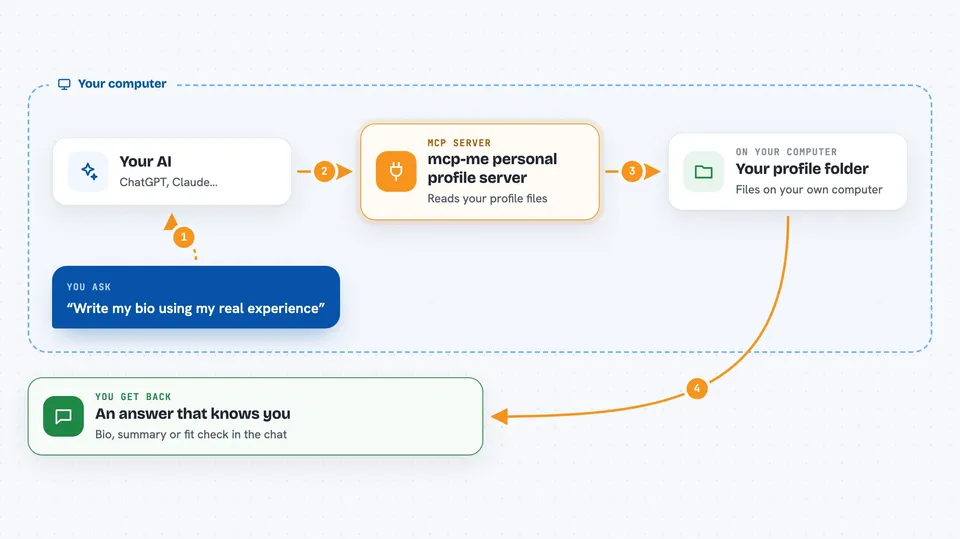
mcp-me is a small helper that keeps a personal profile about you on your own computer. It can fill that profile with details from sites you already use, like GitHub, Medium or Strava. It is handy if you are tired of telling your AI assistant your job, skills and projects every single time.
What is an MCP server? The 30-second version
On its own, your AI can only chat with what you type in that conversation. An MCP server is a small helper program that gives your AI a new skill or a connection to something outside the chat. This one connects your AI to a profile about you, stored as simple text files on your machine. So when you ask something, the AI can look up your real background first and answer with it.
What this MCP server does
You set up a profile folder on your computer and fill it in, either by hand or by letting mcp-me pull details from public sites. Then you start this helper, and your AI assistant can read that profile when it needs to. When you ask a question that involves you, the AI quietly checks your profile files, like your career or skills, before answering. You get a reply that already knows your background, without repeating yourself. Nothing leaves your computer, the profile stays in local files.
 Click to zoom
What you can do with it
- Ask your AI questions about your own career, skills or projects
- Get a cover letter or bio written with your real experience
- Search your whole profile for a keyword
- Generate a short introduction about yourself
- Summarize your career path in a few lines
- Describe your technical skills and tools
- Check whether you fit a project or role
What it gives back to you
You get answers in the chat, written in normal sentences. It can also give you a short introduction, a career summary, a skills description or a fit assessment. When you search, you get the matching pieces of your profile back. The profile itself stays as files on your computer, and the AI only reads them.
Before you start
What you need
- Node.js 20 or later on your computer
- A profile folder, usually created by running mcp-me init
- An AI assistant that supports MCP, like Claude Desktop, Cursor, Windsurf or VS Code Copilot
Good to know
Your profile is personal data kept in plain files on your computer, so anyone with access to that folder can read it, and the AI assistant you connect can read it too.
Install it with your AI
Add mcp-me personal profile server to your AI, no technical skills needed
You don't install anything by hand. You copy one prompt, paste it into an AI that can work on your computer, and it checks, installs and connects the server for you, asking you when it needs something.
Sign in to get the install prompt
Members get a ready-made prompt that lets the Claude desktop app check mcp-me personal profile server, install it and connect it for them, step by step. You don't need any technical skills: you copy, paste and answer a few questions. Your connected AI can also find and install any of the 4,609 MCP servers here for you.
Who it's for
People who use AI assistants often and want them to already know their career, skills and projects, like job seekers, freelancers and developers.





