
MCP server · Analytics
SentiSift MCP server
Let your AI check comments for bots, spam and sentiment using SentiSift.
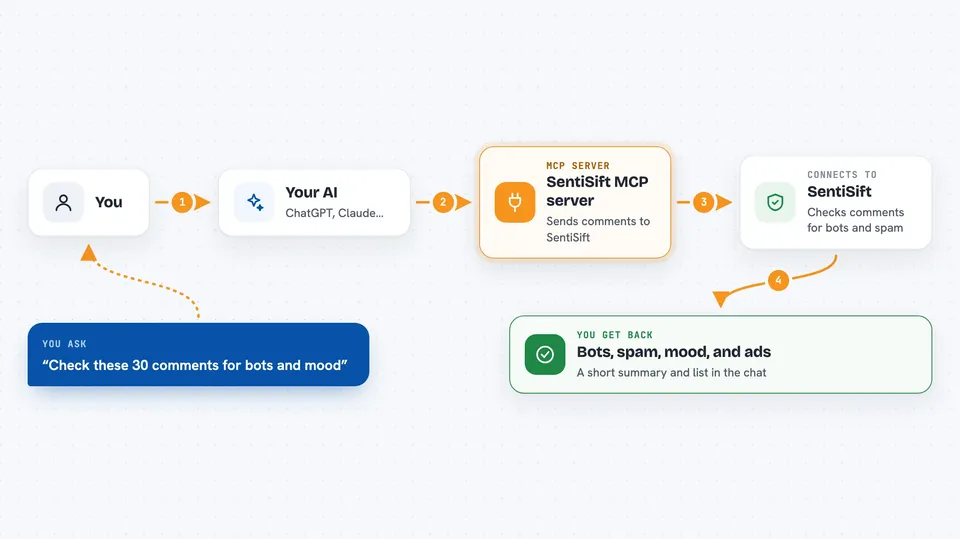
This is a small helper that connects your AI assistant to SentiSift, a service that reads through comments on articles and tells you which ones look like bots or spam, how people feel, and which ones read like ads. It is handy if you run a site, a blog or a news page and want a quick read on your comment section without opening a dashboard. You just ask in plain words and the assistant does the rest.
What is an MCP server? The 30-second version
On its own, your AI can only chat with you. An MCP server is a small helper program that gives your AI a new skill or a connection to an app or service. This one connects your AI to SentiSift, so when you ask about a batch of comments or an article, the AI can actually send them off, get real answers back, and tell you what it found. You do not write any code. You just talk.
What this MCP server does
You paste a set of comments into the chat and mention the article they came from. Your AI passes them to this helper, which sends them to SentiSift. SentiSift looks at each comment and marks which ones look like bots or spam, what the mood is, and which ones read like ads. The helper hands the results back to your AI, and your AI writes them up for you in the chat. You can also ask about your account balance or pull up older results for a specific article.
 Click to zoom
What you can do with it
- Check a batch of comments for bots, spam and ads
- See the mood across a set of comments
- Look up your SentiSift balance and subscription renewal date
- Pull up past results for a specific article
- Check whether the SentiSift service is ready right now
- Ask for a short moderation summary of a comment thread
Try asking your AI
- “Run these 30 comments through SentiSift for the article at https://example.com/news-story and show me the bots and the mood.”
- “What is my SentiSift balance and when does my subscription renew?”
- “Fetch the processed comments for https://example.com/article-42 from SentiSift.”
- “Is the SentiSift service ready right now, or is it still loading?”
What it gives back to you
You get a written answer in the chat, usually a short summary plus a list. For a batch of comments, that means which ones were flagged as bots or spam, what the mood was, and any that looked like ads. For your account, it is your balance, your plan and your renewal date. For an article, it is the older scored comments for that page.
Before you start
What you need
- A SentiSift API key (a kind of password for apps; you can get a free one at sentisift.com/pricing, no credit card)
- Python 3.10 or newer
- uv installed (a small tool that runs Python apps without a full install)
- An AI host that supports MCP, like Claude Desktop, Cursor, VS Code or Continue
Good to know
It uses your SentiSift account balance each time you analyze comments, and the comments you paste are sent to SentiSift, so avoid pasting anything private or sensitive.
Install it with your AI
Add SentiSift MCP server to your AI, no technical skills needed
You don't install anything by hand. You copy one prompt, paste it into an AI that can work on your computer, and it checks, installs and connects the server for you, asking you when it needs something.
Sign in to get the install prompt
Members get a ready-made prompt that lets the Claude desktop app check SentiSift MCP server, install it and connect it for them, step by step. You don't need any technical skills: you copy, paste and answer a few questions. Your connected AI can also find and install any of the 4,361 MCP servers here for you.
Who it's for
Community managers, editors and site owners who deal with a lot of reader comments and want a quick read without opening another dashboard.





