MCP server · Coding
Stella MCP server
by bradleylab
Let your AI build, check, and save Stella system dynamics models as .stmx files for you.
This is a helper that lets your AI assistant work with Stella, a tool people use to model how complex systems change over time, like populations, diseases, or ecosystems. Instead of clicking around a modeling program, you describe the model you want in plain words and the AI builds the file for you. It is handy for teachers, students, and researchers who want to sketch out a model quickly.
What is an MCP server? The 30-second version
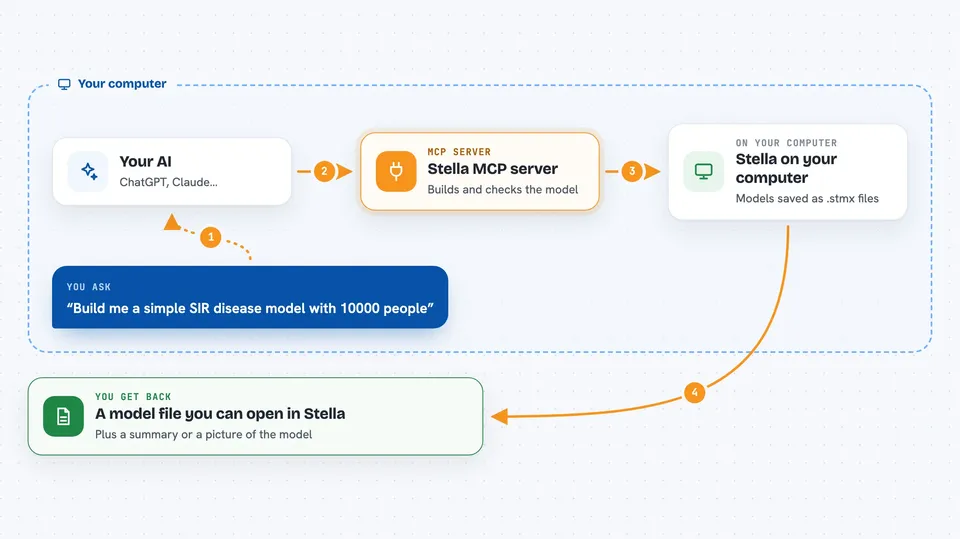
On its own, your AI can only chat. An MCP server is a small helper program that gives your AI a new skill or a connection to another tool. This one connects your AI to Stella system dynamics modeling, so it can create, read, check, and save Stella model files for you. You just ask in normal language, and the AI uses this helper behind the scenes.
What this MCP server does
You tell your AI what kind of model you want, for example a simple disease spread model with people who are healthy, sick, and recovered. The AI uses this helper to build that model step by step: it adds the stocks (the pools that hold things), the flows (the rates that move things between pools), and the numbers that control them. The helper checks the model for mistakes like missing connections or undefined variables. When it looks good, it saves the model as a .stmx file that opens in Stella Professional.
 Click to zoom
What you can do with it
- Build a new Stella model from a plain-language description
- Read and explain an existing .stmx file
- Check a model for errors like undefined variables or missing links
- Add stocks, flows, and helper variables to a model
- Rename or delete variables and fix the references automatically
- Save the finished model as a .stmx file you can open in Stella
- Render the model as a diagram picture
Try asking your AI
- “Build me a simple SIR disease model with 10000 people, a contact rate of 6, and a recovery time of 2 days.”
- “Read the file population.stmx and tell me what it does.”
- “Check this model for errors and list anything that looks wrong.”
- “Add a stock called Water and a flow from Rainfall into it.”
What it gives back to you
You get back clear answers in the chat, like a summary of the model, a list of its stocks and flows, or a list of problems found during checking. When you ask it to save, it writes a .stmx file to your computer. You can also ask it to show the model as a picture (an SVG diagram) so you can see the stock-and-flow layout.
Before you start
What you need
- Python 3.10 or newer installed on your computer
- The stella-mcp package installed (pip install stella-mcp)
- An MCP client like the Claude desktop app or Claude Code
- Stella Professional if you want to open and run the saved .stmx files yourself
Good to know
It can change or delete variables in your model, so save a copy before letting it make big edits.
Install it with your AI
Add Stella MCP server to your AI, no technical skills needed
You don't install anything by hand. You copy one prompt, paste it into an AI that can work on your computer, and it checks, installs and connects the server for you, asking you when it needs something.
Sign in to get the install prompt
Members get a ready-made prompt that lets the Claude desktop app check Stella MCP server, install it and connect it for them, step by step. You don't need any technical skills: you copy, paste and answer a few questions. Your connected AI can also find and install any of the 4,361 MCP servers here for you.
Who it's for
Teachers, students, and researchers who work with system dynamics models in fields like ecology, epidemiology, economics, or engineering.