MCP server · Coding
HackerEarth code runner MCP server
Lets your AI actually run code in 24 languages and read the real output instead of guessing.
This is a small helper that gives your AI assistant a run button for code. When your AI writes a program, it can send it off to be executed and come back with the actual printed result. It is handy for anyone who asks an AI for code and wants to know whether it really works.
What is an MCP server? The 30-second version
On its own, your AI can only chat. It can write code, but it cannot run it, so it guesses whether the code works. An MCP server is a small helper program that gives your AI a new skill or a connection to another service. This one connects your AI to HackerEarth's code running service, so when you ask it to test a program, it can actually send the code there and read back what happened.
What this MCP server does
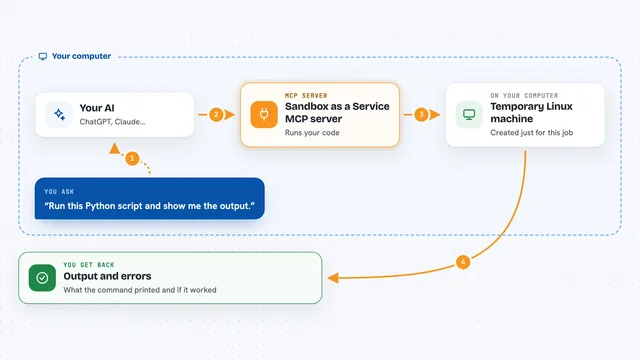
You ask your AI to run a piece of code, and it calls this helper. The helper sends your code and the language to HackerEarth's servers using your own key. HackerEarth runs the code in a sealed sandbox on their machines, away from your computer. The helper waits for the run to finish, then hands the printed output and any error messages back to your AI. Your AI then explains the result to you in the chat.
What you can do with it
- Run a snippet of code and see what it prints
- Check whether a function you wrote gives the right answer
- See the error message when code fails to compile or crashes
- List all 24 languages this service can run
- Test the same idea in a different language
- Try out a small program without installing anything on your computer
Try asking your AI
- “Run this Python program and tell me what it prints: print(6 * 7)”
- “Is this JavaScript function correct? Run it with the input 5 and show me the output.”
- “What languages can you run code in?”
- “Run this code and show me the error message if it fails.”
What it gives back to you
You get back the real printed output from the program, or the error message if something went wrong. Your AI shows this in the chat and usually explains what it means. If you asked which languages are available, you get a list of their names.
Before you start
What you need
- A free HackerEarth account and an API key (a kind of password for apps; you get it from the HackerEarth developer dashboard)
- An MCP-compatible AI assistant such as Claude Desktop or Cursor
- uvx or pip to install the helper (uvx is the easy way, pip is the other option)
Good to know
This sends your code to HackerEarth's servers to be run, so do not paste anything private or secret into the code you ask it to execute.
Install it with your AI
Add HackerEarth code runner MCP server to your AI, no technical skills needed
You don't install anything by hand. You copy one prompt, paste it into an AI that can work on your computer, and it checks, installs and connects the server for you, asking you when it needs something.
Sign in to get the install prompt
Members get a ready-made prompt that lets the Claude desktop app check HackerEarth code runner MCP server, install it and connect it for them, step by step. You don't need any technical skills: you copy, paste and answer a few questions. Your connected AI can also find and install any of the 4,609 MCP servers here for you.
Who it's for
Anyone who asks an AI for code and wants to check that it actually runs, especially people learning to program or testing small snippets.