MCP server · Research
MediaWiki MCP server
Lets your AI read, search, and edit Wikipedia and other MediaWiki wikis for you.
This is a small helper that connects your AI assistant to MediaWiki wikis, the software behind Wikipedia, Fandom, and many company or fan wikis. Once it is set up, you can ask your AI to look things up, read pages, or even make edits, and it will do that on the wiki for you. It is handy for anyone who works with wiki content and wants to skip the manual clicking.
What is an MCP server? The 30-second version
On its own, your AI can only chat with you using what it already learned. An MCP server is a small helper program that gives your AI a new skill or a connection to an outside service. This one connects your AI to a MediaWiki wiki, so it can look up pages, search, and make changes there when you ask. You stay in the chat, and the helper does the wiki work in the background.
What this MCP server does
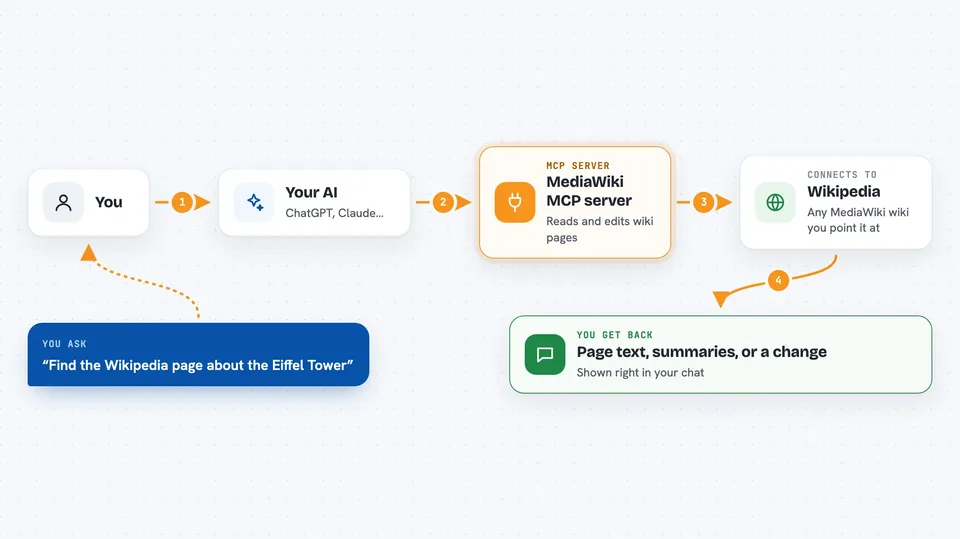
You ask your AI something like find the Wikipedia page on a topic or add a sentence to a wiki page. The AI passes your request to this helper program. The helper talks to the wiki you pointed it at, using the wiki's own public addresses. It brings back what it found, or makes the change you asked for. Then your AI shows you the result right in the chat.
 Click to zoom
What you can do with it
- Search a wiki for pages by title or by words inside them
- Read a full wiki page or several pages at once
- Compare two versions of a page to see what changed
- List the pages in a category or the pages that link to one
- Create, update, move, or delete wiki pages if you have permission
- Upload a file to a wiki or replace an existing one
- Run queries on wikis that use Semantic MediaWiki, Cargo, Wikibase, or NeoWiki
Try asking your AI
- “Find the Wikipedia page about the Eiffel Tower and summarize it for me”
- “What changed on the page Climate change in the last ten revisions”
- “List the pages in the category 2024 films on Wikipedia”
- “Add a short note to the top of my company wiki page about the new office hours”
What it gives back to you
You get answers in the chat: page text, summaries, lists of pages, or a diff showing what changed between two versions. When the helper makes a change, it tells you which wiki it acted on and what it did. Some results also come back as structured data behind the scenes, but you just see the readable version.
Before you start
What you need
- An AI client that supports MCP servers, such as Claude Code or the Claude desktop app
- A configuration file if you want to use your own wiki instead of English Wikipedia
- A wiki account and sign-in if you want the AI to make edits, not just read
Good to know
The editing tools can change or delete real wiki pages and upload files, so only connect an account whose permissions you are comfortable letting your AI use.
Install it with your AI
Add MediaWiki MCP server to your AI, no technical skills needed
You don't install anything by hand. You copy one prompt, paste it into an AI that can work on your computer, and it checks, installs and connects the server for you, asking you when it needs something.
Sign in to get the install prompt
Members get a ready-made prompt that lets the Claude desktop app check MediaWiki MCP server, install it and connect it for them, step by step. You don't need any technical skills: you copy, paste and answer a few questions. Your connected AI can also find and install any of the 4,609 MCP servers here for you.
Who it's for
People who work with wikis day to day, like editors, documentation writers, community managers, and researchers who want their AI to handle the lookups and edits.