
MCP server · Productivity
Prompeteer MCP server
by prompeteer
Let your AI write better prompts, score them, and save them to your PromptDrive library.
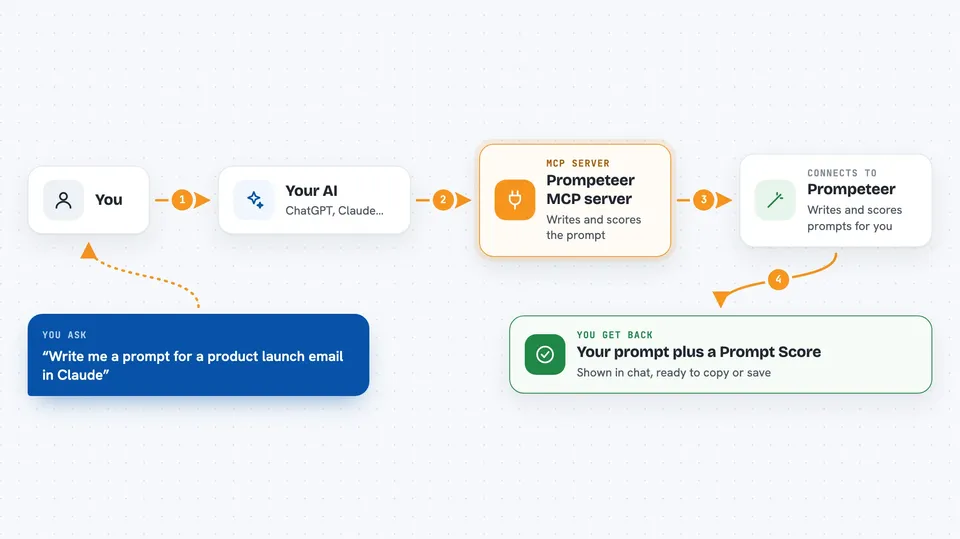
Prompeteer is a helper that works with your AI assistant to write and improve prompts. A prompt is just the message you type to an AI, and a well-written one gets you a much better answer. This is handy if you use ChatGPT, Claude, Midjourney or other AI tools and want your prompts to be sharper without guessing.
What is an MCP server? The 30-second version
On its own, your AI can only chat with you using what it already knows. An MCP server is a small helper program that gives your AI a new skill or a connection to another service. This one connects your AI to Prompeteer, a service that writes prompts, scores them, and keeps them in a library. So when you ask for a prompt, your AI passes the request to Prompeteer and brings the result back into your chat.
What this MCP server does
You ask your AI for a prompt, for example one for a product launch email in Claude. Your AI sends that request through this helper to Prompeteer. Prompeteer writes a prompt tuned to the platform you named, gives it a Prompt Score, and sends it back. Your AI shows you the prompt and the score right in the chat. If you approve it, it can be saved to your PromptDrive library.
 Click to zoom
What you can do with it
- Generate a prompt tuned to a specific AI platform
- Score a prompt you already have and see where it can improve
- Save an approved prompt to your PromptDrive library
- List and open prompts already saved in PromptDrive
- Generate a reusable skill for an AI agent
- Search your saved Prompeteer Memory for past material
- Ask a question against your stored Memory sources
Try asking your AI
- “Write me a prompt for a product launch email in Claude and show its Prompt Score.”
- “Score this prompt and tell me what to fix: write a blog post about our new coffee blend.”
- “Save that prompt to my PromptDrive library.”
- “List the prompts I saved last week.”
What it gives back to you
You get back the finished prompt as text, plus a Prompt Score that rates it across several qualities. If you asked to save it, you also see confirmation that it landed in PromptDrive, with an ID for it. Memory searches come back as matching passages or a short answer. Everything shows up as normal chat text you can copy and use.
Before you start
What you need
- A Prompeteer account (free to start)
- An MCP client that supports remote servers and browser sign-in, such as Cursor, Claude Code or Gemini CLI
- For the local bridge option: Node.js 22.14.0 or later
Good to know
Generating and scoring can use up your plan allowance, and successful generations are saved to your PromptDrive automatically, so check before you run a lot of them.
Install it with your AI
Add Prompeteer MCP server to your AI, no technical skills needed
You don't install anything by hand. You copy one prompt, paste it into an AI that can work on your computer, and it checks, installs and connects the server for you, asking you when it needs something.
Sign in to get the install prompt
Members get a ready-made prompt that lets the Claude desktop app check Prompeteer MCP server, install it and connect it for them, step by step. You don't need any technical skills: you copy, paste and answer a few questions. Your connected AI can also find and install any of the 4,361 MCP servers here for you.
Who it's for
Anyone who writes prompts for AI tools regularly, like marketers, writers, support teams and researchers who want consistent, higher-quality prompts.





