MCP server · Design tools
lambdacad MCP server
by Psalmustrack
Let your AI draw and model inside BricsCAD on Linux, from simple 2D plans to 3D solids.
This is a helper that connects your AI assistant to BricsCAD, a professional drawing program that runs on Linux. Once it is set up, you can just describe what you want and the AI draws it in the open drawing for you. It is handy if you work with technical drawings, plans or 3D models and use Linux.
What is an MCP server? The 30-second version
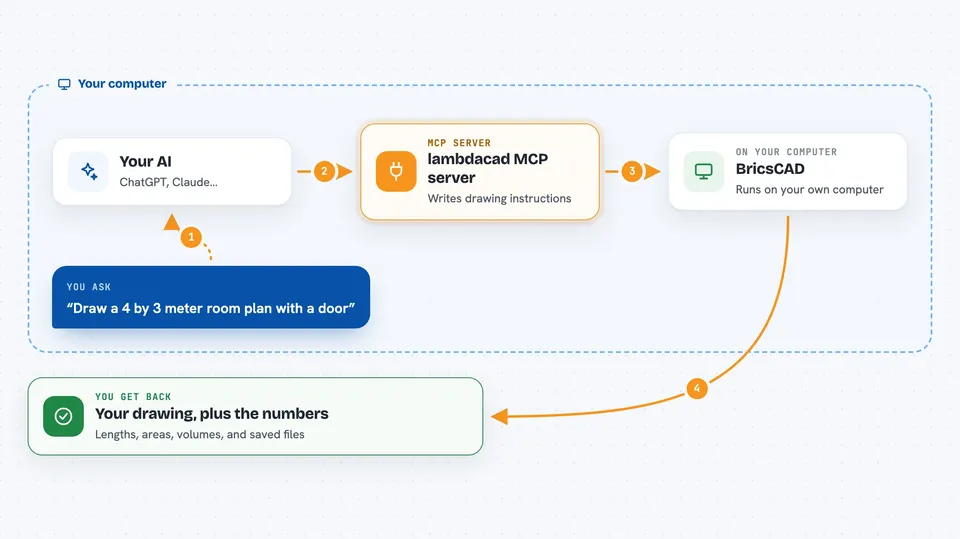
On its own, your AI can only chat: it has no way to touch a drawing program. An MCP server is a small helper program that gives your AI a new skill, here the ability to talk to BricsCAD on your computer. You ask for something in plain words, the AI sends the instructions through this helper, and the helper passes them into BricsCAD and brings back what happened. So the AI stops being just a chat partner and becomes something that can actually draw and measure inside your CAD file.
What this MCP server does
You ask your AI for something like a room plan or a flange. The AI turns that into drawing instructions and hands them to this helper. The helper writes those instructions into a small file, nudges BricsCAD to read them, and waits for the answer. BricsCAD draws the lines, shapes or 3D solids, and the helper sends the result back to your AI. Your AI then tells you what it did, often with exact numbers like lengths, areas or volumes.
 Click to zoom
What you can do with it
- Draw 2D plans with lines, arcs, hatches and dimensions
- Create 3D solids and combine them with cuts and joins
- Generate 2D views from a 3D model
- Measure lengths, areas, volumes and check for collisions
- Place blocks, bolt circles and other repeated shapes
- Export your drawing as PDF, DXF or STL
- Check whether a part would print without supports
Try asking your AI
- “Draw the plan of a 4 by 3 meter room with a door and dimensions”
- “Make a DN80 flange: front view, hatched section, dimensions, then model it in 3D”
- “Check if any parts in this assembly overlap and tell me which ones touch”
- “Export the current sheet as a PDF and tell me the page size”
What it gives back to you
You get answers in the chat, not just a silent drawing. The AI can report exact lengths, areas, volumes, bounding boxes and whether two things collide. It can also tell you which drawing it worked in, what it changed, and whether a cut landed where you expected. When you ask for a file, it saves a PDF, DXF or STL and confirms the result.
Before you start
What you need
- A Linux computer
- BricsCAD installed (any recent version)
- Python 3.10 or newer
- The xdotool program installed
Good to know
The run_lisp and run_command tools can run any code inside BricsCAD by design, so only connect AI clients you trust and keep the bridge files private.
Install it with your AI
Add lambdacad MCP server to your AI, no technical skills needed
You don't install anything by hand. You copy one prompt, paste it into an AI that can work on your computer, and it checks, installs and connects the server for you, asking you when it needs something.
Sign in to get the install prompt
Members get a ready-made prompt that lets the Claude desktop app check lambdacad MCP server, install it and connect it for them, step by step. You don't need any technical skills: you copy, paste and answer a few questions. Your connected AI can also find and install any of the 4,361 MCP servers here for you.
Who it's for
People who draw or model in BricsCAD on Linux, such as drafters, engineers, architects and makers who want help from an AI.